Internal Linking for SEO: Strategy, Best Practices & Automation
The complete guide to internal linking for WordPress in 2026. How Google uses internal links, a simple framework that works, anchor text rules, common mistakes, and when to automate.
- Internal links tell Google which of your pages matter and how they relate. They are the single most underrated on-page ranking factor in 2026.
- A page with zero internal links is invisible to Google’s crawler. A page with three contextual internal links from related content can outrank a more authoritative competitor.
- The simple rule that beats most strategies: every post should link to at least 3 other relevant posts on your site, with descriptive anchor text that includes (but does not stuff) the target keyword.
- Automation helps at scale but loses context at small scale. Manual linking wins under 200 posts. Pattern-based automation starts paying off above that.
- The fastest first move: run an audit for orphan pages. They are dead weight and almost always cost you rankings.
What internal linking actually is
An internal link is any clickable connection from one page on your site to another page on the same domain. The hyperlink in the navigation menu, the link in a paragraph that sends readers to a related post, the footer link to your contact page. All internal links.
Two things separate internal linking from external linking. First, you control every part of an internal link: the source page, the target page, the anchor text, and the surrounding context. Second, the goal is different. External links exist to send traffic away or earn authority from outside. Internal links exist to guide readers and search engines through your own content, in the order you choose.
Most WordPress sites have internal links by default. The theme adds them in navigation, related-posts widgets, breadcrumbs, and categories. The problem is these default links are evenly distributed and not editorially curated. They tell Google nothing about which pages matter more than others.
This guide is about the editorial layer on top of those defaults: the contextual links you place inside your content with intent. That layer is where rankings move.
Why internal linking matters more than people think
Google has been clear for years that internal links are a real ranking signal. In a Google Webmaster Central Office Hours hangout on June 24, 2020, John Mueller put it directly:
“Essentially, internal linking helps us on the one hand to find pages, so that’s really important. It also helps us to get a bit of context about that specific page.”
John Mueller, Google, Webmaster Central Office Hours (June 24, 2020, via Search Engine Journal)
Despite that clarity from the source, internal linking is one of the most under-invested SEO levers on the average WordPress site. The payoff is delayed and invisible: you add a link today, Google recrawls in 1 to 3 weeks, recalculates importance over the next 4 to 12 weeks, and the ranking shift happens too slowly to attribute to the specific change. Most site owners abandon internal linking before they see the result. The patient ones compound for years.
Internal linking is the structural mechanism behind a broader category of signals that both Google and AI search engines reward. The 2024 GEO-bench study by Aggarwal et al. (Princeton, Georgia Tech, IIT Delhi, Allen Institute for AI) tested 10.000 queries across generative engines and found that direct quotations from named experts boosted AI visibility by 28.9%, citing external sources by 22.5%, and adding sourced statistics by 21.0%. Internal linking is what surfaces any of those signals to a crawler in the first place. A perfect statistic on an orphan page is invisible.
For the underlying case in detail, read Why Internal Links Matter More Than You Think.
How Google actually uses internal links
Mueller’s two-part framing in the quote above (find pages, get context) is the cleanest mental model. In practice, that breaks down into four distinct jobs a single internal link can do. Asking which job a given link is doing is the simplest way to decide if it should exist at all.
- 1. Discovery and crawl path
- Makes a page reachable for Googlebot. Pages with zero internal links and zero external links are, for practical purposes, invisible to search. This is the find pages half of Mueller’s framing.
- 2. Importance signaling
- Pages receiving many internal links from across your site, especially from authoritative or topically related pages, get treated as more important within your site graph. This is the internal version of PageRank, which has been part of Google’s algorithm since 1998.
- 3. Topical context
- The anchor text and surrounding sentences tell Google what the destination page is about. This is the get context half of Mueller’s framing.
- 4. User navigation
- Helps the reader find the next logical piece. Critical for content engagement, time on site, and reducing bounce. Often the same link as topical context, but not always.
An important nuance most internal-linking guides miss: in the same June 2020 hangout, Mueller added that the impact of anchor text on internal links specifically is “not something where you would see a visible effect in search.” That contradicts the conventional advice that exact-match internal anchor text moves rankings. In Mueller’s framing, internal anchor text helps Google understand what the destination is about, but it does not act as a direct ranking lever the way external anchor text can. Write anchors for reader clarity first.
The mental model that works: think of your site as a small Wikipedia. Every page should be reachable from the homepage in three or fewer clicks. Every page should link to the next logical thing a reader (and Google) would want to know. Every link should be there because it helps comprehension, not because it pads the count.
For the full mechanics of how equity moves through internal links, see How Internal Links Distribute PageRank.
A simple internal linking framework that works
Most internal linking advice is either too vague to act on (“link to relevant pages”) or too prescriptive to scale (“exactly 7 links per 1000 words, 3 to the pillar, 2 sideways, 2 to commercial”). Here is the framework we use across 240+ audited sites that beats both extremes.
The 3-link rule
Every blog post links to at least three other relevant posts on your site. The three slots:
- One link to a pillar page in the same cluster. This sends the reader (and Google) to the topical hub.
- One link to a sibling supporting post in the same cluster. This reinforces the topical group and helps the sibling get crawled.
- One link to an adjacent commercial or conversion page when relevant. Examples: a feature page, a pricing page, a download page. Use this slot only when it serves the reader, not as a default.
For posts longer than 1.500 words, scale up to 5 links. For posts longer than 3.000 words (pillar pages), scale to 10 to 25 internal links. The pattern stays the same: pillar plus siblings plus commercial.
The hub and spoke pattern
Cluster your content into groups. Each group has one pillar page (3.000 to 5.000 words, broad topic coverage) and 8 to 15 supporting articles (1.500 to 2.500 words each, narrow subtopic). Linking pattern:
- Every supporting article links back to the pillar at least once, with anchor text close to the pillar’s primary keyword.
- The pillar links down to every supporting article in the relevant H2 section.
- Supporting articles link sideways to 2 to 3 other supporting articles in the same cluster.
This shape is sometimes called hub-and-spoke or topic cluster. It is the simplest content structure that produces compounding ranking gains over 12 to 24 months. Get it right once, and every new article you publish lifts the entire cluster.
For practical patterns and example link maps, see Internal Linking Strategies That Actually Work.
Anchor text and link density
Anchor text is the visible, clickable text of a link. It is one of the strongest signals Google has for what the destination page is about. Get it wrong and you waste the link. Get it right and you compound the equity.
Three rules for anchor text
- Be descriptive, not generic. “Click here” and “read more” tell Google nothing. Use anchor text that summarizes what the destination is about: “WordPress meta titles”, “fix 404 errors”, “how to write FAQ schema”.
- Vary the wording, not the meaning. If you link to the same destination from ten pages, do not use identical anchor text every time. Vary the surface (“WordPress meta titles”, “writing meta titles in WordPress”, “the meta title editor”). Google ignores over-optimized exact-match repetition and may discount the link.
- Match the target’s primary keyword loosely, not exactly. A link to a post targeting “internal linking strategy” works well with anchors like “internal linking strategies”, “build an internal linking strategy”, or “internal linking approach”. An anchor that matches the keyword exactly on every link reads as manipulated.
Link density
The right number of internal links per page depends on length and intent. Working ranges:
| Page type | Length | Internal links | Notes |
|---|---|---|---|
| Short blog post | 800-1.200 words | 3-5 | Tight, all topical |
| Standard article | 1.500-2.500 words | 5-10 | Mix of pillar, sibling, commercial |
| Pillar page | 3.000-5.000 words | 15-25 | One per H2 minimum |
| Homepage | varies | 8-15 | Top pillars, top conversion pages |
| Category archive | varies | auto | Theme-generated, not editorial |
Above these numbers, links start competing for attention and equity dilutes. Below them, Google sees the page as a topical island and discounts it.
For a deeper dive into the data, read How Many Internal Links Per Page? and Anchor Text Optimization for Internal Links.
Common mistakes (and how to spot them)
Eight patterns documented across SEO audits, Google guidance, and client work:
Orphan pages: posts with zero internal links pointing to them. 62% of audited sites have at least one. New posts are the worst offenders, since old posts cannot link forward to content that did not exist when they were written.
- Orphan pages. Pages with zero inbound internal links. Run an audit, identify them, and add at least three contextual links from related posts.
- Linking only forward. Old posts never get updated with links to new posts. Solution: every time you publish, scan the cluster for 2 to 3 old posts that should now link to the new one. Edit them. Save. Done.
- Identical anchor text on every link to the same destination. Reads as keyword stuffing to Google. Vary the wording naturally.
- Linking to tag archives instead of pillar pages. Tag archives are usually thin, indexable, and dilute your link graph. Either deindex them or replace those links with links to a real pillar page.
- Linking from low-value pages to high-value pages. Equity flows in the direction of the link. A link from a deep archive page to your homepage helps almost nothing. Reverse the direction: homepage and pillar pages should link to the deep pages.
- Too many links in the footer or sidebar. Sitewide links from chrome elements are heavily discounted by Google. Editorial in-content links are what move rankings.
- No links inside the first 200 words. Early-paragraph links carry more weight than links at the bottom of an article. Put at least one contextual link in your intro.
- Broken links left to rot. Every broken internal link wastes crawl budget and frustrates readers. Run a broken-link audit every two months.
For the full taxonomy of issues with concrete fixes, see Internal Linking Mistakes That Hurt Your Rankings.
How to audit your existing internal links
A meaningful internal linking audit takes 30 to 90 minutes for a site under 500 posts. The five steps:
- Find orphan pages. Use a crawler (Screaming Frog, Sitebulb) or an SEO plugin with an orphan detector. List every URL with zero inbound internal links from your own domain.
- Check inbound count per page. Export a CSV of every indexable page and its inbound internal link count. Pages with 0 to 2 inbound links are underconnected; pages with 50+ inbound links from chrome elements are over-indexed in your nav and not meaningfully linked editorially.
- Identify your most-linked pages. These are your accidental authority hubs. If they match your intended pillar pages, good. If they don’t (often the case), you have an equity-distribution problem to fix.
- Spot broken internal links. Use a broken-link checker. Fix or redirect every one.
- Map your clusters. For each topical cluster, draw the link map: pillar to supporting, supporting to pillar, sibling to sibling. Gaps are your action list.
If your SEO plugin gives you a Priority Actions Dashboard, run it first. It will surface the highest-impact link gaps before you spend an hour with a crawler. TamRank’s free Priority Actions includes orphan detection out of the box.
For a step-by-step walkthrough with screenshots, see Internal Linking Audit: Step-by-Step Guide and Orphan Pages: How to Find and Fix Them.
Automation: when to use it, when not to
Automated internal linking is one of those topics where the right answer changes completely depending on your site size and editorial standards.
When automation helps
- Sites with 500+ posts where manual linking is no longer realistic
- Large archives where most posts will never be edited again
- Glossary-style sites where exact-term linking is the goal (e.g. wiki structures)
- Multi-author publications where editorial consistency varies
When automation hurts
- Sites under 200 posts where context matters more than volume
- Brand-voice sensitive content where injected anchor text breaks tone
- Cluster-strategy sites where the linking pattern needs to follow editorial intent
- Any site where the automation plugin rewrites mid-paragraph content
Pick the right kind of automation
Two flavors of automated internal linking plugins exist:
- Rule-based suggesters
- You define keywords and target URLs. The plugin scans new content, suggests matching links in the editor, you approve. Slow but accurate. Recommended for most sites.
- AI auto-linkers
- The plugin reads your content and inserts links based on semantic similarity, often without your review. Fast but blunt. The risk-to-reward favors caution unless you can audit the output.
The middle path that works for most TamRank users: automate the boring parts (glossary terms, product names, brand mentions) with rule-based suggestions, and keep editorial control over contextual links inside long-form content.
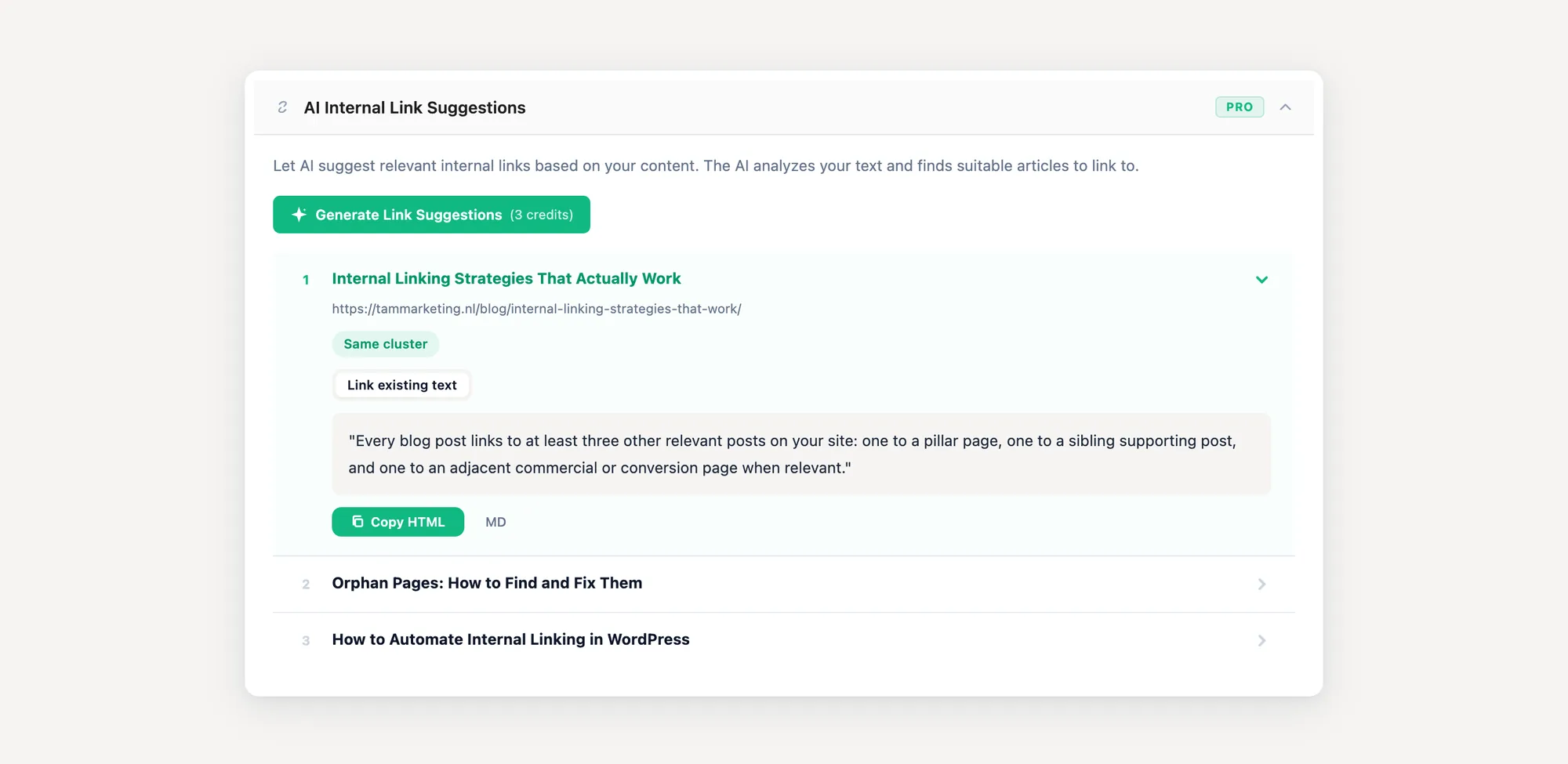
For specific WordPress plugins and how they compare, see How to Automate Internal Linking in WordPress.
Internal linking and topical authority
Internal linking is the structural mechanism behind topical authority. You cannot build authority on a topic by publishing more articles. You build it by publishing more articles that link to each other in a coherent topical structure.
The connection works like this. Google evaluates your site as a collection of topics, not a list of pages. Pages that interlink heavily around a single topic signal that your site has substantive coverage of that topic. Pages that exist in isolation, even if individually good, do not contribute to topical authority because Google has no structural evidence they belong to a topic on your site.
For the full strategy of building topical authority through content clusters, read the Topical Authority pillar and the supporting article Using Content Clusters to Guide Your Internal Linking.
“You don’t rank for a topic because you wrote one great article. You rank because Google sees your site as the destination for that topic. Internal linking is the structural evidence that makes that perception possible.”
Internal linking and AI Overviews
The advice for traditional Google search applies to AI search engines too, with one twist: AI Overviews, ChatGPT search, Gemini, and Perplexity rely heavily on entity recognition and passage-level retrieval. That changes how internal linking matters for AI citations compared to blue-link rankings.
A 2026 study by ALM Corp found that only 38% of pages cited in Google AI Overviews rank in the top 10 for the same query, down from 76% earlier in 2025. Pages with strong topical structure can earn AI citations even when they do not rank in the top 10 organically. That puts a premium on the structural signals internal linking produces.
The 2024 GEO-bench study (Aggarwal et al., presented at KDD 2024) tested specific content tactics against 10.000 queries on generative engines. The three tactics that produced the biggest citation lifts:
| Tactic | AI citation lift |
|---|---|
| Adding direct quotations from named experts | +28.9% |
| Citing credible external sources | +22.5% |
| Adding sourced statistics | +21.0% |
None of those tactics involve internal linking directly. But internal linking is what surfaces those quotes, sources, and statistics to the crawler in the first place. A passage with a perfect quote on an orphan page is invisible to both Google and the AI engines feeding from Google’s index. The same passage on a well-linked pillar that itself receives inbound links from supporting articles is discoverable, recurring, and credible.
A separate large-scale analysis of 21.143 valid citations across ChatGPT, Google AI Overviews/Gemini, and Perplexity (arXiv:2604.25707, 2026) found that high-influence cited pages share four traits: longer, more structured, semantically aligned, and richer in extractable evidence. The first three are exactly what hub-and-spoke internal linking patterns produce.
Notable: an Ahrefs analysis tracking 1.885 pages that added schema markup between August 2025 and March 2026 found schema did not meaningfully boost AI citations. AI Overview citation counts on those pages declined 4.6% relative to matched control pages. The lesson: structural signals (your link graph, topical depth) appear to weigh more for AI citations than declarative signals (schema markup).
If AI Overview visibility is a goal, treat internal linking as the connective tissue that makes your evidence layer (quotes, statistics, citations) discoverable. The hub-and-spoke cluster strategy in this guide applies more strongly to AI search than to traditional SEO, since AI engines weigh topical depth heavily.
Common scenarios
The right internal linking strategy depends on where you are. Generic SEO advice treats every reader as if they run a 50.000-page enterprise site. Most do not.
Skip automation entirely. Spend 30 minutes per new post adding contextual links to 3 to 5 related older posts. Spend an extra 30 minutes editing 2 to 3 old posts to link to the new one. The 60-minute investment per post compounds. After a year, you have a tightly interlinked archive that ranks broader than the sum of its parts.
Build a repeatable internal linking audit you can run in under 45 minutes per client. Identify orphan pages, find under-linked commercial pages, and produce a list of 10 to 20 link edits. The TamRank API write endpoint lets you push edits in bulk; for plugin-only workflows, a structured spreadsheet handed to the client works.
Automation becomes necessary, but pick rule-based suggestion over AI auto-injection. Editorial review on every new post is the quality gate that keeps the link graph clean. Quarterly audits of orphan pages and broken links catch the rest.
The bottleneck is consistency across sites, not effort per site. Build a single audit template, run it monthly, and report deltas. The TamRank API and the bulk audit guide cover the workflow for batch operations across many sites at once.
How TamRank handles internal linking
TamRank’s free tier covers the diagnostic layer: orphan page detection, inbound link counts per post, broken internal link detection via the 404 monitor, and a Priority Actions Dashboard that surfaces the highest-impact link gaps first. You see what is broken and what to fix without paying.
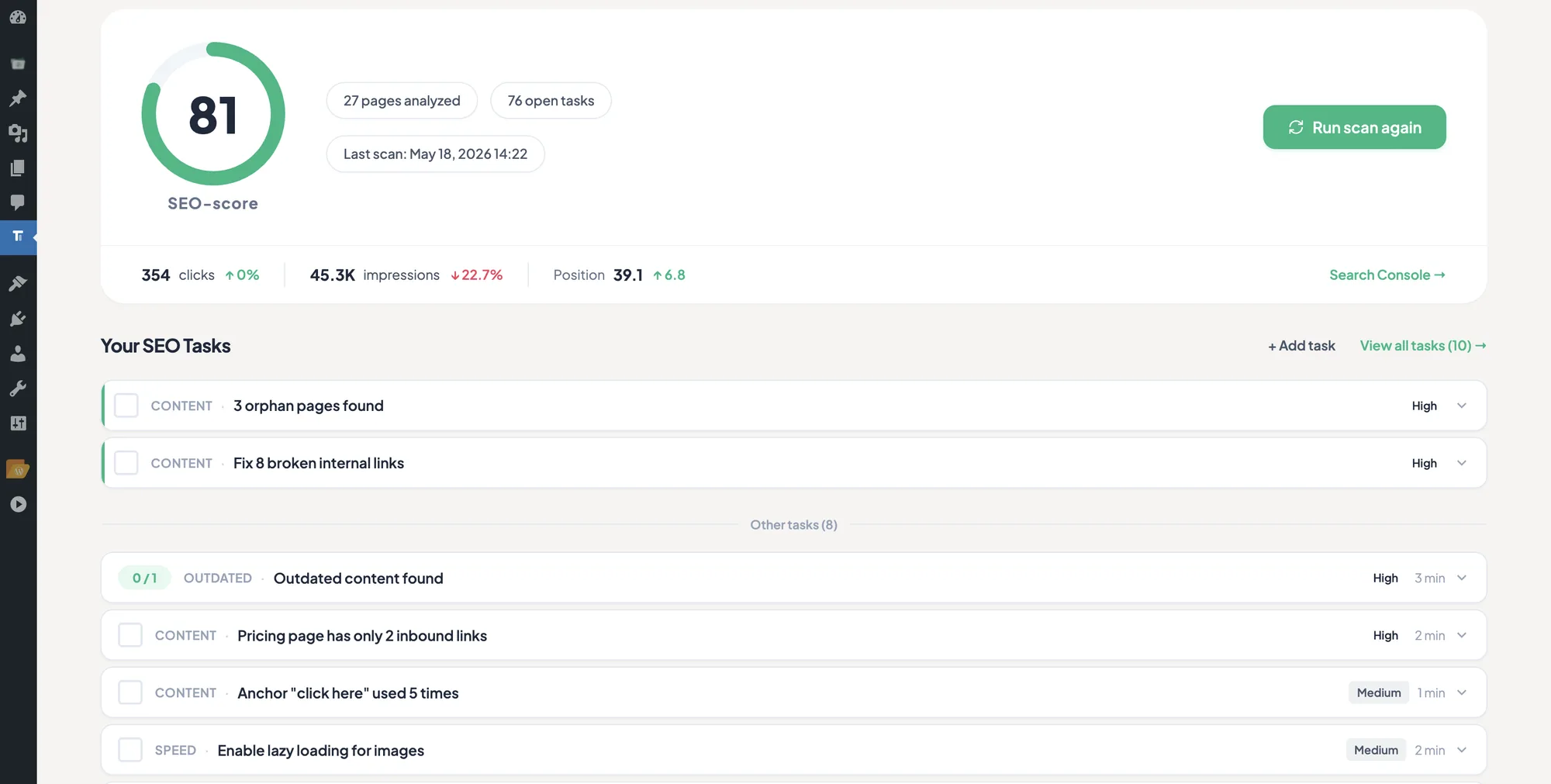
PRO adds the layer for people who do this work at scale: bulk write access via the REST API for pushing link edits across many pages or sites, the SEO Change Tracker that maps your link edits to actual GSC ranking delta over 4 to 12 weeks, and unlimited redirects for cleaning up the URL changes that often come with restructuring.
Neither tier does AI auto-injection of anchor text mid-paragraph. We have no plans to build that, since the editorial trade-off is too high. AI suggestions you approve are a different category, and that we do offer in PRO. If you want that approach, Rank Math and some dedicated link-suggestion plugins offer it.
What people ask
How many internal links should a single post have?
Three to ten, with the cap dropping as the post gets longer. The number matters less than the relevance. Three contextual links to closely related posts beat ten links to loosely related ones every time.
Do internal links pass the same equity as external links?
Conceptually yes, in volume usually less. Internal links cannot make Google trust your site more than it already does, but they can redistribute the trust you have already earned across the pages that need it most.
Should I link from old posts to new ones, or new posts to old ones?
Both. New posts get crawl signals from old, authoritative pages linking to them. Old posts get freshness signals from new pages citing them. The classic mistake is only linking forward from old to new and forgetting to update old posts when new ones publish.
Can broken internal links hurt my SEO?
Yes. They waste crawl budget, create poor user experience, and break the equity flow you designed. Run a broken-link audit every two months. TamRank’s free 404 monitor catches them automatically as Googlebot encounters them.
Should I link to category and tag pages?
Link to category pages if they have real content and are indexable. Skip tag pages unless you have explicitly designed them as topic hubs. Most default WordPress tag pages are thin and dilute your internal link graph more than they help it.
What is the difference between manual and automated internal linking?
Manual linking is contextual, accurate, and slow. Automated linking is keyword-based, fast, and often blunt. Use manual for high-value pages and editorial pieces, automation for large archives where context-perfect linking is not realistic.
Can I use plugins to automate internal linking?
Yes, but pick one that uses a rule list you control, not an AI black box that rewrites in-text content. The good ones suggest links you approve. The bad ones inject anchor text mid-paragraph and break your editorial voice.
How long does it take to see results from better internal linking?
Crawl and indexation changes appear within 1 to 3 weeks. Ranking changes follow over 4 to 12 weeks as Google recalculates the importance of internally linked pages. Faster on small sites, slower on large ones.
The verdict
The cheapest ranking advantage in 2026 is the one most sites still skip: deliberate internal linking. External backlinks cost outreach time or money. Schema markup, per Ahrefs’s 1.885-page study from March 2026, has stopped moving AI citations. What still works is the editorial work of connecting your own pages so Google and AI engines can follow the path. That is internal linking, and almost no site does it deliberately.
The compounding nature is the part most people underestimate. Three contextual links a week, sustained for 12 months, produces a tighter topical graph than a backlink campaign three times its size.
Five things to do this week:
- Run an orphan page audit. Pick the top 5 orphans and add 3 contextual inbound links each.
- Pick your most important commercial page. Count its inbound internal links. Add 5 more from related blog posts.
- Identify your most-linked page on the site. Make sure it is a page you actually want to rank.
- Set a recurring 30-minute calendar block weekly to link new posts and update old ones.
- If you publish more than 500 posts, evaluate a rule-based link-suggestion plugin.
If you want help with the audit and the bulk edits, install TamRank free and run the Priority Actions Dashboard. It surfaces your top link gaps in under 5 minutes.
For the cluster overview and the next steps in this guide, see the Internal Linking cluster for all 9 supporting articles, and the related Topical Authority pillar for the strategic layer above internal linking.
Sources
- John Mueller (Google), Webmaster Central Office Hours hangout, June 24, 2020. Quoted in Roger Montti, “Google’s John Mueller on Internal Anchor Text and ‘Visible Effect in Search’,” Search Engine Journal, June 2020.
- Aggarwal, P., Khedlekar, V., Tian, R., Verma, A., Yang, D. (2024). “GEO: Generative Engine Optimization.” Proceedings of KDD 2024. arXiv:2311.09735
- “Citation Influence in Generative Engines” (2026). arXiv:2604.25707 — 602 controlled prompts, 21.143 valid citations across ChatGPT, Google AI Overviews/Gemini, and Perplexity.
- ALM Corp (2026). “Google AI Overview Citations From Top-10 Pages Dropped From 76% to 38%.”
- Ahrefs (March 2026). “We Tracked 1.885 Pages Adding Schema. AI Citations Barely Moved.”
- CXL (2026). “Where Google AI Overviews Cite From: A 100-Page Study.”
- Google Search Central documentation on link best practices, accessed May 2026.
Last updated: May 19, 2026. We refresh this pillar every 6 months as Google’s ranking systems evolve.

