TamRank · WordPress SEO, under control. Know exactly what to fix.
Start with a complete free plugin. Move to PRO when you need impact-based priorities, controlled automation and measurable outcomes.
SEO shouldn't feel like this.
The dashboard you log into every day.
A banner you close, and close again.
Tomorrow it's back, with a countdown.
A score, and then nothing.
Green, orange, red. Still no answer to "what do I actually do?"
Their brand on your site.
A promo footer on the website you built for a client.
You outgrew that. There's a calmer way.
Everything SEO, in one calm dashboard.
Audit, schema, redirects, WebP and Search Console, built into WordPress rather than bolted on.
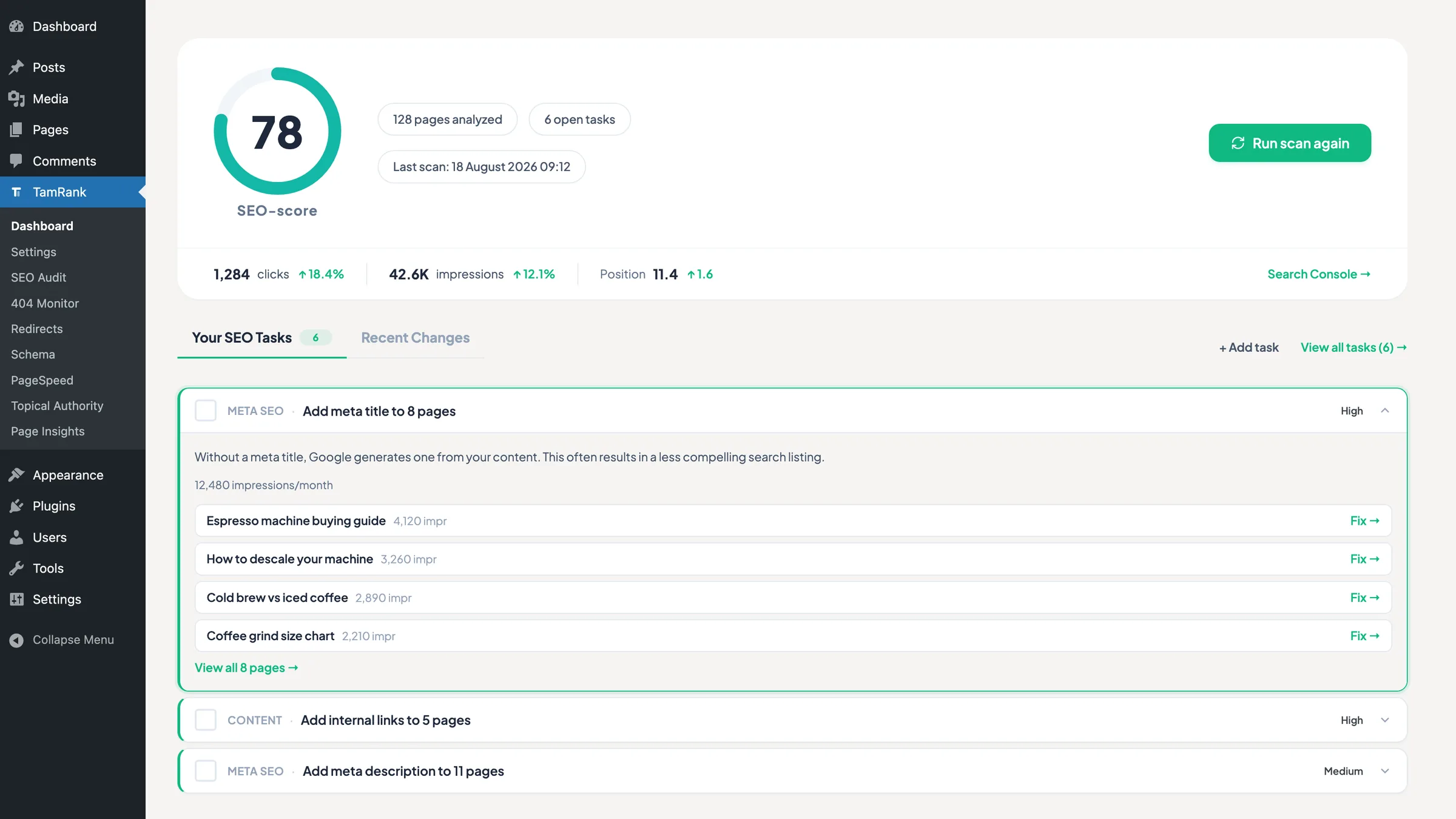
Every score comes with the fix next to it
FREEA score you get everywhere. What you rarely get is the next step. Here it stands right next to it: your SEO tasks, prioritized, in plain language, with the fix attached. Site-wide whenever you want, and per page while you write.
An admin you can hand over
FREENothing of ours ends up on the front end of the site you built, and nothing in the admin is there to sell you something. Where PRO exists, it sits in the place that feature would be, not in a banner that keeps coming back.
Redirects, built in
FREEUnlimited 301, 302, 307, 410 and regex redirects, created for you when you rename or delete a page. That is the mail from your client about broken URLs, prevented.
Search Console, built in
FREEYour clicks, impressions and position sit next to your content, so you never have to learn the Search Console interface. Seven and 28 days, free.
Schema, 14 types + custom
FREEAuto-detected from your content, reusable as templates, and you can write your own JSON-LD without a single developer filter.
WebP conversion, free
FREEEvery upload converts on its own, and the bulk converter rewrites the library you already have in one click. No credits, no second plugin, no paid tier.
Leave Yoast and keep what you built
FREEThe wizard imports your per-page SEO from Yoast, Rank Math or All in One SEO in one click, and your redirects from Yoast Premium and Rank Math. Check a few pages, then switch the old one off.
Doing SEO for a living?
PROPrioritize what matters, review every change before it runs and measure what followed. Work directly in WordPress, with optional access through your AI assistant.
- Priority Actions, Change Tracker and Page Insights
- Open REST API and hosted MCP access, one connection for up to 10 of your sites
- PageSpeed per page, with real Chrome user data next to the lab score
- An index status column in your posts list, rechecked daily
- Every 404 with the page it came from, filtered by source
Dry-run first. Approve every change. Roll back eligible changes.
See everything in PRORun your SEO from your AI assistant
Ask in the chat you already have open. Your assistant reads the site, proposes the fix and shows you the exact change before anything is written.
Review the exact proposal, approve its execution and keep eligible changes reversible. Connect up to 10 of your sites through hosted MCP using claude.ai or a compatible AI assistant.
See how agents work with TamRank-
Read
get_capabilitiesget_work_queue -
Dry run
plan_changesreturns the diff, writes nothing -
Approve
execute_change_setyou confirm, then it applies -
Undo
rollback_change_seteligible changes, with a new proposal and approval
How it works
Start with the free foundation. Add PRO when you need the connected workflow.
-
Install free
Import your existing SEO data in one click.
-
Improve the foundation
Use the free audit and page guidance to fix the basics.
-
Add PRO when work grows
Prioritize work, approve changes and measure what followed.
Free core, forever No upsell spam A rollback point before migration Your data stays yours
“We’ve stared at those green lights too. We know the banner you keep clicking away.”
- Built with SEO professionals
- Free on WordPress.org
- One-click migration from Yoast, Rank Math and All in One SEO
- No tracking on your site
One developer in the Netherlands, no VC, no roadmap by committee. Here is why I built it.
Things people ask before they install.
Is TamRank free?
Yes. TamRank Free is a complete WordPress SEO plugin, available free on WordPress.org. No trial, no feature countdown, no upsell banners in your editor. TamRank PRO adds workflow automation and historical reporting for the SEO professionals who need it.
Get TamRank FreeDo I need to be a developer to use TamRank?
No. TamRank is built to be clean and readable for anyone who runs a WordPress site. Schema is detected automatically, settings are organised in plain language, and every score comes with the exact fix next to it, never a bare number to decode. If you do write code, the REST API is there when you want it.
See the REST API docsHow is TamRank different from Yoast and Rank Math?
TamRank focuses on showing you exactly what to fix, without upsell spam, gamified scores or branded widgets in your admin. Free covers the essentials cleanly. PRO answers the two questions Yoast and Rank Math leave open at every tier: which fix is worth doing first, and what each change actually did to the page. See the full breakdown on the comparison pages.
Can I switch from Yoast to TamRank without losing my SEO settings?
Yes. TamRank's Onboarding Wizard imports your existing meta titles, descriptions, canonicals, robots settings, focus keywords and social overrides from Yoast, Rank Math or All in One SEO, so your current SEO stays intact. Your redirects come across too, from Yoast Premium and from Rank Math, and so do your robots.txt, your sitemap settings and your brand details. The migration saves a rollback point first, so the imported post data and redirects go back in one click. Check a handful of pages, then switch the old plugin off: two SEO plugins running side by side write your meta tags twice.
See the TamRank vs Yoast breakdownWill TamRank slow down my site?
No. TamRank is built to stay light. It has been tested on sites with hundreds of posts with no measurable slowdown, and the front-end overhead stays minimal. Features like WebP conversion and automatic indexing requests actually help your site's speed and indexing rather than weigh it down.
What happens to my data and redirects if I deactivate TamRank?
Your content is never touched. Deactivating TamRank leaves your posts, pages and meta data exactly as they are. Redirects you created stay in the database while the plugin is installed. A full uninstall only removes TamRank's own data, and only if you choose that option.
How much does TamRank PRO cost, and is it a subscription?
TamRank PRO starts at €99 per year. Solo covers 1 site, Studio covers 5 sites and Agency covers 20 sites. The three plans differ in sites and monthly AI credits, not in features. It renews automatically each year so your SEO tools never lapse, and you can cancel anytime from your account.
See full pricingDoes TamRank help with AI search and Google AI Overviews?
Yes. TamRank keeps your schema markup accurate so AI search engines can read your site correctly, and gives you the full set of robots directives, so you decide per page whether a snippet, a cached copy or your images may be used. Google documents that nosnippet also stops a page being used as a direct input for AI Overviews and AI Mode, so those directives are your AI controls too. SEO and AI visibility are increasingly the same job.
Ready to see what your SEO is actually doing?
Free forever plan, no credit card required.

