Ready to boost your SEO?

View Pricing Login

Switch SEO plugins.
Keep the way back.

TamRank's wizard shows you the plan before it writes anything, saves a restore point first, and never deletes your old plugin's data. Change your mind and the imported post data and redirects go back in one click. The import itself takes about a minute.

Free plugin. No account, no export files, no downtime.

Staying is not free either.

The current plugin works, which is exactly why you stopped counting what it costs you. Itemised:

Close the upsell banner. Again.

every time you log in

Tomorrow it is back, with a countdown. Multiply by every site you keep it on.

Paste the cleanup snippet.

every new build

The filter code that strips the ads, the widgets, the metaboxes you never asked for. And once more when an update breaks it.

Explain the promo in the client's admin.

every handoff

Their branding sits on a site with your name on it, and the client asks you whether they should buy it.

Total Your time, on every site, indefinitely.

"It works" was never the question. The question is what you keep paying for it to keep working. The rest of this page is about making the alternative safe enough to try.

Four ways back, built in.

This switch is not safe because nothing can go wrong. It is safe because at every point there is a way back. From loose to final, each with the promise the wizard itself prints on screen:

  1. Before you commit

    Run both, side by side

    Install TamRank next to your old plugin and compare the output with your own eyes before you switch anything off. Keep the overlap short: two active SEO plugins both write meta tags, so check, then choose.

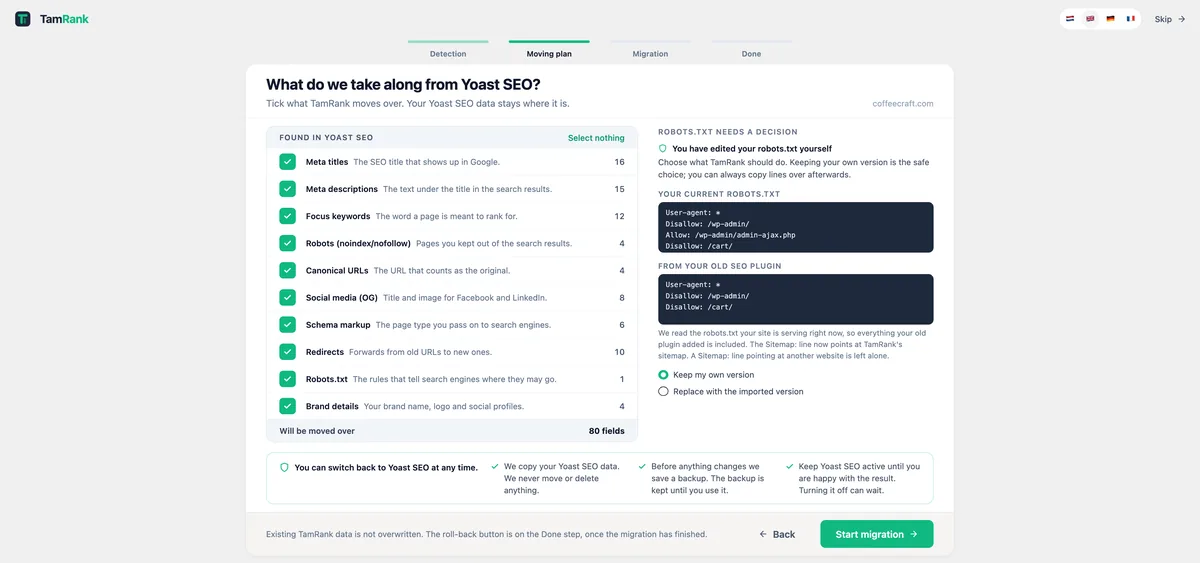
    Printed on the plan: "Keep Yoast SEO active until you are happy with the result. Turning it off can wait."

  2. Before the first write

    A restore point, saved automatically

    The moment the import starts, TamRank backs up every field it is about to touch. The roll-back button is waiting on the wizard's Done step, and later under Settings, Import / Export. One click and the imported post data and redirects go back. The settings you chose yourself stay as you set them.

    Printed on the plan: "Before anything changes we save a backup. The backup is kept until you use it."

    One honest note: the rollback is site-wide, not scoped to a single run. Migrate twice and roll back, and both runs go back.

  3. Always

    Your old plugin's data is never deleted

    The import reads your old plugin's data and writes TamRank's own fields. There are zero deletes on source data in the entire onboarding module. That is measured in the code, not promised in the copy.

    Printed on the plan: "We copy your Yoast SEO data. We never move or delete anything."

  4. Until you uninstall

    The old plugin is one click from active

    Deactivating is not deleting. Its data and settings sit untouched in your database, so reactivating it puts its output back the way it was. You decide when, or whether, to remove it for good.

    Printed on the plan: "You can switch back to Yoast SEO at any time."

The wizard's Done step: 'You're all set!', 26 items migrated, 4 items skipped, a 0 errors badge, the category list with counts, and a 'Roll back migration' button under the heading 'Not happy with the result?'.
The Done step, with the roll-back button on it: "Not happy with the result? Roll back the migration." Recorded on the CoffeeCraft demo site.

The plan is on screen before anything moves.

Most migration tools tell you afterwards what they did. TamRank shows you beforehand what it is going to do. This is the wizard's second step, the moving plan: "Tick what TamRank moves over. Your Yoast SEO data stays where it is."

The wizard's moving plan step, titled 'What do we take along from Yoast SEO?'. Ten data categories with counts and a plain-language line each, a total of 80 fields, a robots.txt decision panel with 'Keep my own version' preselected, and four trust promises along the bottom.
The moving plan, recorded on CoffeeCraft, a fictional coffee roastery that serves as our demo site. The counts are real measurements from that site, not yours. Swipe the panel to read the counts.

Google reads your HTML, not your plugin.

This is what a crawler sees before and after the switch. Same tags, same values, different plugin writing them. That is the whole reason rankings do not move.

An example page keeps the same title tag, meta description, canonical URL and robots directive before and after the migration. Only the plugin that outputs them changes.

One thing does change: with both plugins active at the same time, every tag is written twice. That is why the overlap stays short.

Three plugins in, one wizard.

What comes across is nearly the same from all three. The fine print differs, and it is printed here instead of buried in a knowledge base.

From all three, per page and post: meta titles and descriptions, the focus keyword, canonical URLs, noindex and nofollow settings, and Facebook and X overrides.

Yoast SEO

Free and Premium

Redirects come across from Yoast Premium. Pattern rules, duplicates and unsupported types are skipped and counted.

Schema type, where it matches. The page or article type you picked moves along when TamRank has the same type.

Title templates are resolved as they come across, so your separator and site name land as TamRank variables instead of Yoast placeholders.

TamRank vs Yoast

Rank Math

Free and PRO

Redirects come across: active, exact-match rules. Regex and "contains" rules are skipped and counted.

Schema type, where it matches. Your rich snippet choice moves along when TamRank has the same type.

More than one focus keyword? The first one becomes your TamRank focus keyword. The rest stay behind.

TamRank vs Rank Math

All in One SEO

Since TamRank 1.3.8

Redirects are not taken over. The plan counts them and says so, and they keep working in All in One SEO until you rebuild them.

Schema type, if you had AIOSEO Pro. Schema generation is a Pro feature there, so on AIOSEO Lite there is nothing to move.

Smart tags are resolved to TamRank variables as they come across, so nothing leaks into your titles as a raw tag.

Running more than one of them? The wizard shows you which sources it found and you pick the one to bring across. It never guesses on your behalf.

What comes across, and what does not.

TamRank maps the per-page SEO fields and counts what it could not, so nothing changes silently. Both columns are on screen before the import runs.

Comes across

Meta titles & descriptions

Every custom title and meta description you wrote, per post and page.

Canonical URLs & robots

Canonical tags plus your noindex and nofollow settings, carried over as-is.

Your focus keyword

The keyword you picked per page stays attached to that page.

Social / Open Graph overrides

Per-post Facebook and X titles, descriptions, and images.

Your schema type choice

From all three sources; from All in One SEO only if you had Pro. TamRank generates the markup itself, so what moves is the type you chose, not the old plugin's snippet data, and it moves where TamRank has the same type. A post that already has TamRank schema is skipped, never overwritten.

Your redirects

The redirects you built up in Yoast Premium or Rank Math move across with the rest. Pattern rules, duplicates and types TamRank does not support are skipped, and it tells you how many.

Your robots.txt

The rules that tell search engines where they may go. Edited the file yourself? The plan shows your version next to the imported one and you choose, with "Keep my own version" preselected as the safe choice.

Brand details

Your brand name, logo and social profiles, carried into TamRank's own brand settings.

Your title templates, resolved

The placeholders inside your titles and descriptions, site name and separator, are converted as they come across. AIOSEO smart tags too.

Stays behind, and it tells you

Site-wide settings

Separators, title defaults and global toggles. You set those once in TamRank, which takes a minute. The two site-wide things that do move, robots.txt and brand details, are on the left.

Secondary keywords

Your focus keyword comes across, extra keywords do not. TamRank gives you four more per page to fill in.

Redirects from All in One SEO

Counted and reported, not imported. They keep working in AIOSEO until you rebuild them, so nothing breaks in the meantime.

Pattern and regex redirects

Regex rules, "contains" rules, inactive rules and duplicates are skipped on purpose, and counted so you know exactly which ones to look at.

Migrating more than one site?

The honest answer first: the wizard runs per site. There is no bulk migration across sites, no CLI shortcut, no central dashboard that does your whole client list in one run. We would rather tell you that here than have you find out on site four.

What we can tell you is what makes it workable, and it is on the right. The sensible path: do one site first, the one you know best. If the plan and your spot-check hold up, the rest is routine, a minute at a time.

  • Free on every site

    No account, no license per site, no per-seat anything. The wizard, the migration and the rollback are all in the free plugin.

  • About a minute per site

    Detection, moving plan, migration, done. No export files to shuttle between installs, nothing to configure before it runs.

  • A restore point per site

    Every site you migrate keeps its own rollback. A problem on one site never means undoing the others.

  • The plan repeats

    After the first site you know exactly what the wizard will show on the next one. The counts change, the checks do not.

How do you switch from Yoast, Rank Math or All in One SEO to TamRank?

Switching from Yoast SEO, Rank Math or All in One SEO to TamRank takes about a minute. TamRank's onboarding wizard detects the plugin you are already using and shows you a moving plan first: what it found, counted per category, and what it will not take. Nothing is written until you press start, and it saves a restore point before it writes anything, so the imported post data and redirects go back in one click. Your posts and pages are never touched and your old plugin's data is never deleted. Redirects come across from Yoast Premium and Rank Math; All in One SEO redirects stay where they are and TamRank tells you how many it found. Site-wide settings such as separators and defaults do not come across, with robots.txt and your brand details as the two exceptions.

Questions people ask before switching.

Not from the switch itself. What search engines see is the output in your HTML: titles, meta descriptions, canonicals, robots directives and structured data. TamRank imports those values from your old plugin before you deactivate anything, so the output stays the same. The risk in any migration is data that fails to carry over, which is why TamRank counts what it could not map and saves a rollback point first.

Yoast SEO, Rank Math and All in One SEO. All in One SEO joined in TamRank 1.3.8, along with a source picker: if the wizard finds more than one of them on your site, you choose which one to bring across instead of it guessing for you.

Meta titles and descriptions per post and page, canonical URLs, noindex and nofollow settings, your focus keyword, and per-post social overrides for Facebook and X. Your schema type choice moves along when it matches a type TamRank has; from All in One SEO that only applies if you had AIOSEO Pro. Coming from Yoast Premium or Rank Math your redirects come across too. What does not come across: secondary keywords, site-wide settings such as separators and defaults, and redirects from All in One SEO. TamRank counts what it could not map, so you see it right after the import instead of finding out later.

They stay in All in One SEO and keep working. TamRank does not take them over, and rather than leaving you to discover that, the migration plan counts them and says so before you start: "N redirects found in All in One SEO. TamRank does not take redirects over from it, so they stay where they are." You rebuild them in TamRank's redirect manager when it suits you.

Yes. TamRank saves a restore point the moment the import starts, and one click puts the imported post data and redirects back. Your old plugin's own data is never deleted, so that is still there as well. This is the part most SEO plugins skip, so if you have migrated before and it went badly, this is the difference.

No. Install TamRank alongside it, run the import, and check a handful of pages. Then deactivate the old plugin. Do not leave both running: two SEO plugins both write meta tags, so your pages end up with the tags twice. Treat the overlap as a short check, not a state to stay in.

No. The import only writes SEO metadata. Your posts, pages, media and theme are untouched.

No. Install it, activate it and it works. An account is only needed for PRO, which is where licensing and AI credits live.

Don't switch today. Compare today.

Install TamRank next to your current plugin and open the wizard. It shows you the plan for your site: what comes across, what stays, the counts. If the plan does not convince you, close it and your SEO data has not changed. If it does, the import takes about a minute, and every way back on this page stays open.

The migration wizard's moving plan: ten categories found in Yoast SEO with their counts, a total of 80 fields, the robots.txt choice, and four promises along the bottom.
The whole thing, start to finish, on the CoffeeCraft demo site.
Install free and see your plan

Free plugin. No account. Your old plugin stays until you decide.