TamRank PRO for SEO professionals.
Know what to fix.
Stay in control.
Find the SEO work that deserves your time. Review changes before they go live, then see what followed in Search Console. In WordPress, with optional access through your AI assistant.
The problem is not finding more issues.
Every SEO plugin can produce a list. The hard part is knowing which issue deserves your time, changing it without losing control and showing a client or team what followed afterwards.
See what is happening
Bring Search Console, WordPress, indexation, 404 and performance signals together around the pages they affect.
Know what matters first
Turn those signals into a focused work queue, with the pages and traffic opportunity behind each recommendation.
Review the exact change
Other SEO plugins now let an AI agent write SEO fields, one page at a time. PRO shows the exact diff first, applies a whole set of pages as one approved batch and keeps eligible changes reversible in the audit trail.
Measure what followed
Compare clicks, impressions, CTR and position before and after, without pretending that correlation proves causation.
PRO keeps all four steps connected as one controlled SEO action. Nothing you use today moves behind the paywall.
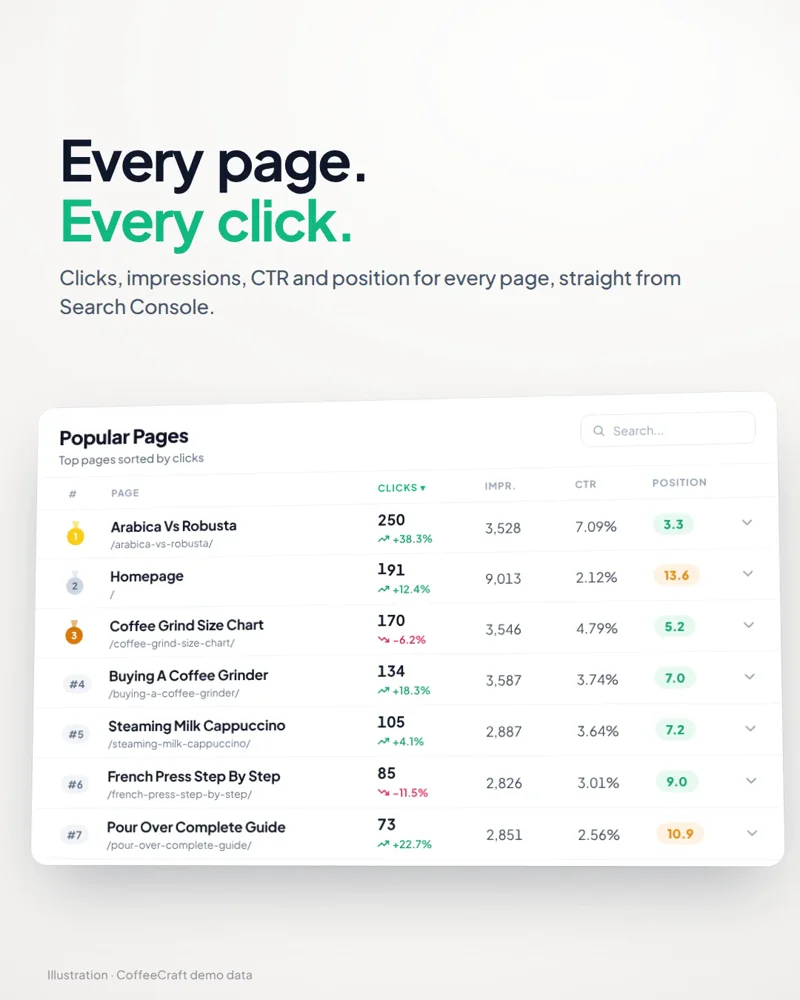
See which pages need your attention.
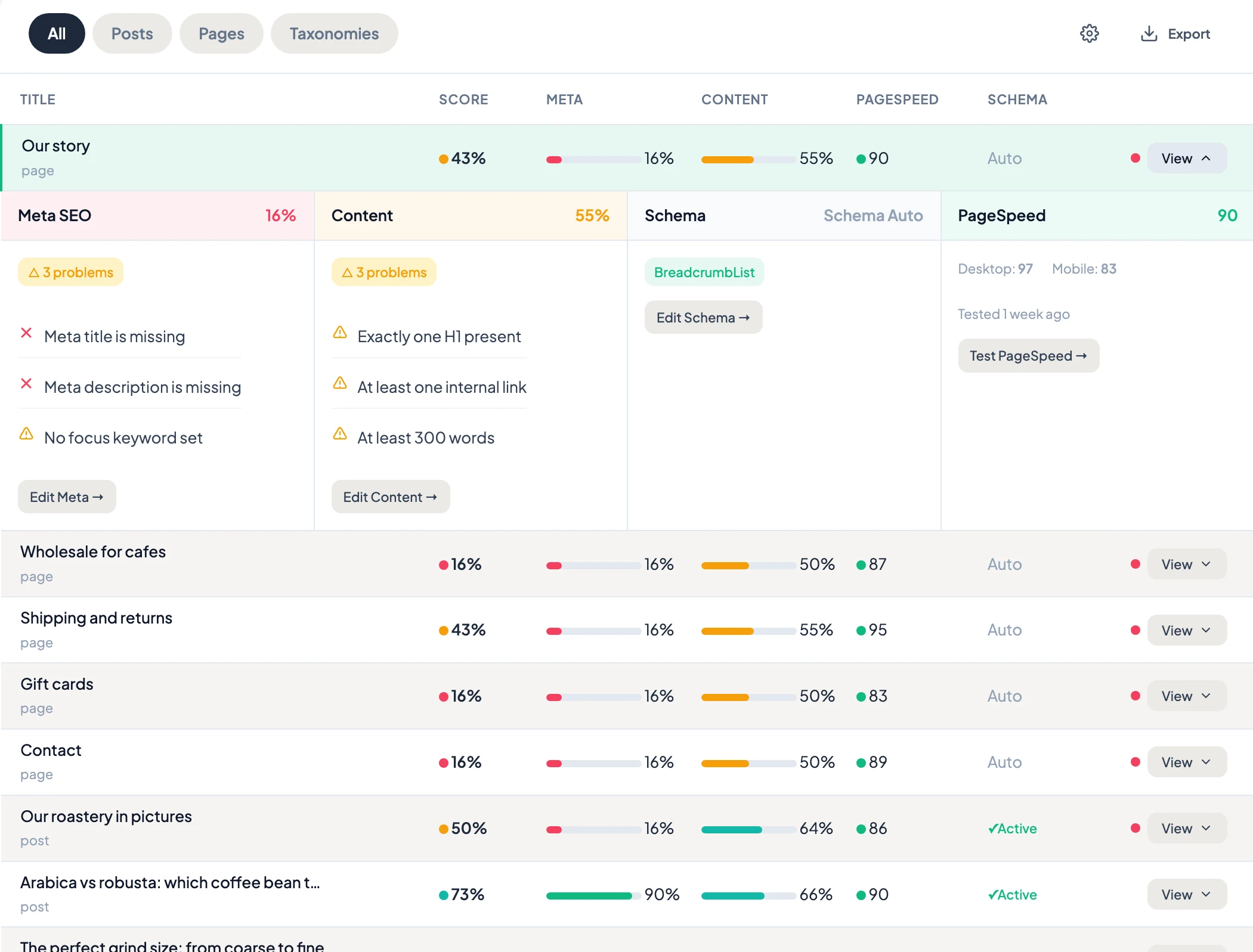
Stop piecing together what happened across separate reports. Explore search performance, ranking changes, page speed and content gaps where you already work.
- Start with the page.See its clicks, impressions, CTR and positions from Search Console.
- Look beyond a single number.Explore ranking movement and compare lab performance with available field data.
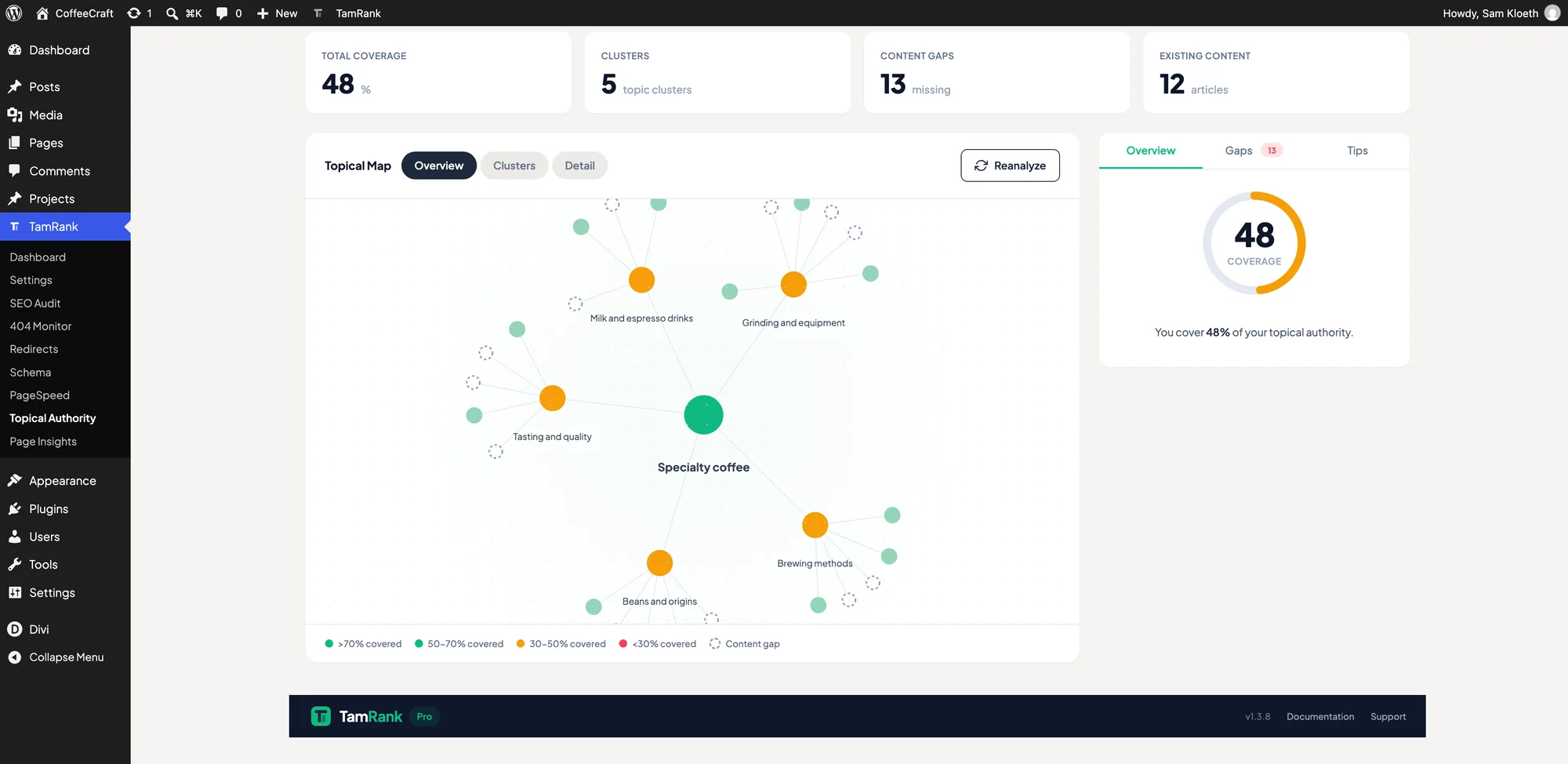
- Find your next investigation.Use your topic map to explore coverage and possible content gaps.
Use PRO directly in WordPress. Connecting an external AI assistant is optional.
From a conversation to an approved change.
Ask your assistant to investigate a page and propose improvements. TamRank connects the conversation to your WordPress site through MCP. Review the exact plan before you approve it.
MCP access available with PRO.
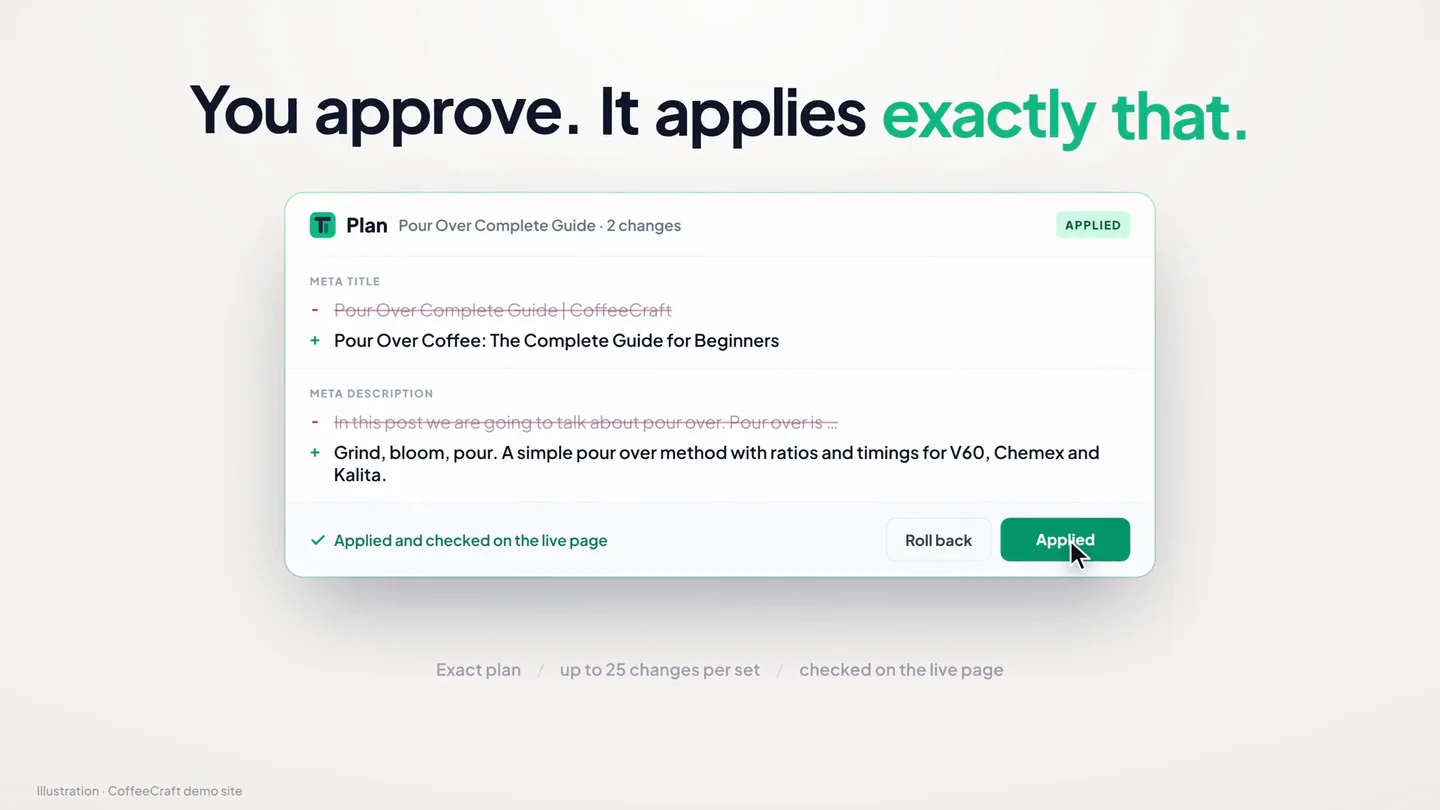
- Review the exact plan
- Approve before execution
- Keep a traceable change history
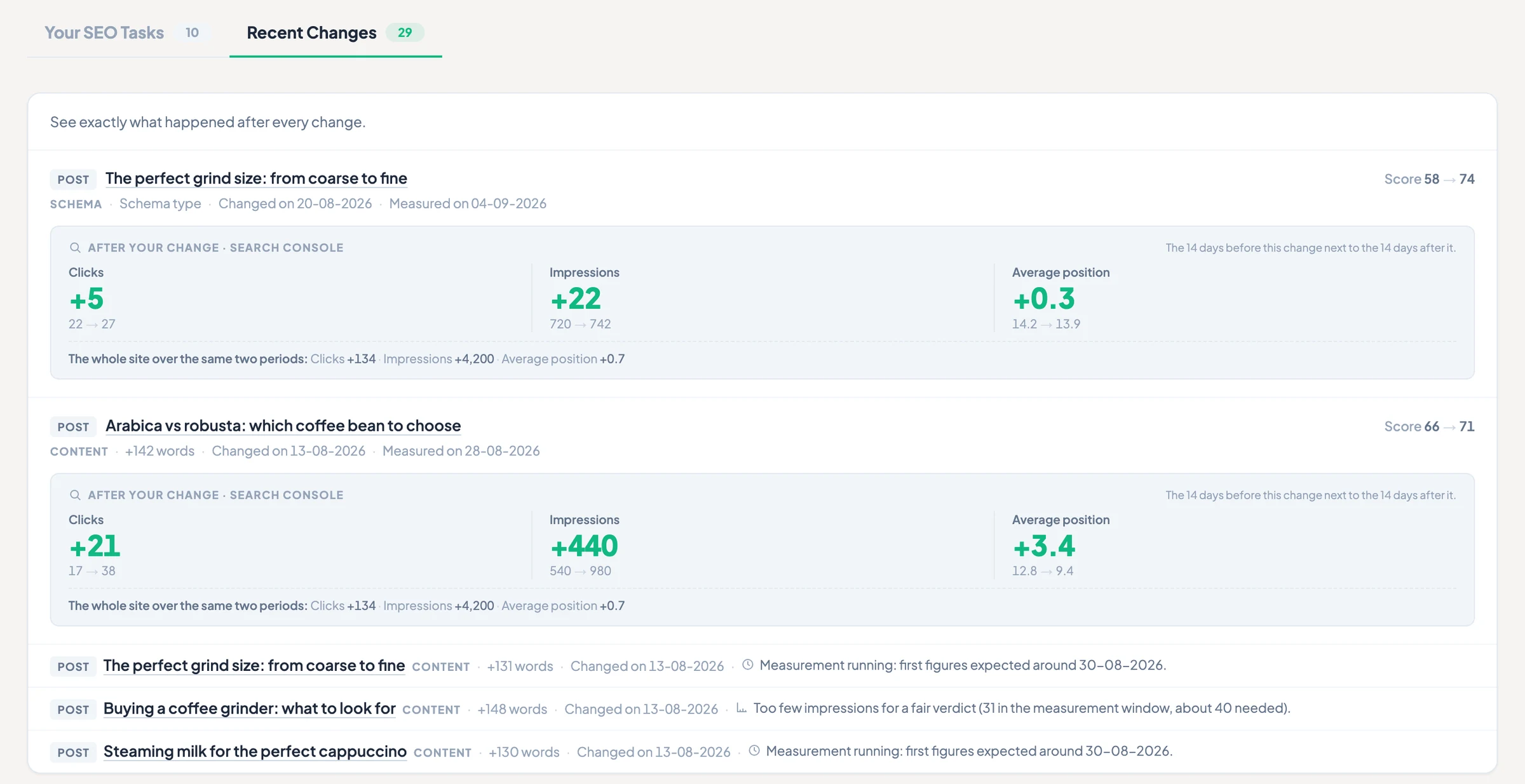
Changed is not the same as improved.
Keep the change and its follow-up together. Compare clicks, impressions, CTR and position in Search Console before and after, so you have something concrete to review with your client or team.
Everything that supports the workflow.
Start with the action, then open the specialist tool it calls for. Every capability below is included in every PRO plan; plans differ only in sites and monthly AI credits.
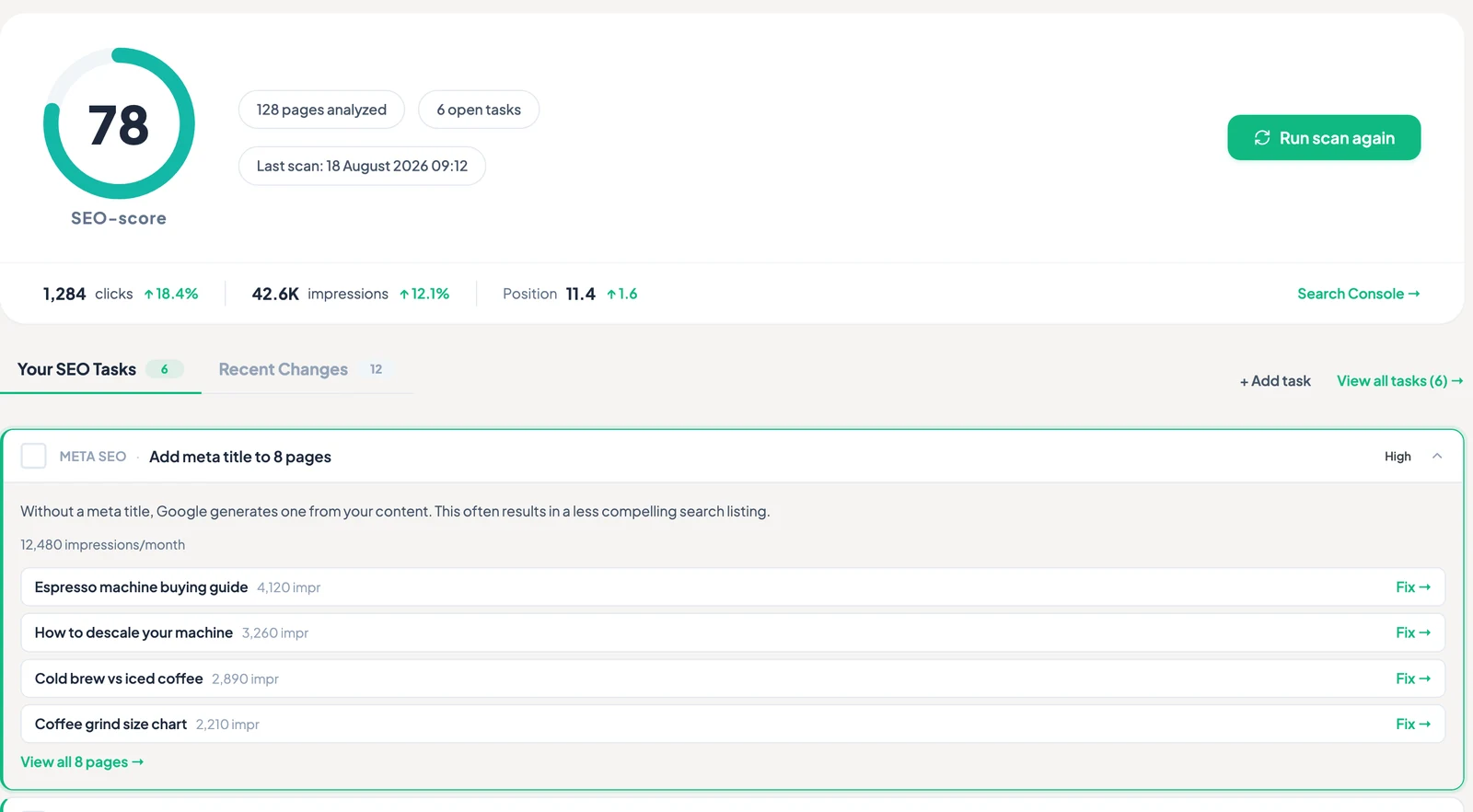
Priority Actions
★ What TamRank was built forA queue weighted by real traffic: what to fix first, why it is first, and what it is worth. Not the longest list, the highest upside.
GSC Page Insights
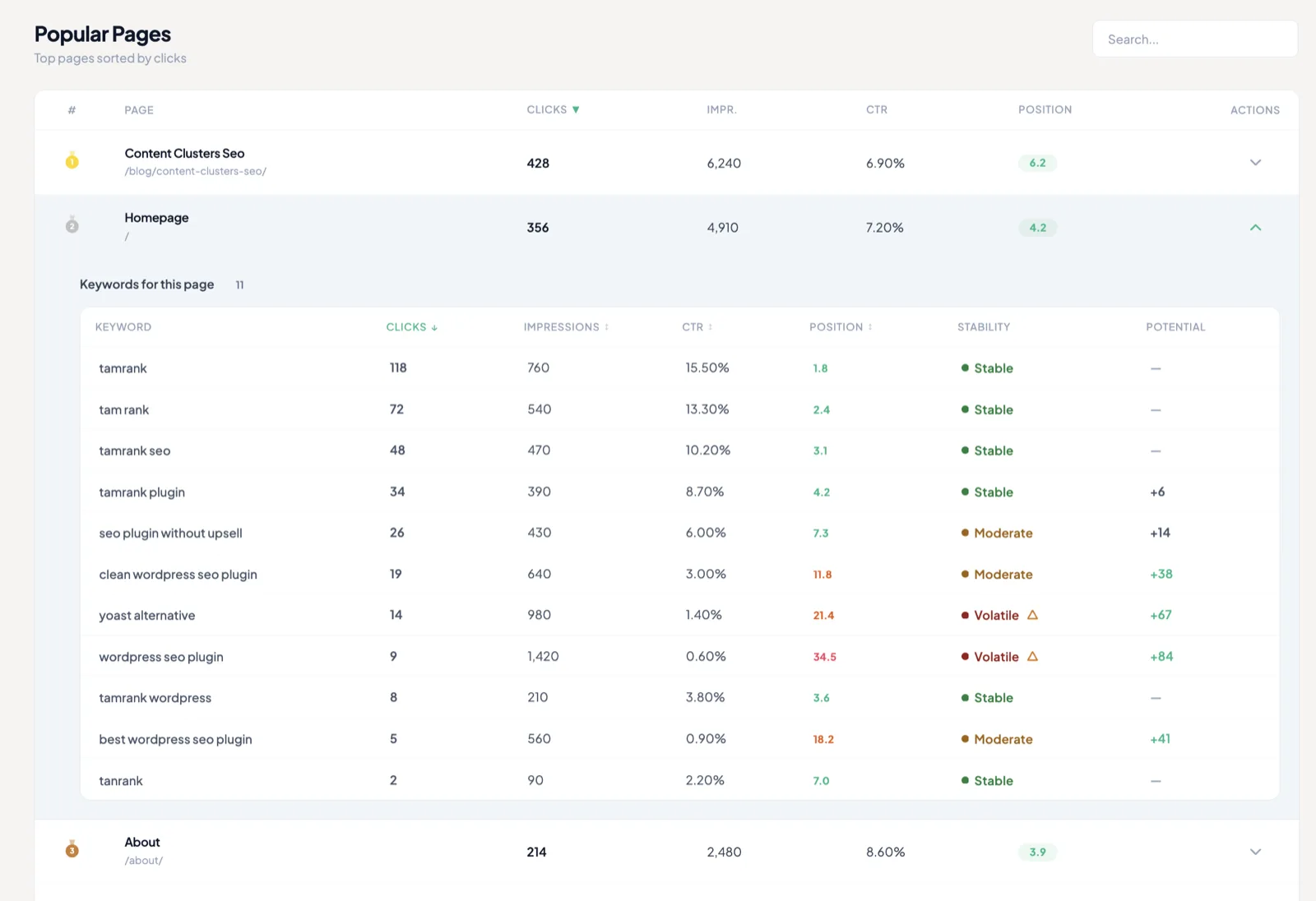
Keywords, CTR and position per page, over 28 or 90 days, on one Page Insights screen, with Position Stability and Keyword Potential. Site-wide trends go back up to 16 months on the dashboard.
SEO Change Tracker
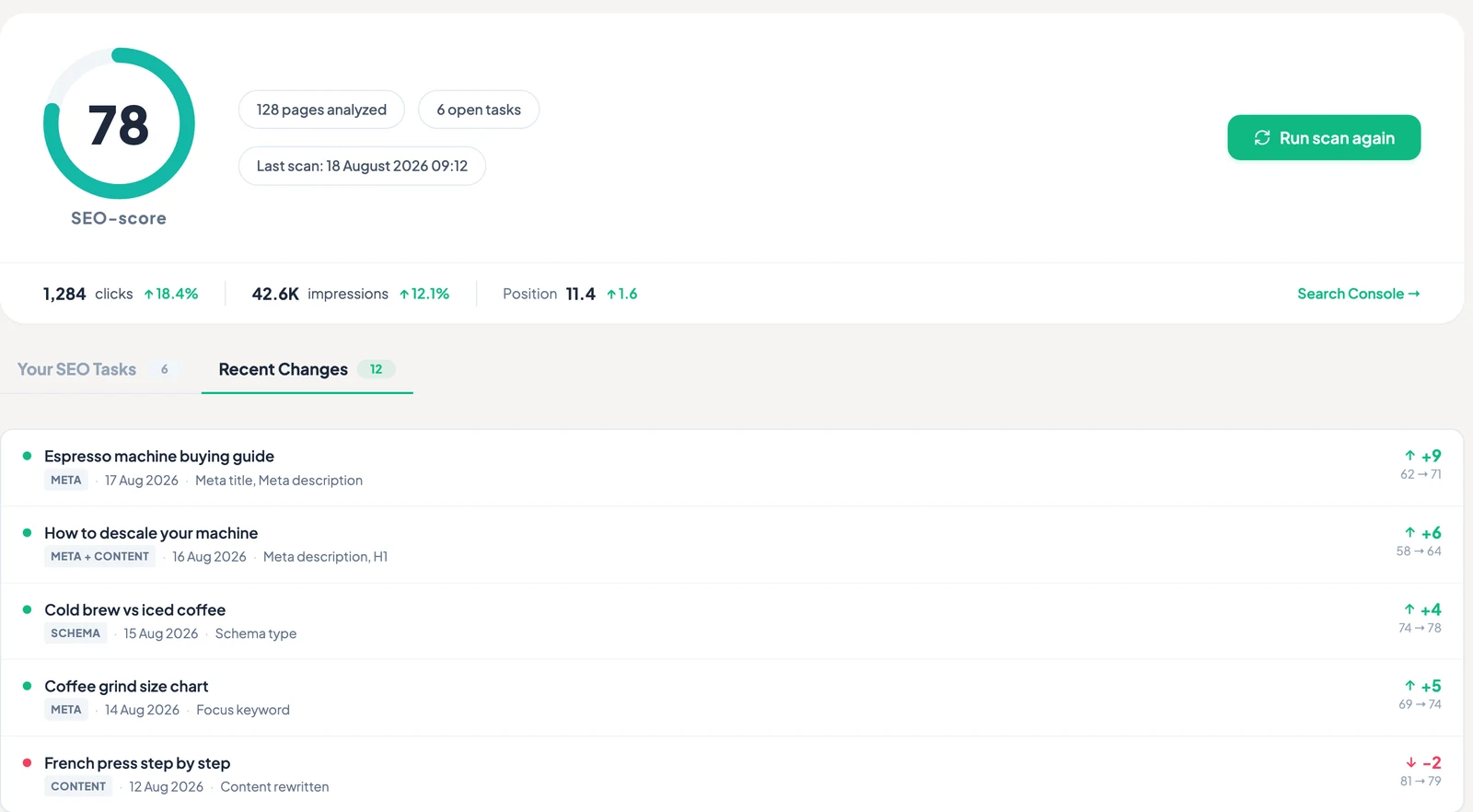
★ What TamRank was built forEvery change stays linked to its page, date and Search Console comparison: clicks, impressions, CTR and position before and after. TamRank shows the measured movement without claiming the change caused it.
Index monitoring
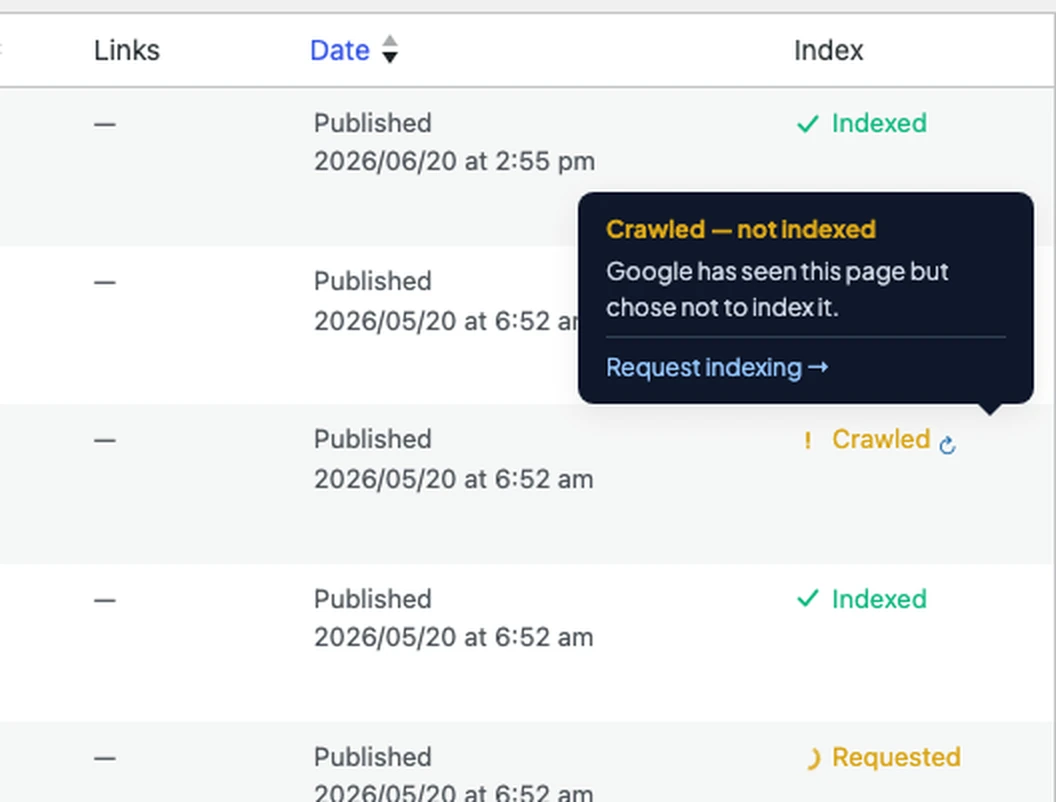
A column in your posts list plus a daily automatic bulk scan, so you can see whether Google actually indexed a page, without checking them one by one.
PageSpeed + CrUX
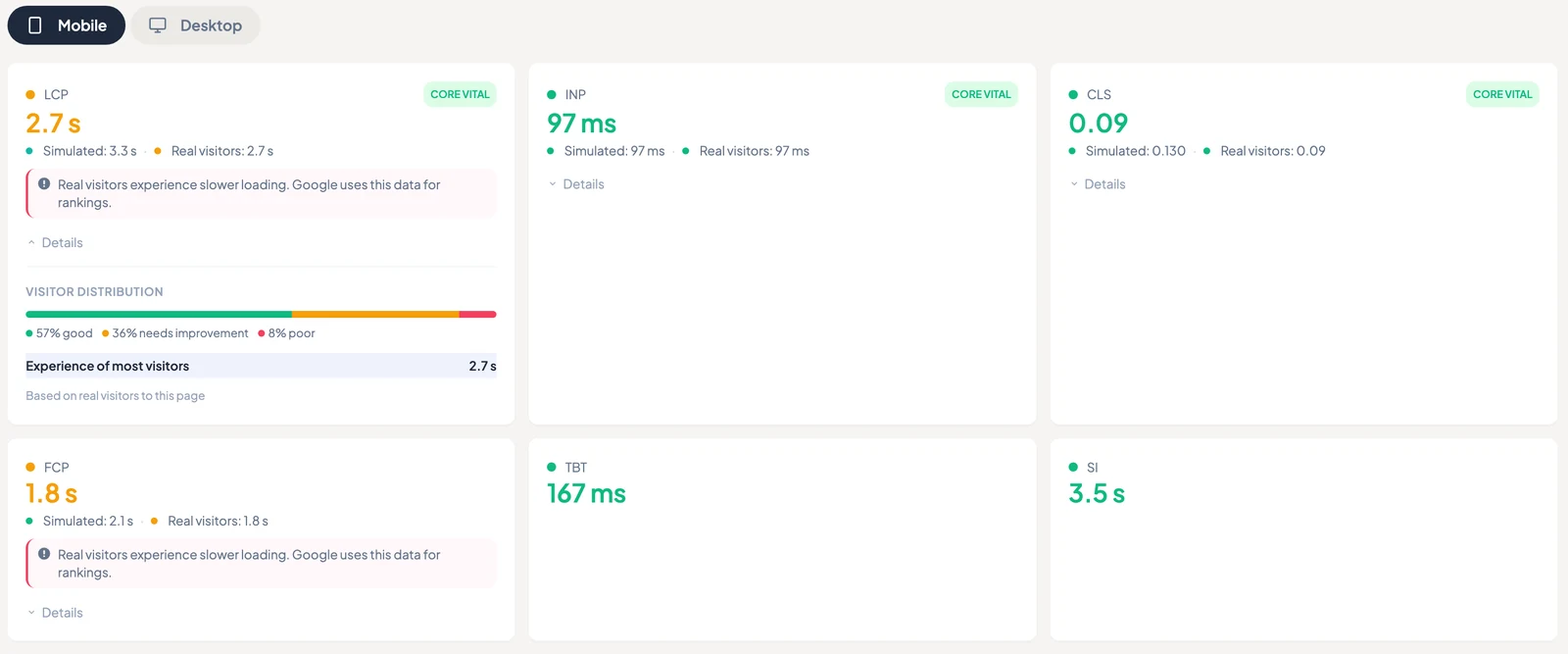
Lab and field data side by side. Test, queue, bulk-run and export to CSV.
SEO Audit
Multi-tab site audit with bulk actions, bulk meta save, and export.
Open REST API
Read, write and batch: all 13 meta fields are scriptable. The reference is public and the rate limits are documented.
Built-in AI actions
Meta Generator, Internal Links, Vision Alt Text, Brand Profile + Tone, Bulk AI titles & descriptions.
- Metas, alt text and internal links use 1 credit each. Vision alt text uses 3 per image; a Topical Authority analysis uses 10 per 10 pages.
- Solo 250, Studio 500, Agency 1,500 credits/month, included in the license and shared across your sites.
- OpenAI and Claude rather than a vague "our AI".
- No second subscription, no per-word pricing.
Topical Authority Map
A visual cluster map of your content, and the gaps in it.
A calmer week, and a report you can stand behind.
TamRank keeps the recommendation, approved change and measured follow-up together, whether you report to a client or your own team.
Run the same controlled workflow across client sites
- Use the same controlled WordPress workflow on every licensed client site
- Solo covers 1 site, Studio covers 5 sites and Agency covers 20 sites.
- Each MCP connection can reach up to 10 sites that are already connected to TamRank. There are no changes across all sites at once and no central agency dashboard.
Give the team a clear next action every week
- Start with the work that deserves attention first
- Review exact changes before they reach the site
- Show what changed and how Search Console moved afterwards
Three plans. One feature set.
You pick a plan for the number of sites you run. No feature gates inside PRO, no seat count, no upsell inside the plugin.
Less than one billable hour, per client site, per year.
Solo covers 1 site, Studio covers 5 sites and Agency covers 20 sites. Studio and Agency include a larger monthly bundle for built-in AI actions, measured in credits and shared across the license.
Get PRO · from €99/yearRenews at the same price: no intro-then-spike. VAT invoice on your company name.
Cancel anytime. Your data stays yours, and the free plugin keeps working.
- GSC Page Insights + Position Stability + Keyword Potential
- SEO Audit (bulk, export) · Index monitoring (daily)
- PageSpeed + CrUX · 404 and indexation signals
- Priority Actions · traffic-weighted work queue
- Topical Authority Map
- Dry-run, approval, audit trail and rollback
- Open REST API with MCP agent access
- Built-in AI actions · 250 to 1,500 credits/month
- SEO Change Tracker · 14 days before and after each change
- Clicks, impressions, CTR and position before and after
- Priority support (within one business day)
Not ready for PRO?
You already have a genuinely complete SEO toolkit in the free plugin. PRO is here when you want prioritized work, controlled changes and measured follow-up. No pressure, no nagging: that's the whole point.
Get the free plugin →Questions you'd actually ask
Is the API actually complete, or "API coming soon"?
Complete and documented. The full API reference is public, all 13 meta fields are writable, batch endpoints take up to 50 items per request, and the rate limits are published: 120 reads/min, 30 writes/min, 5 batch calls/min. Read endpoints ship in the free plugin; write access is PRO. Full reference at tamrank.com/api/.
What can the AI assistant do, and what stops it breaking my site?
Your assistant checks the connected website and its permissions first. Supported changes include SEO titles and descriptions, social fields and image alt text. Redirect actions depend on the available capabilities and approved permissions. Review the exact proposal before execution; eligible changes can be rolled back with a new proposal and approval. Schema writes and starting scans are not part of this promise. There is no autopilot mode.
Do I need my own AI subscription?
Built-in AI features use the monthly credits included in your PRO license and do not require a separate AI subscription. MCP uses your own compatible AI assistant account. Any subscription or usage charges from that provider are separate from TamRank.
What happens if I don't renew?
You drop back to the free plugin. Your data stays in your own WordPress database, and because the API is open, nothing is locked in: you can export or migrate whenever you want.
I manage multiple client sites. How does licensing work?
There are three plans, from €99/year. Solo covers 1 site, Studio covers 5 sites and Agency covers 20 sites. AI credits are shared across the sites on your license. You can use PRO on your own sites or on client sites you manage. Each MCP connection can reach up to 10 sites that are already connected to TamRank. There are no changes across all sites at once and no central agency dashboard.
Where does my data live?
Primarily on your own site, in your WordPress database. The hosted parts, index monitoring and the Search Console proxy, run on our own servers in the EU, with EU error monitoring and EU backups. The AI tools are the exception: those requests go to OpenAI and Anthropic in the United States, so what you send them leaves the EU. No visitor tracking, no data resale.
What is included, and is all of it live?
Everything marked as available on this page is live today, including agent access. Every plan gets the same feature set and differs only in sites and AI credits.
Prioritize what matters. Change it safely. Measure what followed.
Three plans, from €99/year. Every plan includes the complete PRO workflow.

