Know exactly what to fix.
Everything you need to run WordPress SEO, organized in two clear layers. FREE covers the complete foundation. PRO adds the workflow for deciding what matters first, changing it under control and measuring what followed.
The short version
Start with the complete FREE foundation or follow the PRO workflow from evidence to measured outcome. The full feature inventory is further down.
The clean foundation
The everyday SEO work is free, and stays free. No locked teasers inside the plugin.
Know what to fix first
Every recommendation is weighed by the traffic it affects, so the top of your to-do list is the page that matters.
Measure what followed
Each change stays dated and connected to the Search Console movement measured afterwards, with the site-wide baseline as context instead of a causal claim.
Make controlled changes
Use the open REST API to prepare and apply approved changes in batches. AI assistants connect through hosted MCP.
The full inventory
Everything in the plugin, grouped the way you'll use it. The badge tells you the tier, that's all it does.
SEO essentials
The everyday work: scores, metas, keywords.
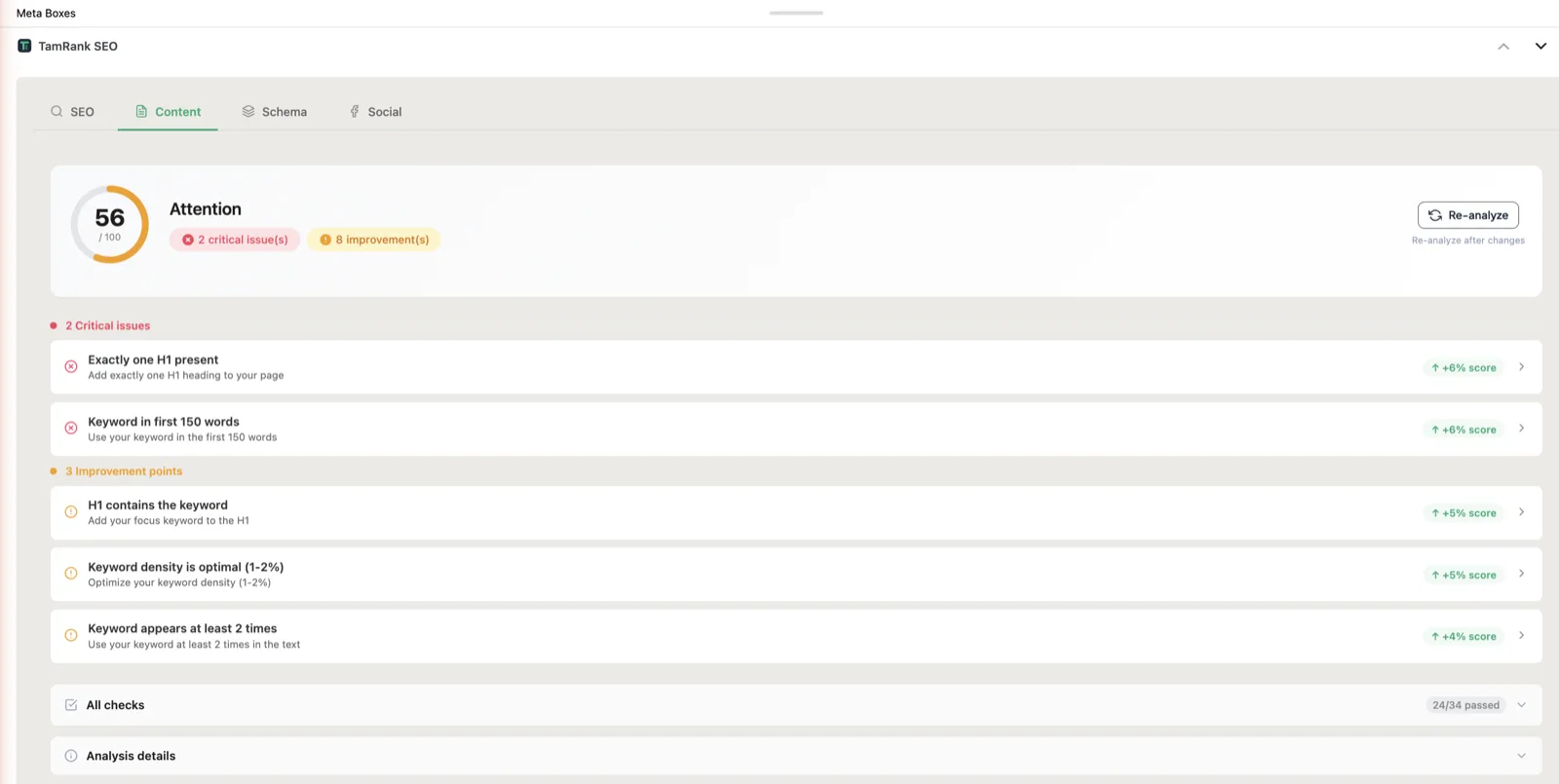
Content Analysis
FREEHeading structure, keyword usage, readability, images, internal links and content length, checked per page in the SEO metabox, with a floating widget that keeps the tips in view while you edit.
SEO Score
A live score per page, across meta, content and technical checks.
FREEMeta Title & Description Editor
Edit per page, with a length indicator.
FREEFocus Keyword
One primary keyword per page.
FREESecondary Keywords
Up to four extra keywords per page, so five in total.
FREEFloating Widget
SEO tips that float alongside the post editor while you work.
FREESEO Score Column
A score column in your posts list, so you spot weak pages at a glance.
FREESchema
Structured data without writing JSON-LD.
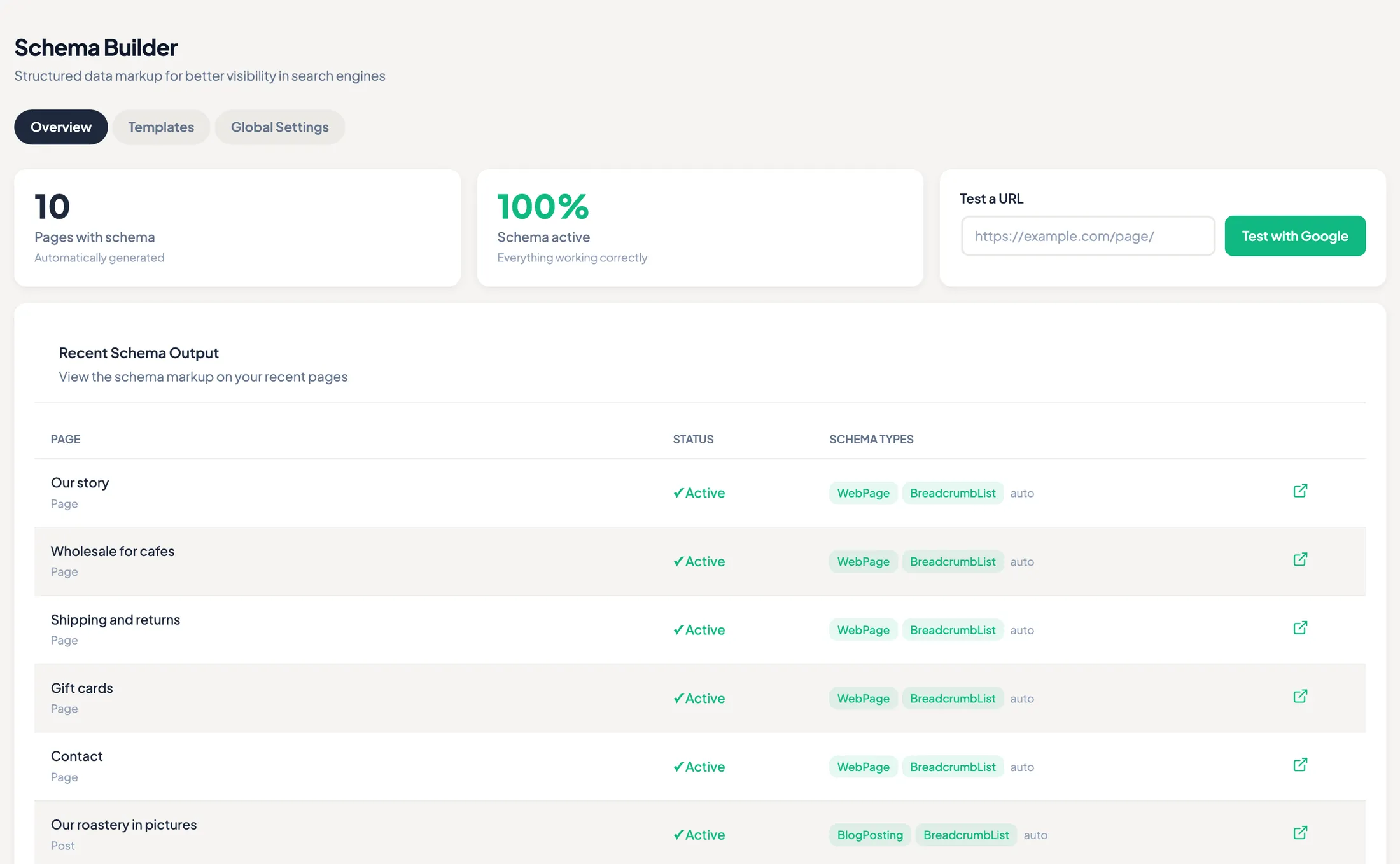
Schema Builder
FREEFourteen schema types plus custom JSON-LD, reusable per post type, with the right type detected for you and a live preview of the markup. The overview tells you which pages carry schema and which types are active.
Schema Templates
Reusable templates per post type.
FREEAuto Schema Detection
Detects the right schema type automatically, plain logic, no AI needed.
FREESchema Audit
Validates your schema markup.
FREEBreadcrumb Schema
Auto-generated BreadcrumbList JSON-LD.
FREELive JSON-LD Preview
Real-time preview of the markup, right in the editor.
FREETechnical SEO
Sitemaps, robots, canonicals, set once, then forget.
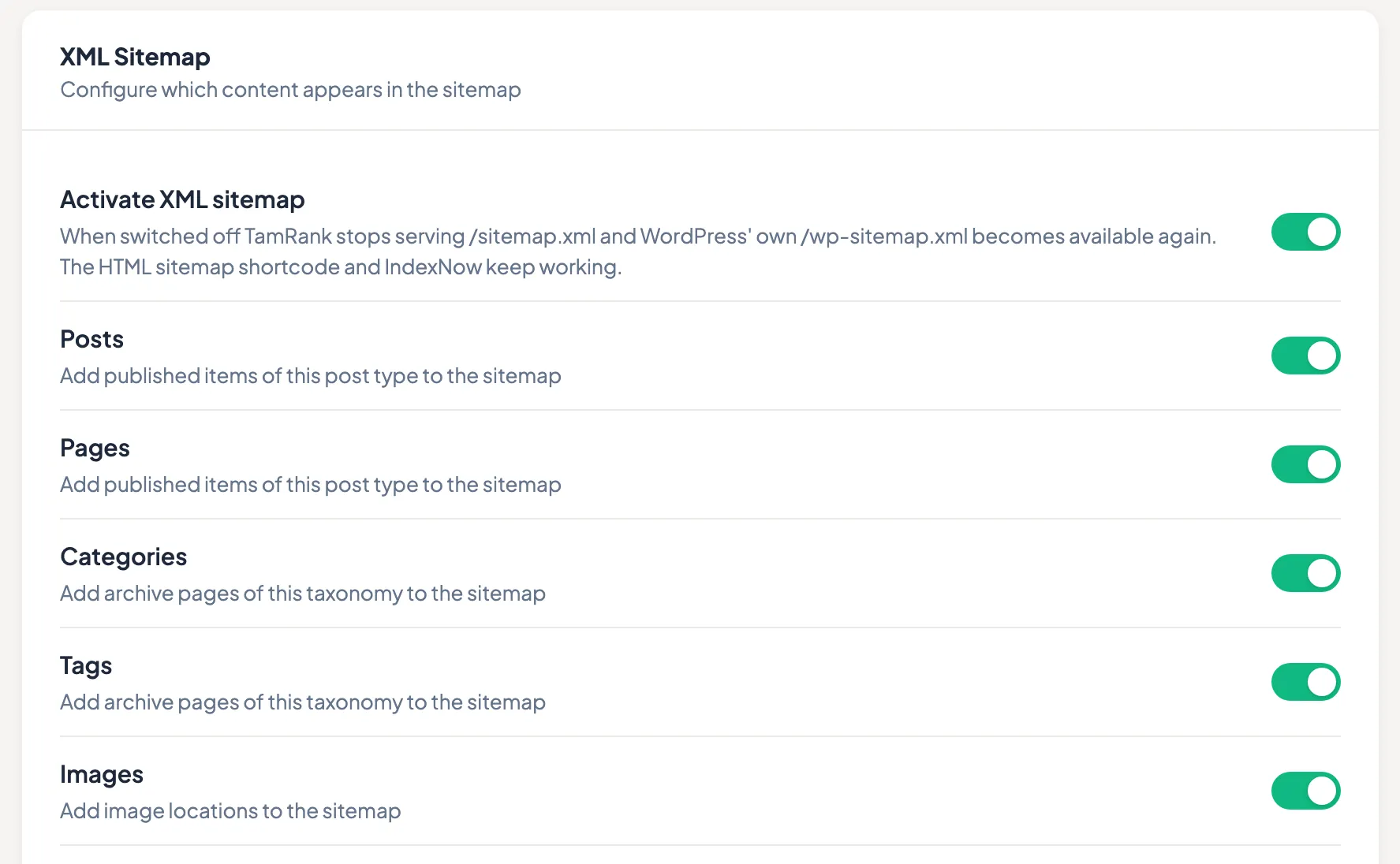
XML Sitemap
FREEGenerated automatically, switchable per post type and taxonomy, with your image locations included. Robots.txt, canonicals and the per-page robots meta sit in the same settings tab.
Image Sitemap
Images auto-detected and included in the sitemap.
FREERobots.txt Editor
Manage a custom robots.txt from the dashboard.
FREECanonical URL
Set per page.
FREERobots Meta
Noindex and nofollow, per page.
FREEOpen Graph & Twitter Cards
Social media meta tags, handled.
FREE4-Platform Social Preview
Preview how a page shares on Facebook, X, LinkedIn and Instagram.
FREERobots Directives
Per page, post and term: whether search engines may keep a cached copy, show a snippet, index its images or translate it, and how large a text, image or video preview may be.
FREEHTML Sitemap
A readable sitemap for your visitors, as a shortcode or a template tag. Built from the same data as your XML sitemap, so the two never disagree.
FREEBreadcrumbs
A visible breadcrumb trail, as a shortcode or a template tag. The trail and its BreadcrumbList markup come from one source.
FREERSS Feed Optimisation
A line of text before and after every item in your feed, so sites that republish it link back to the original. Off by default.
FREE.htaccess Editor
Edit your server rules from the dashboard. TamRank keeps a backup, tries the change in a sandbox first, and puts the old file back if your site stops answering.
FREERedirects & 404s
Unlimited redirects, and a 404 log that earns its keep.
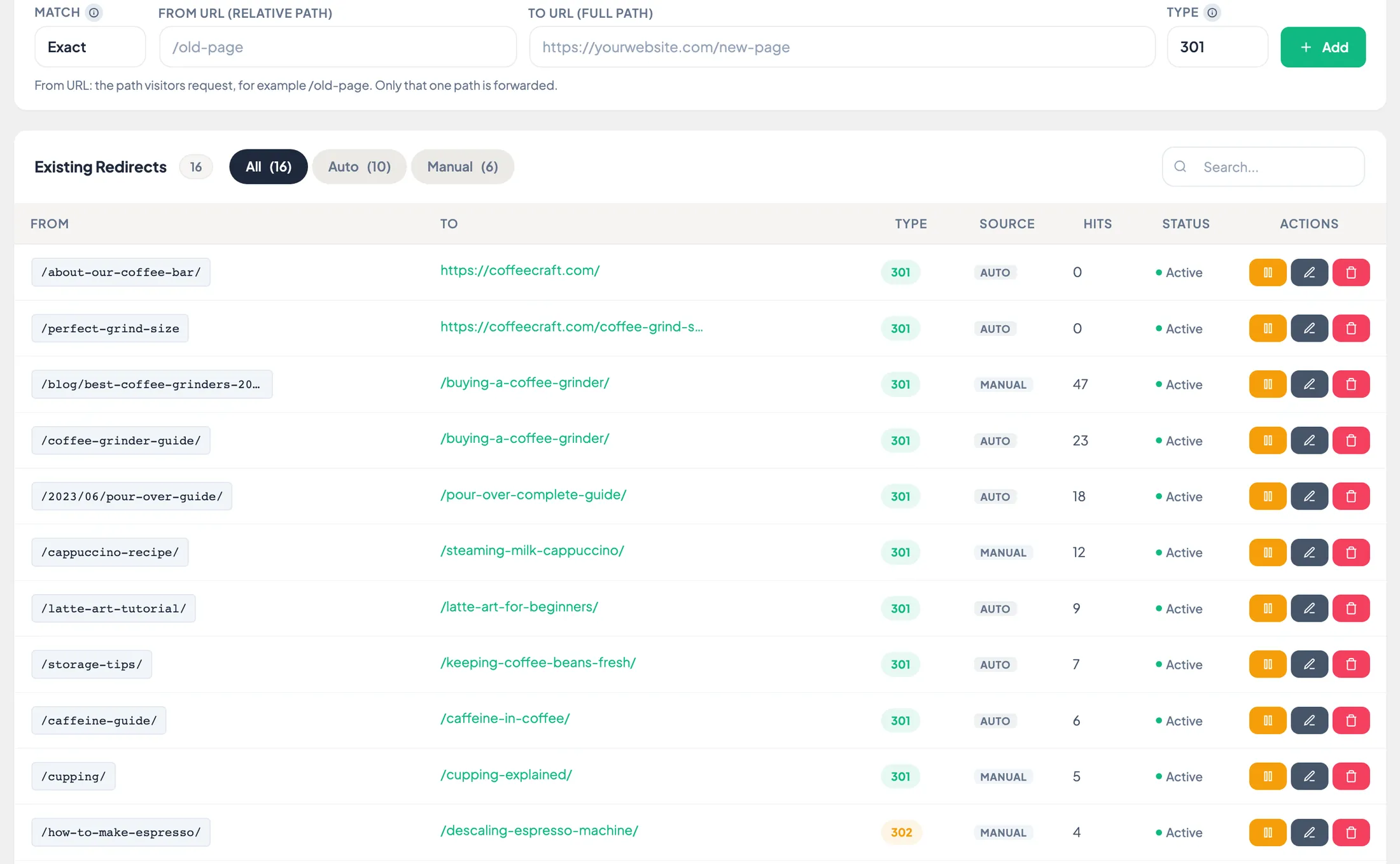
Redirect Manager
FREE301, 302, 307 and 410, with hit statistics, no limits, and a learning engine that improves its suggestions from what you accept and reject. Locally, in your own database.
Learn moreAuto-redirect on Slug Change
A 301 is created automatically when a URL changes.
FREEAuto-redirect on Delete
A prompt with suggestions, parent, category, homepage or custom.
FREERedirect Suggestions
Suggested automatically from your 404 logs.
FREERedirect Learning Engine
Learns locally from accepted and rejected suggestions, your database, no external service.
FREE404 Monitor
URL, hits and date, unlimited log with redirect creation and CSV export.
FREEAdmin Bar 404 Alert
The 404 count, right in the admin bar.
FREECSV Import / Export
Bulk import and export of redirects.
FREERegex Redirects
One pattern rule covers a whole set of old addresses, with the target filling in whatever the pattern captured. Every pattern is checked before it is saved.
FREE404 Source Tracking
A "found on" column: where each 404 was linked from, internal or external, with drill-down.
PRORedirect Chain Detector
Blocks any redirect that would create an infinite loop, and lists A→B→C chains for your AI assistant to review.
PROImages & WebP
Full WebP conversion, free, in every tier.
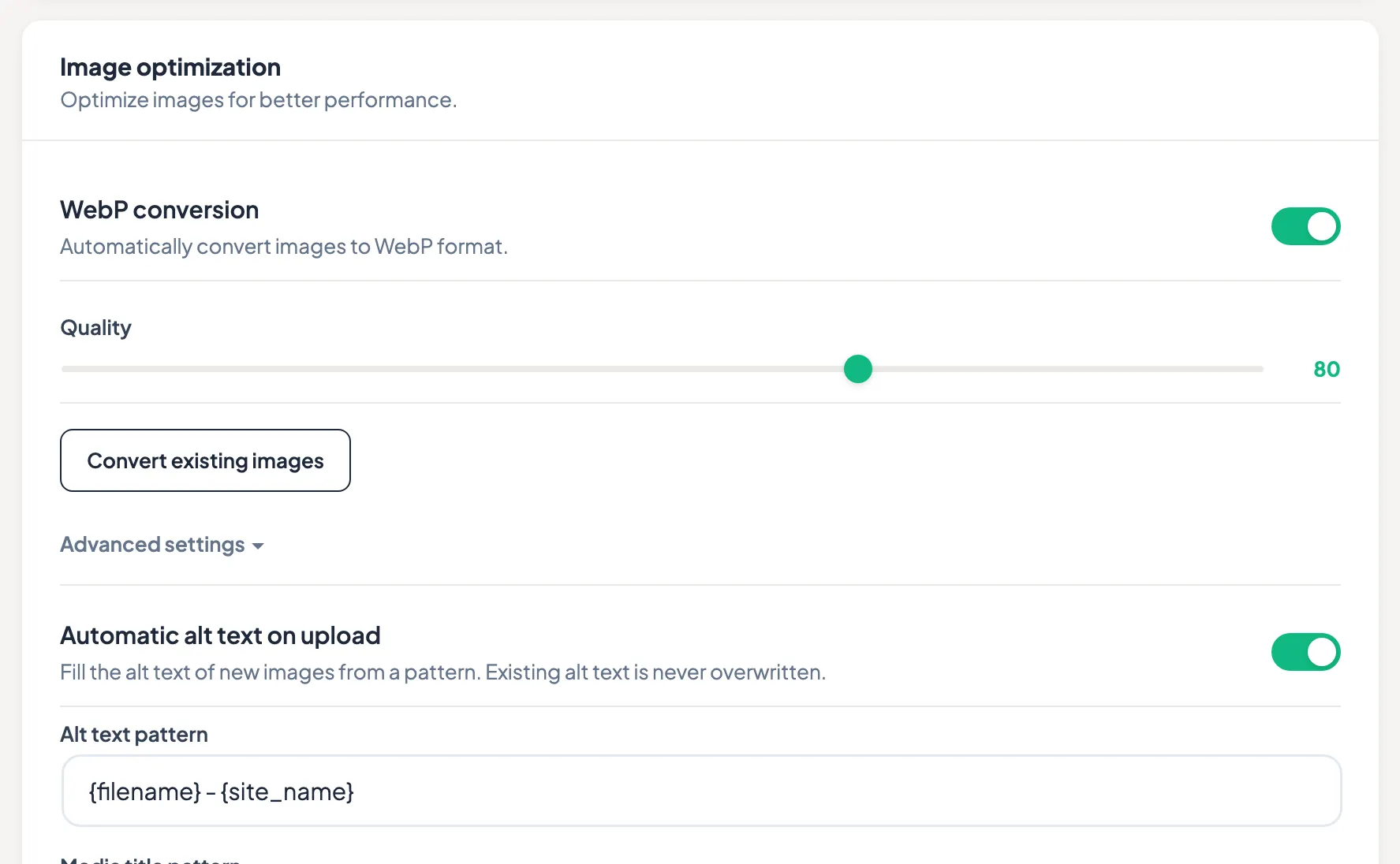
WebP & Alt Text
FREEAutomatic WebP on upload with a quality slider, plus a bulk converter for the library you already have. Alt text is filled from a pattern on upload, and existing alt text is never overwritten.
WebP Conversion
Automatic WebP on upload (Imagick or GD). Off by default, on when you say so.
FREEWebP Bulk Converter
Convert your existing media library in batches.
FREEWebP Server Module
Serves WebP to compatible browsers, with a fallback for the rest.
FREEImage Alt Text UI
Edit alt text right in the metabox.
FREEAutomatic Alt Text
New uploads take their alt text and media title from a pattern you choose. Off by default.
FREEBulk Alt Text
Run that same pattern across the images already in your library. It only fills what is still empty, and a run can be undone.
FREESearch Console & indexing
Your Google Search Console data, inside WordPress.
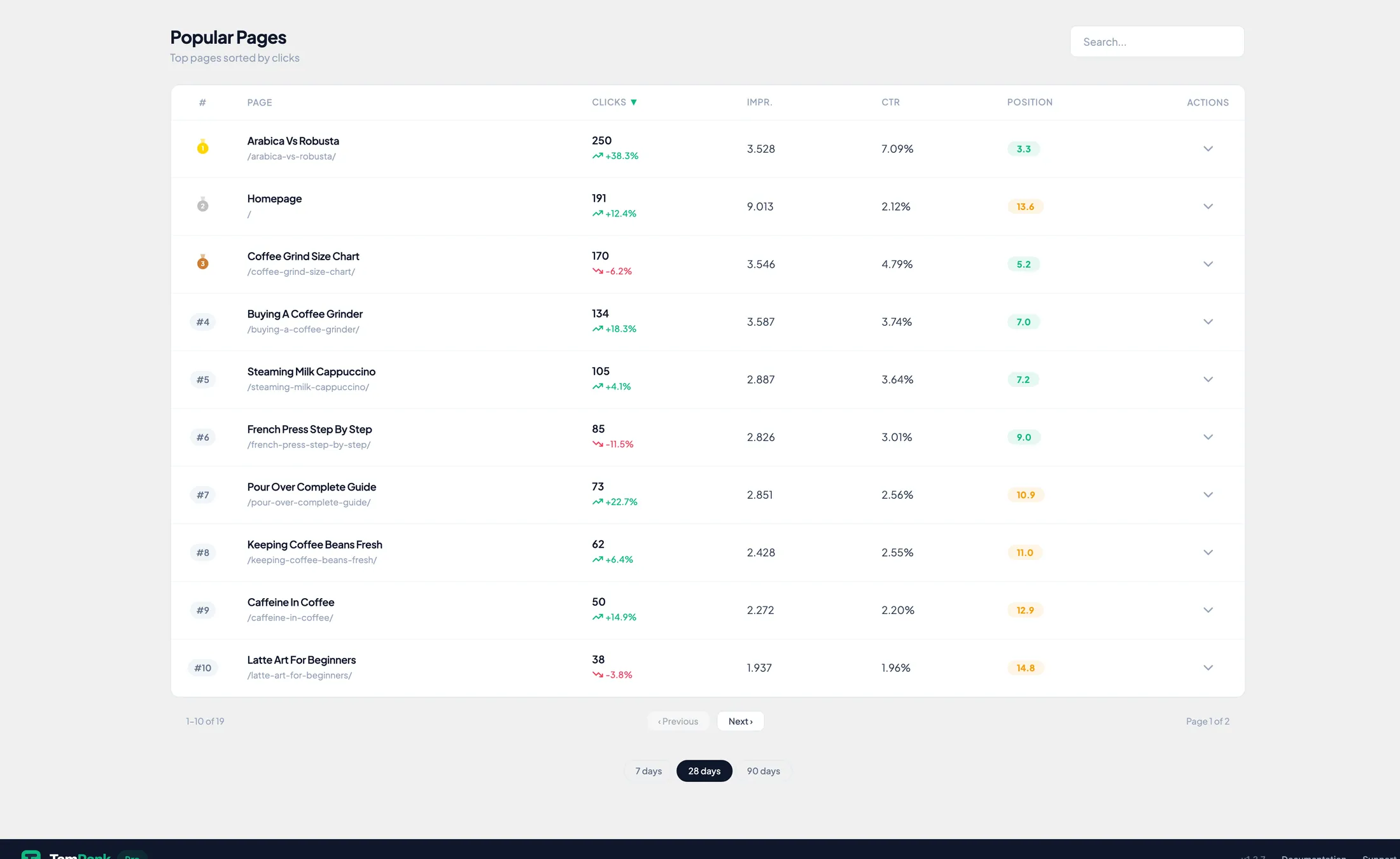
Page Insights
PROYour own Search Console data per page: clicks, impressions, CTR and position, with the keywords behind each page one click deeper. Connecting Search Console and the 7 and 28-day dashboard are free; this per-page screen and the longer periods are PRO.
Learn moreGSC Connection
OAuth connection and property selection.
FREERequest Indexing
A button per page. After that, two days before the same page can go again.
FREEAuto-Indexing on Publish
An indexing request goes out automatically when you publish.
FREEIndexNow
Publishing or updating a page tells Bing, Yandex, Naver, Seznam, Amazon and Yep right away, instead of waiting for the next crawl. Off until you switch it on.
FREEGSC Dashboard Extended
3, 6, 12 and 16-month periods, with the trend across each period.
PROPosition Stability
Stability and gap-awareness charts over 28 and 90 days.
PROKeyword Potential
Calculated uplift per keyword, where a small move pays off.
PROIndex Status Column
Indexing status per page, in the posts list.
PROAuto Index Status Scan
A daily scan, 200 pages a day.
PROSEO Audit
Scan the whole site free; go page-by-page with PRO.
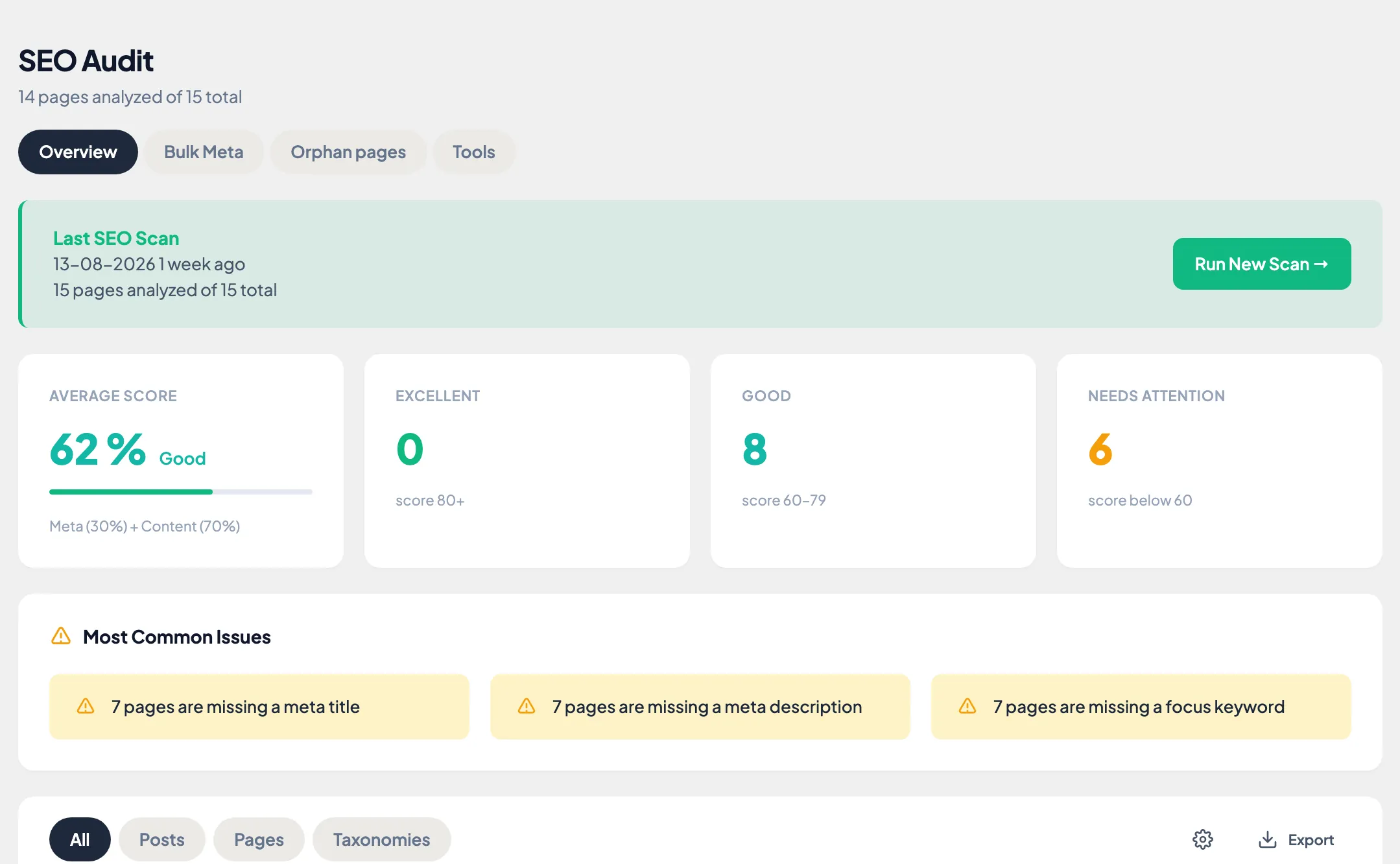
Audit Overview & Bulk Scan
FREEScan every page at once and see the site-wide score with filter pills. Reset and CSV export included. PRO adds the per-page detail, the bulk meta editor and a shareable report.
Reset & CSV Export
Reset audit results, export them to CSV.
FREEOrphan Pages
Pages with no incoming contextual link, listed in the audit. Links that only live in menus or page-builder layouts are not counted.
FREEPer-Page Detail
Expand any page for its specific recommendations.
PROBulk Meta Editor
Edit metas in bulk, with AI drafting on hand.
PROSEO Report
A shareable report of the audit results.
PROPerformance
Core Web Vitals: LCP, INP and CLS.
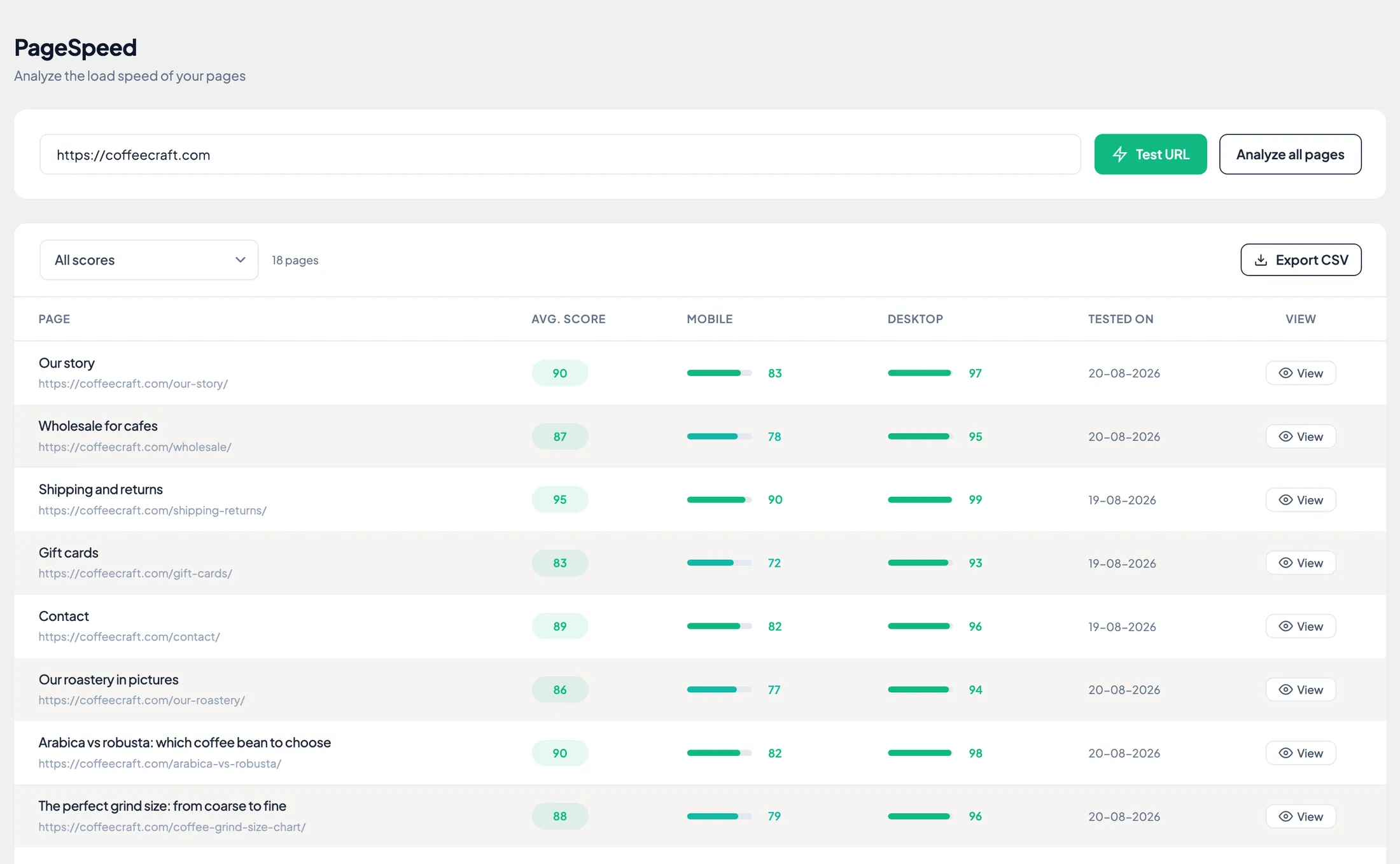
PageSpeed Monitor
PROA mobile and a desktop score per page via Google PageSpeed Insights, with LCP, INP and CLS, and field data from real Chrome users next to the lab result. Scan every page at once and export.
Learn moreCrUX Real User Data
Real Chrome-user data, next to the lab results.
PROBulk PageSpeed Scan
Every page at once, with export.
PROAnalysis & strategy
What deserves attention first, and what Search Console measured afterwards.
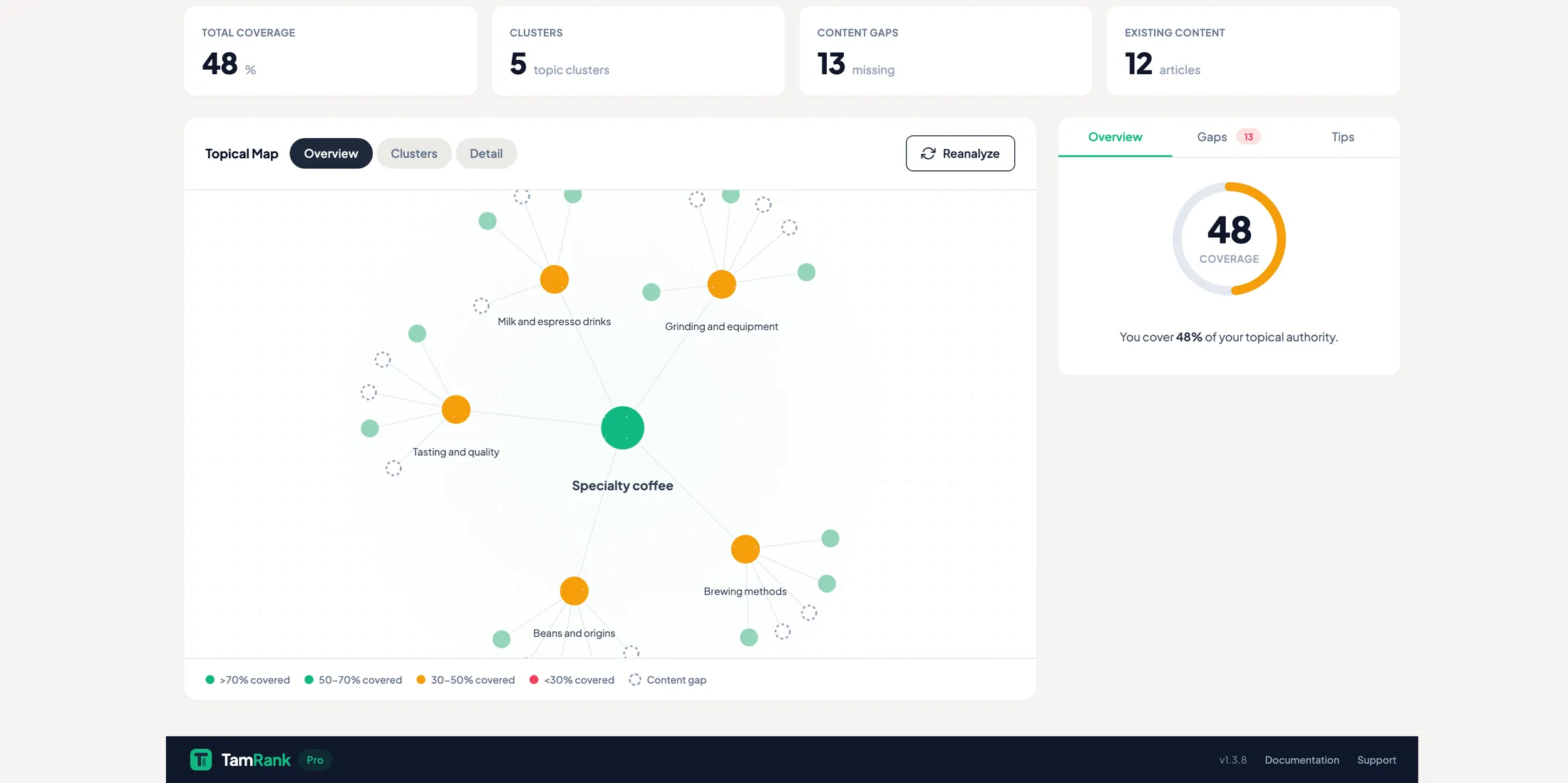
Topical Authority Map
PROYour content drawn as clusters around your pillar: what you cover, which topics are missing and why they matter. It sits next to Priority Actions, which orders your fixes by the traffic they touch.
Priority Actions Dashboard
A focused queue that connects each recommendation to the affected pages, traffic opportunity and the reason it matters.
PROSEO Change Tracker
A dated log that connects an SEO change to the later movement in clicks, impressions, CTR and position, with baseline context.
PROContent Strategy
The planning view of the Topical Authority Map, with suggestions for new content.
PROOutdated Content Detection
Flags old years in titles, metas and slugs before your visitors notice.
FREEAI features
AI is always PRO, it runs on credits. 250 to 1,500 a month, by plan.
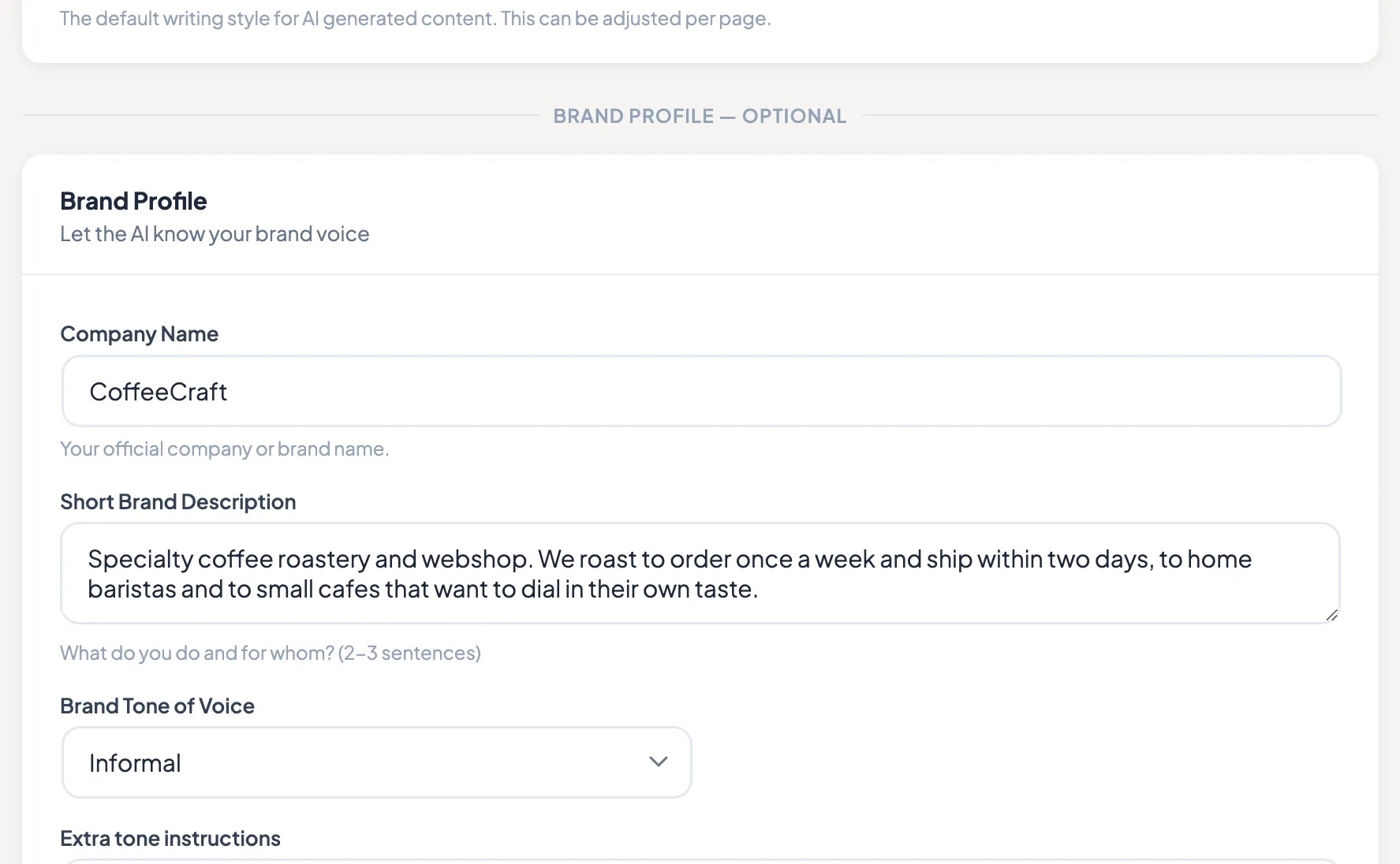
AI Brand Profile & Tone
PROThe AI Meta Generator takes its voice from here: who you are, what you do and for whom, a tone of voice, and the words it should never use. Set it once and every generated title and description follows it.
Learn moreAI Meta Generator
Drafts meta titles and descriptions. 1 credit per action.
PROAI Internal Links
Link suggestions based on topical clusters. 1 credit per action.
PROAI Image Alt Text
Alt text from real image analysis, not from the filename. 3 credits per image.
PRO250 to 1,500 Credits per Month
Solo 250, Studio 500, Agency 1,500, shared across your sites and reset on the 1st of every month. Top up in packs of 250, 750 or 2,500 that never expire.
PROAPI & controlled automation
An open API for your own tools and workflows. Preview first, approve deliberately and keep eligible changes reversible.
REST API, Read
All 13 meta fields, 120 reads per minute, the same for everyone.
FREEREST API, Write
Write any of the 13 fields, 30 writes per minute.
PROBatch Write
Up to 50 pages per call, 5 batches per minute.
PROAI Assistant Integration
Hosted MCP access for compatible AI assistants. Connect up to 10 of your sites, review the proposed changes and approve before execution.
PROWorkflow Endpoints
Site context, capabilities, health, priority actions, audit log and rollback.
PROPersonal Access Tokens
Per-agent scopes, expiry and an audit trail.
PRODashboard & workflow
Setup, migration and the daily overview.
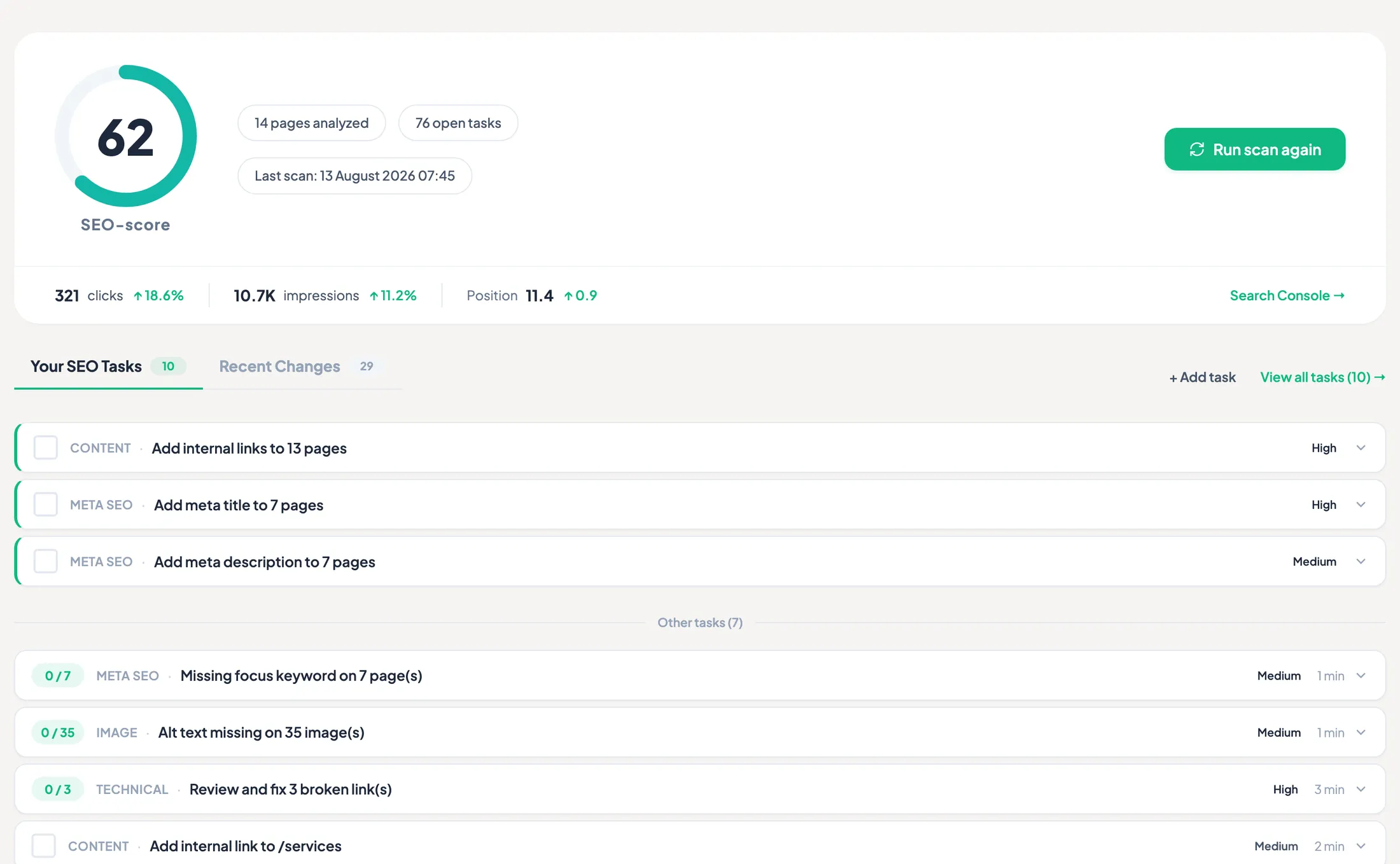
Dashboard & SEO Tasks
FREEOne score for the site, your Search Console numbers on the same row, and the open tasks that would raise it, ordered. Health per category underneath, each with a way in. The Recent Changes tab next to the tasks is PRO.
Onboarding Wizard
Setup plus migration from Yoast SEO, Rank Math or All in One SEO, with redirects from Yoast Premium and Rank Math and a rollback after import. Category and tag SEO comes along too.
FREEDashboard Widgets
Overall score, health categories, tasks, pages analyzed, last scan.
FREEAdmin Bar Menu
Quick links to the dashboard and settings.
FREEFeature Tour
An interactive walkthrough of the plugin.
FREEFour Languages
English, Dutch, German and French.
FREEPriority Support
Email, answered within one business day, ahead of general questions.
PROMost of this page is free.
Not a trial and not a teaser. Unlimited redirects, the full schema builder, WebP conversion, five focus keywords per page and a readable API. PRO keeps evidence, priority, controlled execution and measured outcomes together as one professional workflow.
Compare FREE and PRO line by line
