The dashboard is the first thing you see under the TamRank menu. It gives you one overall SEO score for your whole site, breaks that score down by area, and points you at the pages that need work first. This is where you check your progress and decide what to do next.
In short
- Open TamRank → Dashboard to see your overall SEO score.
- Read the health categories to see which area is holding that score back.
- Work through the task overview to fix the highest-impact issues first.
Where to find it
The dashboard lives at TamRank → Dashboard in your WordPress admin. There is also a TamRank item in the admin bar, so you can jump to it from any page while you work.
Your overall SEO score
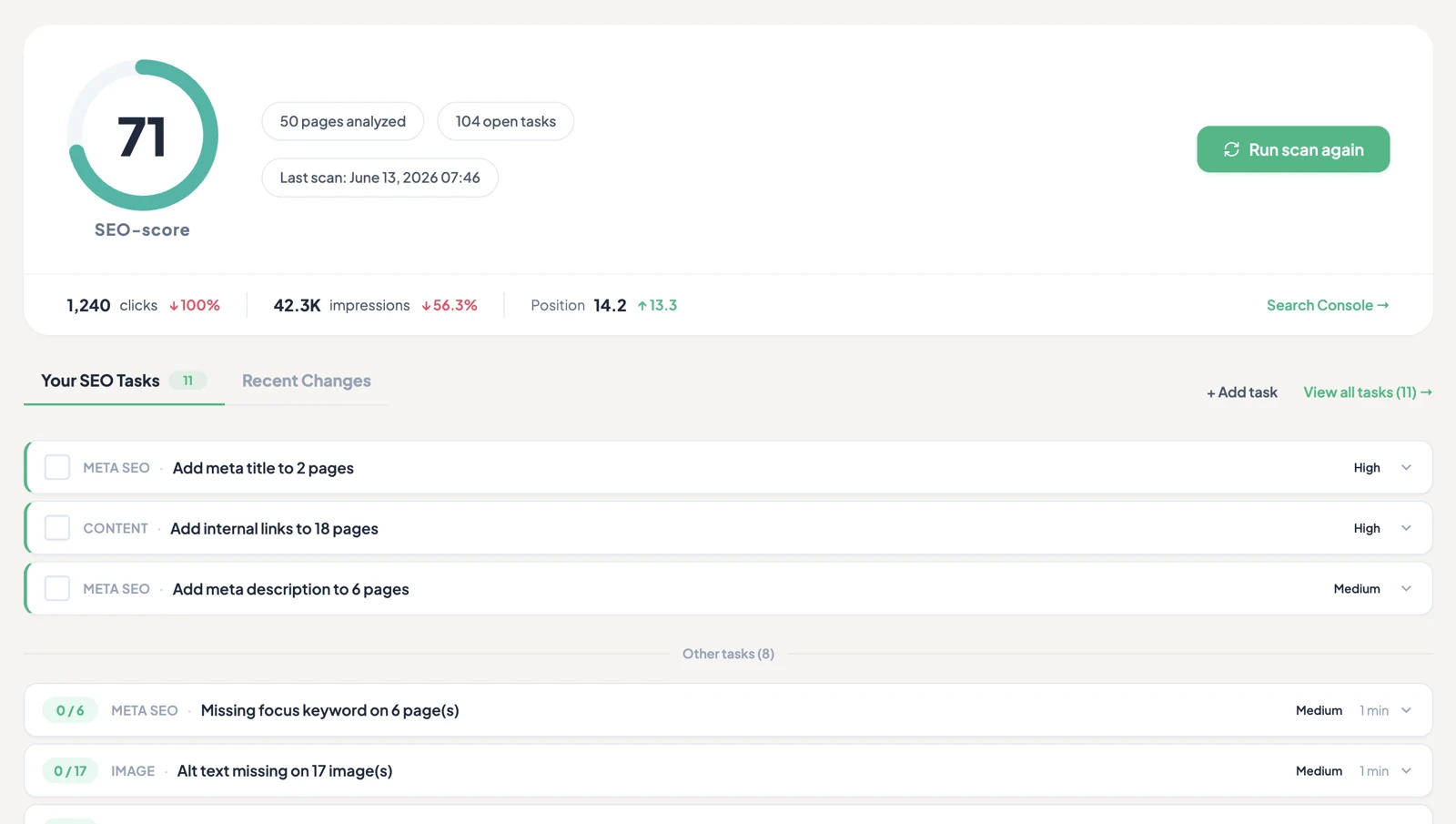
The large number at the top is the average score across every page TamRank has analyzed, on a scale of 0 to 100. It is a quick health check, not a target in itself. TamRank labels the bands:
- excellent (80 to 100)
- good (60 to 79)
- attention (40 to 59)
- improve (0 to 39)
One weak page pulls the average down, so a middling score usually means a handful of pages need attention rather than your whole site. For how the per-page score is built, see The SEO score, explained.
Health categories
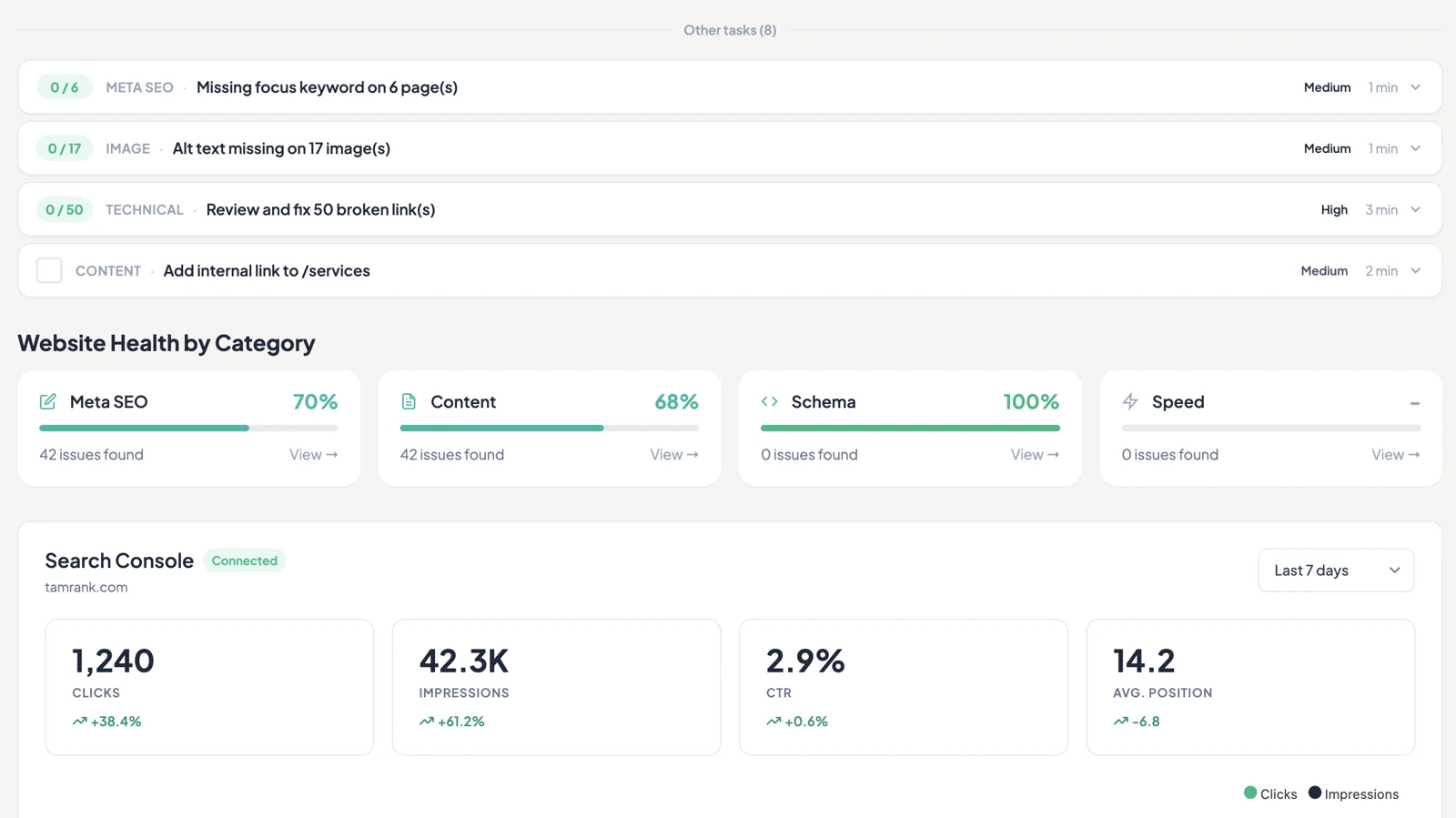
Below the overall score, TamRank breaks your site health into four cards:
- Meta SEO — a score for your titles, descriptions, and other metadata.
- Content — a score for your content quality: headings, keyword use, readability, links, and images.
- Schema — a status card rather than a score. It shows whether structured data is Active on your site or still needs Set up.
- Speed — page performance. On the free plan this is a PRO card, because PageSpeed testing is a PRO feature; on PRO it shows your real performance data.
So the two scored cards to act on first are Meta SEO and Content. If Meta SEO is low but Content is high, start with your titles and descriptions rather than rewriting pages.
Task overview
The task overview lists the open issues and quick wins across your site, ordered so the highest-impact fixes come first. Rather than guess, you can work straight down this list. Each item links through to the page and the exact check that flagged it, so you always know what to change.
Pages analyzed and last scan
The dashboard also shows how many pages have been analyzed and when the last scan ran. If the count looks low, some pages may be excluded from analysis, for example ones you have set to noindex. If the last scan is old, run a fresh one so your scores reflect your current content.
Search Console metrics
Connect Google Search Console (free, takes about a minute) and the dashboard adds a widget with your clicks, impressions, CTR, and average position, plus a trend chart you can switch between the last 7 or 28 days — all included on the free plan. PRO extends this with longer date ranges (3, 6, 12, or 16 months) and a dedicated Page Insights screen showing which keywords rank per page, position stability, and keyword potential.
Tip: start with your weakest category
The overall score is a summary, not a to-do list. The quickest way to raise it is to open whichever of Meta SEO or Content is lower, clear the tasks inside it, then move to the other. Chasing the top-line number without looking at the categories tends to spread your effort too thin.
Troubleshooting
The score is zero or no pages are analyzed. TamRank needs to scan your site before it can score it. Run the initial scan from the first-time setup wizard, or trigger a fresh scan and give it a moment to finish.
A page is missing from my score. Pages set to noindex, and some post types you have excluded from analysis, do not count towards the average. That is expected, and it keeps the score focused on the pages you want ranked.
Frequently asked questions
What does the overall score actually mean?
It is the average SEO score of every analyzed page. It is a direction, not a grade. A single low page can pull it down, so always read it alongside the health categories.
Why is a page not counted in my score?
Pages you have set to noindex, and post types you have excluded from analysis, are left out on purpose so the score reflects the content you actually want found.
How often does the dashboard update?
It reflects your most recent scan, and it updates as you edit pages and run new scans. The last-scan timestamp tells you how current the numbers are.
What does PRO add to the dashboard?
The Search Console widget itself (clicks, impressions, CTR, position, 7/28-day view) is free once you connect. PRO adds longer date ranges and the Page Insights screen, which breaks performance down by keyword and by page.
Related
- Next: The SEO score, explained
- Go deeper: Running a site-wide audit
- Back to Documentation

