Heading tags look like a formatting choice. You highlight a line, click Heading 2, and it turns bigger and bolder, job apparently done. But that appearance is a side effect, not the point. What a heading tag actually does happens under the surface: it tells browsers, screen readers and Google how the page is organised, and it builds an outline of the whole document that sits invisibly beneath the text you can see.
That gap, between how a heading looks and what it does, is where nearly every heading mistake on a WordPress site lives. They are structural, not cosmetic, and they stay invisible until you stop reading the page and start reading its outline. This guide is about using H1 to H6 the way they were meant to be used: why a page gets exactly one H1, how to build a hierarchy that actually holds together, what headings genuinely do for SEO (less than the folklore claims, and more than you would guess), and the WordPress-specific traps that catch careful people. It sits under the complete WordPress SEO guide, and it is one of the on-page checks in the WordPress SEO checklist. New to all this? Start with WordPress SEO for beginners and circle back.
- Heading tags, H1 to H6, are structure, not styling. They build the outline that a reader and a crawler both use to make sense of a page.
- Use one H1 per page. On WordPress the theme usually turns your post title into that H1, so do not add a second one in the body.
- Headings nest in order: H2 under H1, H3 under H2, no skipped levels. The list of headings alone should read like a sensible outline.
- Headings help SEO by making a page legible to Google and quotable in featured snippets and AI answers. They are a clarity multiplier, not a ranking lever to game.
- Write headings that describe their section. Stuff them with keywords and Google reads it as manipulation.
What are heading tags?
Heading tags are the six HTML elements H1 through H6. They mark the headings of a page in descending order of importance, and stacked together they form its outline: the H1 is the title of the whole document, H2s are the main sections, H3s are subsections inside those, and so on down to H6.
The distinction that runs through this entire guide is structure versus appearance. A heading tag is structure. The fact that it also renders bigger and bolder is your theme painting styling on top of that structure, nothing more. Think of a road sign: the size and colour catch your eye, but the instruction it carries is the part that matters, and Google reads the instruction, not the paint. So the golden rule is to never choose a heading level because of how it looks. If a line needs to be large or bold but is not genuinely a section heading, that is a job for bold text or a line of CSS, not for an H3 conscripted into decoration. Picking heading levels by their size is the single most common way a page outline quietly falls apart.
In the WordPress block editor you add these with the Heading block, which lets you pick the level from a dropdown. One heading, though, is usually handled before you type a word: most themes grab the post or page title and output it as the H1 automatically. Hold onto that fact, because it drives the whole next section.
The H1: one per page, and what it is for
The H1 is the most important heading on any page. It names what the whole thing is about, both for a reader running an eye down the page and for Google working out the topic. The rule fits in four words: one H1 per page.
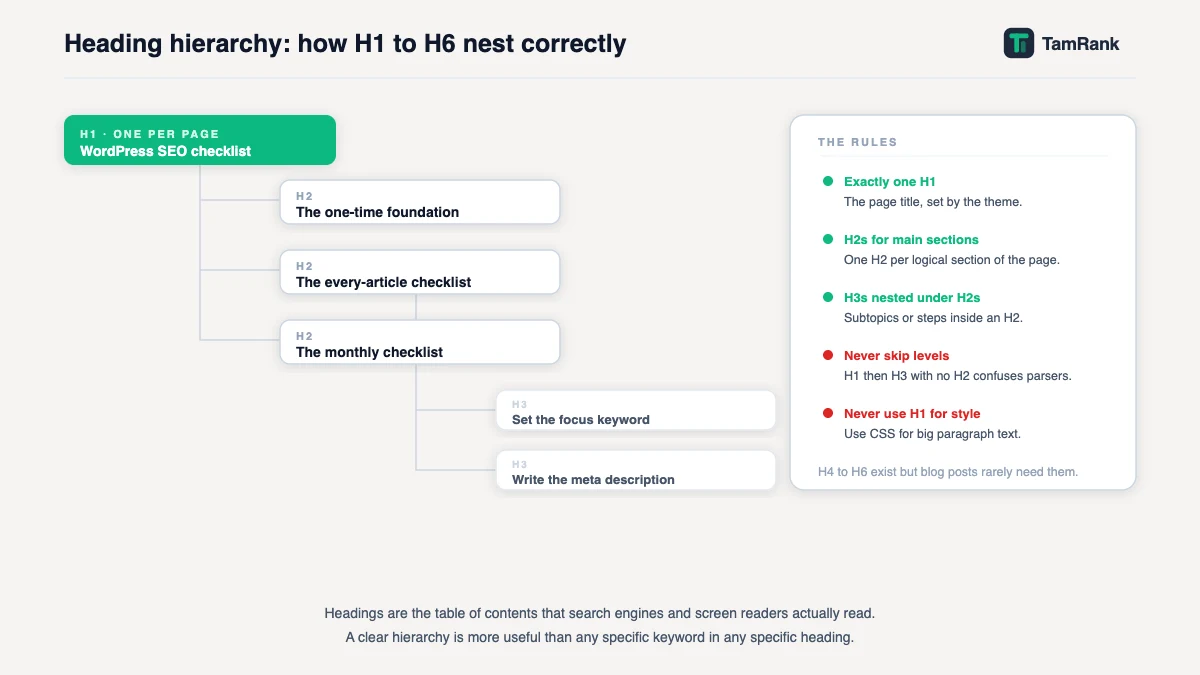
On WordPress that rule comes with a twist worth understanding, because it trips up exactly the people who are trying to be careful. Since most themes already render your post title as the H1, you usually should not add an H1 yourself at all. The classic mistake is adding one anyway: you open the post body with a Heading 1 block out of habit, and now the page carries two H1s, the theme’s title and your duplicate. The fix is undramatic. Make every heading inside your content an H2 or lower, and let the theme keep the single H1 to itself.
Two neighbouring WordPress problems are worth a glance while you are here. A few older or unusual themes wrap the site logo or site name in an H1 on every page, which quietly demotes your actual page title to an H2 or worse, like a book where the chapter number is printed larger than the chapter title. And some page builders make it far too easy to drop an H1 block into content without noticing. Now, strictly speaking, modern HTML and Google both tolerate more than one H1, and Google has said outright that multiple H1s will not break a site. But “will not break it” is a long way from “is a good idea”. One clear H1 hands every reader and every crawler an unambiguous answer to “what is this page about”, and that clarity is the entire reason the tag exists. Write the H1 in plain words, and let it include the topic you are targeting because that topic genuinely is the subject of the page, not because you are slotting in a keyword.
H2 to H6: building a logical hierarchy
Below the H1, the remaining headings carve the page into sections, and the one principle that governs them all is nesting. An H3 sits inside an H2, an H4 inside an H3, and you never skip a level on the way down. Jump straight from an H2 to an H4 and you leave a hole in the outline, the structural equivalent of a missing step in a staircase: anyone taking it in the dark, a screen reader above all, stumbles.
There is a quick test for whether your hierarchy holds, and it takes about ten seconds. Read the headings on their own, top to bottom, ignoring every word of body text. If that bare list reads like a coherent table of contents, where you can see the main sections and what tucks under each, the structure is sound. If it reads like a shuffled deck, or everything is a flat row of H2s with no sub-levels, or the levels leap around, it needs work. Most articles, in practice, need only H2 and H3. H4 turns up now and then, H5 and H6 almost never in ordinary writing. Depth is not a virtue here. A clean two-level outline beats a three-level one nobody can follow.
How headings help SEO
Headings have earned their spot in an SEO guide, but it pays to be precise about what they actually do, because the folklore inflates it.
They do three real things. First, they make the page legible to Google. When Google indexes a page it processes the main content tags, headings included, to work out what the page covers and how it is arranged; clear headings hand it an accurate map, while a flat wall of text hands it a blank one. Second, headings are how your content becomes quotable. Featured snippets and AI-generated answers tend to lift a clean, self-contained chunk, and a chunk sitting under a clear, descriptive heading is exactly what those systems reach for, especially a question-shaped heading followed by a straight answer. Third, and quietly important, headings are an accessibility feature: screen-reader users navigate by jumping from heading to heading, so a broken hierarchy makes a page genuinely harder to use, not merely untidy.
What headings are not is a dial you crank for rankings. Wedging your keyword into six headings does not rank you six times harder. It reads as manipulation, which is precisely the writing-for-search-engines behaviour Google’s people-first guidance warns against. Headings are a clarity multiplier: they make a good page easier to understand, to rank and to cite. They cannot turn a thin page into a strong one, and no amount of heading discipline will pretend otherwise.
Common WordPress heading mistakes
Five traps account for almost every broken outline I run into on a WordPress site.
- Two H1s. The theme prints the title as an H1 and the writer adds a second one in the body. Keep every in-content heading at H2 or below and the problem never starts.
- Skipped levels. Jumping from H2 to H4 because the H4 “looked about the right size”. Size is a styling job for CSS; never choose a level for its appearance.
- Headings used as styling. Promoting an ordinary emphasised line to an H3 just to make it stand out. If it is not actually a section heading, it should not be a heading tag at all.
- Keyword-stuffed headings. The same phrase jammed into every H2. It helps nothing, and it signals low quality to the one reader you were hoping to impress.
- No headings at all. A 1,500-word post poured out as a single unbroken block. Both the reader and Google need the seams.
Writing headings that work
A good heading describes its section closely enough that you could predict the content from the heading alone. Front-load the meaning: put the substantive words first, so the heading still lands when someone is skimming at speed and only reads the opening few words. Where a section genuinely answers a question, phrasing the heading as that question is a smart move, since it mirrors how people search and how AI systems choose passages to quote. And keep each section self-contained enough that the heading plus the paragraph beneath it works as a standalone unit, the way a good newspaper subhead lets you follow a story you only half-read. That last habit is also what makes content quotable, and it hands off neatly to the wider craft of shaping a whole post, which the dedicated blog post structure guide in this cluster picks up.
A worked example: fixing a page’s outline
Here is the shape of a real fix. A WordPress how-to post has its title as the H1, which is fine, but the body outline underneath reads like this: an H1 (“Getting Started”), then an H2, then an H4, then two more H2s, then an H3 that clearly belongs under the very first H2.
Read as an outline, that is gibberish. The repairs, though, are purely mechanical, and not one of them touches a single word the reader sees. The body “Getting Started” H1 drops to an H2, which kills the duplicate H1. The stray H4 becomes an H3, since it is really a subsection of the H2 above it, and the skipped level closes up. The orphaned H3 gets moved so it sits directly beneath the section it was always about. A casual reader notices nothing: the words are identical and the sizes are roughly the same. But the outline now reads cleanly, one H1, four H2 sections, a single H3 nested correctly under one of them, and a page that was structurally scrambled is suddenly a clear document. That is the whole job in a sentence: headings repaired as structure, not restyled as decoration.
How TamRank helps
Heading problems are good at hiding, because a page with a wrecked outline can look completely ordinary on screen. To catch them you have to read the structure rather than the styling, which is exactly the reading almost nobody does by hand.
TamRank’s content analysis does that reading for you. It checks each page for a single H1, flags a second one when your theme and your content both produce one, catches skipped heading levels, and points out a long run of text with no headings at all. It reads the outline so you never have to open the HTML and squint, and it puts each issue in plain words rather than a validator’s jargon. We build TamRank, so weigh that recommendation accordingly, but heading checks are the kind of thing that is genuinely tedious to do by eye and quick for software to catch.
It is part of the free plugin. You can install TamRank free or look over the feature list first.
Heading tags and SEO FAQ
How many H1 tags should a page have?
One. The H1 names what the whole page is about, and a single, clear H1 gives readers and Google an unambiguous answer. Google has said multiple H1s will not break a site, but one is still best practice. On WordPress, the theme usually makes the post title the H1, so you generally should not add another in the body.
Does the H1 need to match the title tag?
They do not have to be identical, but they should describe the same page. The title tag is what shows in search results; the H1 is what shows on the page. It is fine for them to be worded slightly differently for their two contexts, as long as both clearly name the page’s topic.
Do heading tags affect SEO rankings?
Indirectly. Headings help Google understand a page’s structure and topic, and they make sections quotable in featured snippets and AI answers. They are not a direct ranking lever, and stuffing keywords into headings does not help. Think of them as a clarity multiplier for content that is already worth ranking.
Should headings contain keywords?
Headings should describe their section accurately, and if that naturally includes the words people search for, good. What to avoid is forcing the same keyword into multiple headings. Google’s guidance treats writing for search engines rather than people as a quality problem, and stuffed headings are a clear example.
Can I skip from an H2 to an H4?
No. Heading levels should nest in order, so an H3 sits under an H2 and an H4 under an H3. Skipping a level leaves a gap in the page outline, which confuses screen readers and weakens the structure. If an H4 looked like the right size, fix that with styling, not by skipping a level.
What are H4, H5 and H6 heading tags used for?
H4, H5 and H6 are sub-levels that nest under H3, H4 and H5 respectively. In practice, most web content never needs to go below H3. H4 occasionally appears in long technical documentation where a section genuinely has two layers of subsections. H5 and H6 are rare enough in normal content that seeing them is often a sign someone has used a heading for styling rather than for structure. If you find yourself reaching for an H4 or deeper, ask first whether the content can be reorganised into fewer levels, or whether a well-styled paragraph would serve better.
How do I check the heading structure of my WordPress pages?
Three options. In your browser, right-click any page and choose View Source, then search for <h1, <h2 and so on to read the raw outline. A browser extension such as HeadingsMap (available for Chrome and Firefox) renders the heading hierarchy as a sidebar panel on any page. Or use TamRank, which checks each page’s heading structure automatically from inside WordPress and flags a second H1, skipped levels, or long stretches of content with no headings, without needing to inspect the HTML yourself.
The bottom line
Heading tags are the skeleton of a page, not its paint. Use one H1, which on WordPress usually just means letting the theme turn your title into it and keeping your hands off Heading 1 in the body. Build everything below it as a clean nested run of H2s and H3s that reads as a sensible outline entirely on its own. Write each heading to describe its section honestly, and never pick a level for how big it looks on screen.
Do that, and headings get on with their three quiet jobs: they make the page legible to Google, quotable to featured snippets and AI answers, and navigable for everyone, including the people using a screen reader. For how headings fit into the whole shape of an article, the blog post structure guide in this cluster is the next stop, and the WordPress SEO guide ties it back to the rest. And to have your heading structure checked for you automatically, install TamRank free.
Sources
- Google Search Central, “SEO Starter Guide: The Basics,” on using a meaningful heading structure to organise content and help readers and search engines understand a page. Google developer documentation.
- Google Search Central, “In-depth guide to how Google Search works,” on Google processing content tags, including headings, during indexing. Google developer documentation.
- Google Search Central, “Creating helpful, reliable, people-first content,” on avoiding content, including headings, written to manipulate search engines. Google developer documentation.

