Search for how to do SEO on a new WordPress site, and within about ten minutes you will have fifty tips, a dozen plugins, and at least two pieces of advice that flatly contradict each other. For someone who just wants their blog to turn up on Google, that is not a starting line. It is a reason to close the tab and go do something less confusing.
So here is the calmer version, the one we give people who install our plugin and then message us asking what on earth to do first. Your opening month of WordPress SEO needs about six things done, in the right order, followed by one habit. Most of those fifty tips arrive much later, and a fair few never matter at all. What follows is the sequence: what to do in week one, what to do across weeks two to four, and, just as usefully, what to deliberately leave alone until much later. It assumes you have a WordPress site and zero SEO experience. If you want to see how the whole thing fits together, the complete WordPress SEO guide is the pillar this article hangs off.
- Beginner SEO is about sequence and patience, not doing more. Six things in the right order will beat fifty tips done in a panic.
- Google finds new sites on its own. You cannot pay to rank and you cannot hurry it. Your only job is to make the site easy to understand and worth reading.
- Week one is the technical setup, done once in an afternoon. Then you take your hands off the settings and start writing.
- Most beginner effort goes to things that do not matter yet: schema tweaks, keyword counting, chasing every audit warning. Park all of it.
- Ninety days in, done right, you will have a few visitors and a pile of impressions. At this stage that is the win, not the disappointment.
What beginners get wrong about WordPress SEO
Almost everyone who gets stuck on WordPress SEO is making one of two mistakes, and neither of them is a missing technique.
The first is plain overwhelm. You read that SEO involves keywords, meta tags, schema, internal links, Core Web Vitals, backlinks, image compression and a dozen other things, so you try to do all of them at once in your first week, and you end up doing none of them for longer than a Tuesday. SEO turns into a wall of homework, and walls of homework get quietly abandoned somewhere around the third week.
The second is subtler: the right tasks in the wrong order, wired up to the wrong expectations. Beginners reach for the advanced stuff, schema markup, backlink outreach, technical audits, before the basics are in place. It is like bolting a sound system into a car that has no engine yet. The other version is worse, because it looks like patience: you do the basics, watch nothing move for six weeks, decide SEO does not work for people like you, and quit roughly three months before it would have started paying you back.
I will be blunt about the reframe this whole guide leans on, because it is the part that took me longest to accept myself. Beginner SEO is not a pile of tactics. It is a short sequence, done in order, followed by a stubborn amount of patience. The real skill is restraint: knowing the handful of things that matter this month, doing those properly, and ignoring everything else until later. The rest of this article is just that sequence, spelled out.
How does Google actually find your site?
Before the sequence, one bit of background, because it dissolves most of the mystery and nearly all of the panic. You do not need to understand algorithms to do this well. You do want a rough mental picture of what happens the moment you hit publish.
Google Search runs in three stages. Crawling: automated programs called crawlers fetch the pages they can find on the web. Indexing: Google reads each page, works out what it is about, and files it in an enormous database. Serving: when someone searches, Google pulls the most relevant entries from that index and ranks them. Everything we call SEO is just making those three steps go smoothly for your particular site.
Two things Google says about itself are worth pinning to the wall as a beginner. The first is reassuring. In its own words, “the vast majority of sites listed in our results are found and added automatically as we crawl the web”. You rarely have to do anything special to get found, because Google mostly discovers new pages by following links from pages it already knows. The second keeps your expectations honest. Google “doesn’t accept payment to crawl a site more frequently, or rank it higher”, and it “doesn’t guarantee” that it will crawl, index or rank any given page. There is no queue to pay your way to the front of, and no result you can demand. There is only making your site easy to crawl, easy to understand, and genuinely worth the click.
Your first month, week by week
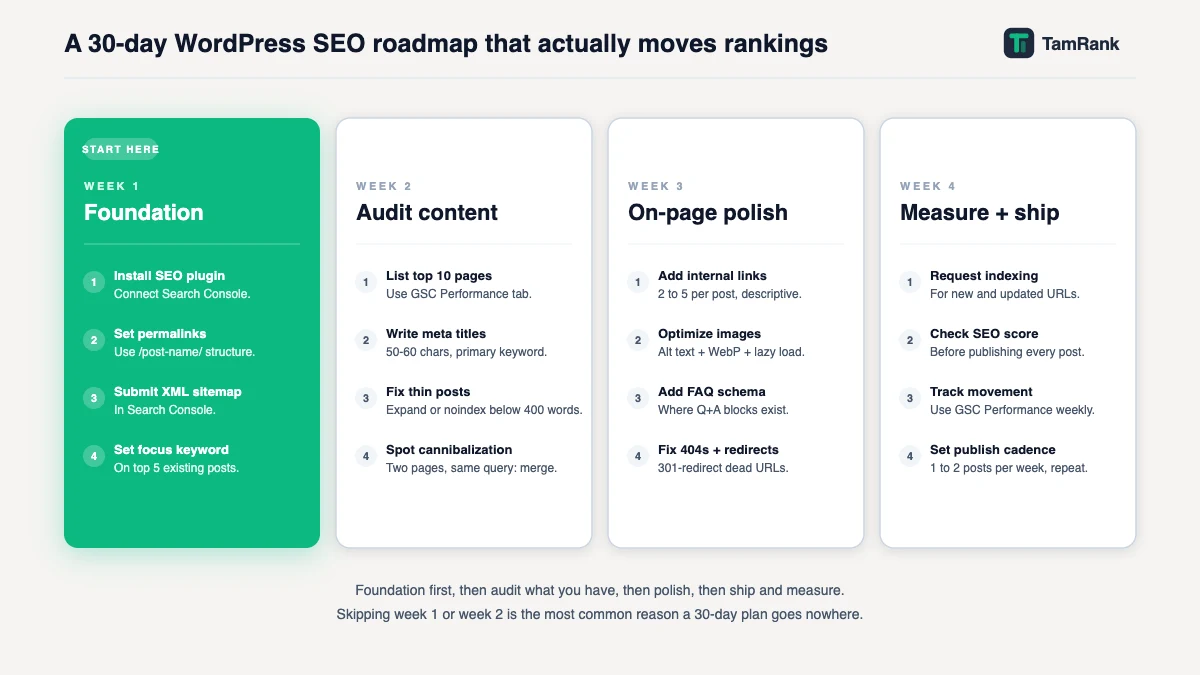
Here is the sequence. Four weeks, one focus each. Do them in this order, and resist, hard, the urge to sprint ahead to week four while you are still in week one.
Week 1: build the foundation, then stop
Week one is the technical setup, and honestly it is a single afternoon of work, tea included. The complete WordPress SEO guide lists the exact steps: set your permalinks to “Post name”, check that the “discourage search engines” box is unticked (it is switched on by default on some fresh installs, and it will quietly hide your entire site from Google), install one SEO plugin, set your site title, and submit your sitemap. Work down that list in one sitting on day one. If you like ticking boxes, the WordPress SEO checklist in this cluster is the same list in that shape.
Installing the plugin is one line on that list, so let me name what it actually involves, because “install a plugin” stops a surprising number of people cold: go to Plugins, then Add New, type the plugin’s name, click Install Now, then Activate. A setup wizard runs afterwards, asks for your site type, and connects Search Console for you. Walk through it once and you are finished. Nothing to maintain, nothing to keep revisiting. The only real decision here is which plugin, and the guide to the best WordPress SEO plugins in this cluster covers that properly; for almost every beginner, the free version of any reputable one does everything you need.
Then comes the genuinely hard part for a beginner, the part no tutorial warns you about: stop. Once the foundation is in, it is in. The pull in week one is to keep opening Settings, keep flicking switches, keep reading one more tutorial and changing one more thing on the strength of it. Do not. Configuration is a one-off job, and a site whose settings change every other day is harder for you and for Google to make sense of. Week one ends with the foundation built and your hands visibly off the keyboard.
Week 2: connect Search Console and learn to read one thing
Google Search Console is a free tool from Google, and it is the only place that shows you what Google is genuinely doing with your site: which pages it has indexed, which searches you are turning up for, and what is broken. Connecting it is the single new task for week two. Your SEO plugin walks you through it, and the dedicated guide to setting up Search Console in this cluster does it step by step.
Search Console can show you a genuinely overwhelming amount of data, and for a beginner that is a trap dressed up as a gift. Do not try to read all of it. This week, learn to read exactly one number: the Performance report, and inside it, impressions. An impression just means your page showed up in someone’s search results, whether or not they clicked. On a new site that number will be tiny, often a flat zero for a while, and that is completely normal. You are not hunting for good numbers yet. You are just finding out where the honest scoreboard is kept.
Week 3: write one article, properly
Week three is your first real piece of content, and the target is one good article, not five rushed ones. Pick one specific thing your intended reader actually types into Google. Give the page a plain title that says what it is. Break the piece into sections with descriptive headings, so a human can skim it and Google can see how it is built. The cluster guides on heading tags and on structuring a blog post go deeper into that craft than I will here.
Above all, write it for a person. Google’s own guidance is unusually blunt on this: content should be made to help people, and it rewards pages that leave a reader feeling they got what they came for. So do not write for a search engine, do not tally keywords, and do not chase perfect. Aim for useful and finished. One honest, complete article will teach you more about SEO than a week of reading about it, this article included.
Week 4: turn it into a rhythm
The one thing that builds WordPress SEO over months is not a clever trick. It is consistency, and week four is where you rig it up so that consistency does not depend on how motivated you feel. Pick a publishing pace you can keep without dreading it. For most beginners that is one article a week, maybe two if the writing comes easily. A slow pace you actually keep will beat a fast one you ditch by mid-February.
Then bolt one habit onto that pace: every time you publish something new, add a link from it to two or three older, related posts. Those internal links help readers wander through your site and help Google see which of your pages belong together. By the end of week four, SEO has stopped being a project with a checklist and turned into a loop: write, link, publish, repeat. Hold that loop for months and you have basically won the beginner game.
What to ignore (for now)
Most beginner guides skip this next part, probably because a list of things not to do never feels productive. Every item below is real SEO, and we use all of it. Just not on a three-week-old site with four posts, where fussing over it is like re-grouting a bathroom in a house that still has no walls. It quietly eats the hours that belong to the foundation and the writing, the two things that genuinely move a young site, and pays you back in the feeling of progress instead of the fact of it.
- Schema markup beyond the automatic kind. Your SEO plugin already adds basic schema for you. Hand-building more of it is fiddly, advanced work with almost no payoff for a site nobody has heard of yet.
- Keyword density. Chasing a magic percentage for how often your phrase shows up is a leftover from 2010-era SEO, and Google stopped rewarding it a long time ago. Write the way you would explain the topic to a sharp friend who just does not happen to know this niche, and the keywords sort themselves out.
- Chasing every audit warning. SEO plugins flag dozens of issues, and most of them are the digital equivalent of a slightly crooked picture frame. Fix the two or three that are genuinely serious and let the long yellow tail wait until your site has grown up a bit.
- Backlink outreach. Getting other sites to link to you matters eventually, but with three articles live you have nothing worth linking to yet. Earn the content first, then go asking.
- Swapping themes or plugins for speed. Unless your site is genuinely crawling along, leave the setup be. Theme-swapping is a month-six decision that beginners keep making in week two.
- AI-search tactics. Optimising specifically for AI Overviews or chatbots is, at this stage, the exact same work as ordinary good SEO. A clear, useful, crawlable page is what both a search engine and a chatbot reward. There is no separate lever to pull yet.
None of this is banned forever. It is purely a question of order. Spending month one on advanced SEO is like sprinting the final stretch of a marathon from the start line: real effort, aimed at entirely the wrong moment. The cluster guide on WordPress SEO myths digs further into the habits that quietly eat a beginner’s time.
How do you know if it is working?
The most common beginner habit, once the week-one panic fades, is checking Google rankings every single morning and reading the daily wobble as triumph or disaster. Daily ranking data is almost pure noise. Genuinely, ignore it.
Instead, open Search Console once a week, no more than that, and look at two things in order. First, impressions: are they creeping up? Rising impressions mean Google is putting your pages in front of more people, which is the earliest sign of progress, well ahead of any clicks. Second, average position across a whole month rather than a day: is the line drifting toward page one? That slow drift, boring as it is to watch, is exactly what working SEO looks like.
Set your expectations by Google’s own words: changes “could take several months”, and you should “wait a few weeks” before reading anything into them. A new article on a young site routinely takes three to nine months to settle into a real position. The full method for measuring progress is its own guide in this cluster, but the beginner rule fits on a napkin: check rarely, measure in months, and watch impressions before clicks.
A realistic first three months
To make the timeline concrete, here is what a beginner’s first ninety days honestly tend to look like. Picture a coach starting a WordPress blog, writing one article a week. Treat the numbers as an illustration rather than a promise; your mileage will wander depending on your topic and how competitive it is.
Month one: the foundation afternoon, then three articles published. Organic traffic from Google: zero, or close enough that you will refresh the page to check the tracking is working. Search Console is nearly empty. This feels like failure and is, in fact, dead on track.
Month two: around seven articles are live. Search Console starts to twitch: maybe 150 impressions across the whole month, a scatter of queries sitting at position 35 to 45, and perhaps one or two actual clicks. Minuscule numbers, but the scoreboard has stopped being blank.
Month three: about twelve articles up. Impressions climb into the few-hundred-a-month range, one or two pieces nudge onto page two, and clicks creep into the fifteen-to-thirty region for the month. That is the honest reward for a quarter of steady work: a few dozen visitors and a clear upward line on impressions.
This is the exact moment that separates the beginners who make it from the ones who do not. Someone expecting hundreds of visitors looks at month three and quits in disgust. Someone who understands the shape of the curve sees that upward line and keeps writing, because months four to six are where a steady site starts to compound on itself. The numbers are small on purpose. The direction is the entire point.
How TamRank helps
The hardest part of beginner SEO is not doing the work. It is not knowing whether the work you just did was right, and most SEO advice online answers that question in a dialect you would need a second plugin to translate.
That gap is the reason TamRank exists. The free TamRank plugin gives each page a clear SEO score and, more to the point, tells you in plain English what to fix and how, instead of handing you a heap of jargon and wishing you luck. For a beginner that turns “I think this page is fine?” into “this page needs a meta description, and here is the box to write it in”. It installs free from the WordPress plugin repository, with no time limit and no upgrade nagging, which makes it a calm place to start rather than a countdown to a paywall.
We build TamRank, so treat that as the opposite of a neutral recommendation, and any of the established plugins will do the job perfectly well. The honest case for starting on the free version is simply that it is built for clarity, which happens to be the one thing a beginner is shortest on. You can install TamRank free, browse the full feature list, or compare the free and paid plans for the day you actually outgrow free, if you ever do.
WordPress SEO for beginners FAQ
Do I need to be technical to do WordPress SEO?
No. The technical foundation is one afternoon of following clear steps, and a modern SEO plugin quietly handles the parts that would otherwise want actual code. After that, WordPress SEO is mostly writing useful articles and linking them sensibly, which asks for patience and consistency far more than any technical skill.
How long before a new WordPress site ranks?
Think in months, not weeks. Google says changes can take several months to show, and a new article on a young site commonly needs three to nine months to reach a real position. You will usually see impressions, meaning your pages turned up in search, well before you see any clicks worth celebrating.
Do I need a paid SEO plugin as a beginner?
No. The free version of any reputable SEO plugin covers the lot for a beginner: meta tags, sitemaps, basic schema and an SEO score. Paid features start earning their keep once your site is established and you have a specific reason to reach for them. Start free, upgrade later, or never; all three are fine.
How many articles should I publish as a beginner?
Pick a pace you can actually sustain, which for most beginners lands at one article a week. Consistency over many months matters far more than a heroic burst in any single week. A slow rhythm you keep will quietly beat a fast one you abandon.
Should I worry about schema markup and backlinks as a beginner?
Not yet. Your plugin adds basic schema on its own, and backlinks only start to matter once you have got content worth linking to. Both are real, load-bearing parts of SEO, but pouring your first months into them just robs the foundation and the writing that actually move a new site.
Which SEO plugin should a beginner start with?
Any of the reputable free plugins will do the job: Yoast SEO, Rank Math and TamRank (which we build) all cover the beginner essentials without charging you a cent. The honest difference is in how they talk to you. Yoast has the biggest tutorial community, which helps when you are googling for answers at 11pm. Rank Math gives the most away on its free tier. TamRank is built to tell you what to fix in plain language and in priority order. Try the free version of one, and switch later if it grates. The blow-by-blow comparison lives in the plugin guide in this cluster.
The bottom line
WordPress SEO for beginners is not hard. It is just very easy to do in a way that burns you out: forty tabs open, every tactic attempted at once, and a quiet decision six weeks in that SEO simply does not work for you.
The version that works is smaller and slower, and slightly boring in the best possible way. Week one is the foundation, built in an afternoon, after which you take your hands off the settings. Week two you learn to read one report in Search Console. Then comes the part that actually compounds: week three is a single genuinely useful article written for a person rather than a crawler, and week four turns that into a publishing rhythm you can hold for months. Leave schema, keyword counting, backlinks and audit noise for much later. Measure in months, watch impressions before clicks, and keep writing through the long quiet stretch where it looks like absolutely nothing is happening.
Do that, and ninety days in you will be sitting on a dozen articles, a rising line of impressions, and the first real flicker of momentum. From here, work through the rest of the WordPress SEO guide one area at a time. And if you would like a plain-language second opinion on what to fix as you go, install TamRank free and let the SEO score point the way.
Sources
- Google Search Central, “SEO Starter Guide: The Basics,” on Google finding most sites automatically, content being the biggest factor, and changes taking weeks to months. Google developer documentation.
- Google Search Central, “In-depth guide to how Google Search works,” on the crawling, indexing and serving stages, how Google discovers pages, and that ranking cannot be paid for. Google developer documentation.
- Google Search Central, “Creating helpful, reliable, people-first content,” on writing for people rather than for search engines. Google developer documentation.

