You can research a topic properly, write two thousand careful words, and still watch the post do precisely nothing. The content is not always the culprit. More often the culprit is that all that good writing arrived as one unbroken wall of text, and the reader who landed on it took a single look, found no way in, and left before the second paragraph.
Structure is what stands between a good piece of writing and a piece of writing that actually gets read, ranked and quoted. It is not decoration you sprinkle on at the end. It is the scaffold that lets a skimming reader find their answer, lets Google work out what the page is about, and lets an AI system lift a clean quote from it. This guide is the anatomy of a post that works: the opening, the sections, how to write for people who skim, how to shape a page for AI answers, and the honest truth about length. It sits under the complete WordPress SEO guide and builds on the heading tags guide, which handles the H1 to H6 layer in detail.
- Structure does not rank a weak post. What it does is let a strong post get found, finished and quoted.
- Open fast. Answer the core question near the top instead of burying it under a long warm-up.
- Build the body from self-contained sections under clear headings, so each one works as a standalone answer.
- Most readers skim before they commit. Short paragraphs, varied sentences and real formatting are what survive that skim.
- There is no ideal post length. Google’s guidance never mentions a word count, only whether the page satisfies the reader.
Why structure matters for SEO
Start with how people actually read online, which is to say, mostly they do not. Someone landing on a blog post skims it first. They run an eye down the headings, catch the first line of a few paragraphs, snag on anything bold, and decide within about five seconds whether to settle in or bounce. Structure is what that skim is reading. A post with a clear shape passes the skim and earns the read; a wall of text fails the audition in those five seconds.
Google and AI systems behave in a parallel way, oddly enough. When Google indexes a page it takes in the structure as well as the words, using the headings and sections to work out what the page covers and how the parts fit together. Featured snippets and AI answers push this further: they pull a specific passage out of a page, so a page built from clean, self-contained sections is one they can quote, and a shapeless one is one they skip.
One honest limit, though, because I have watched people reach for structure as a fix it was never going to be. Structure cannot rank a weak post. It adds no information that was not already there. What it removes is the friction between good content and the people and systems that would otherwise use it. A strong post with no structure is just a strong post nobody finished.
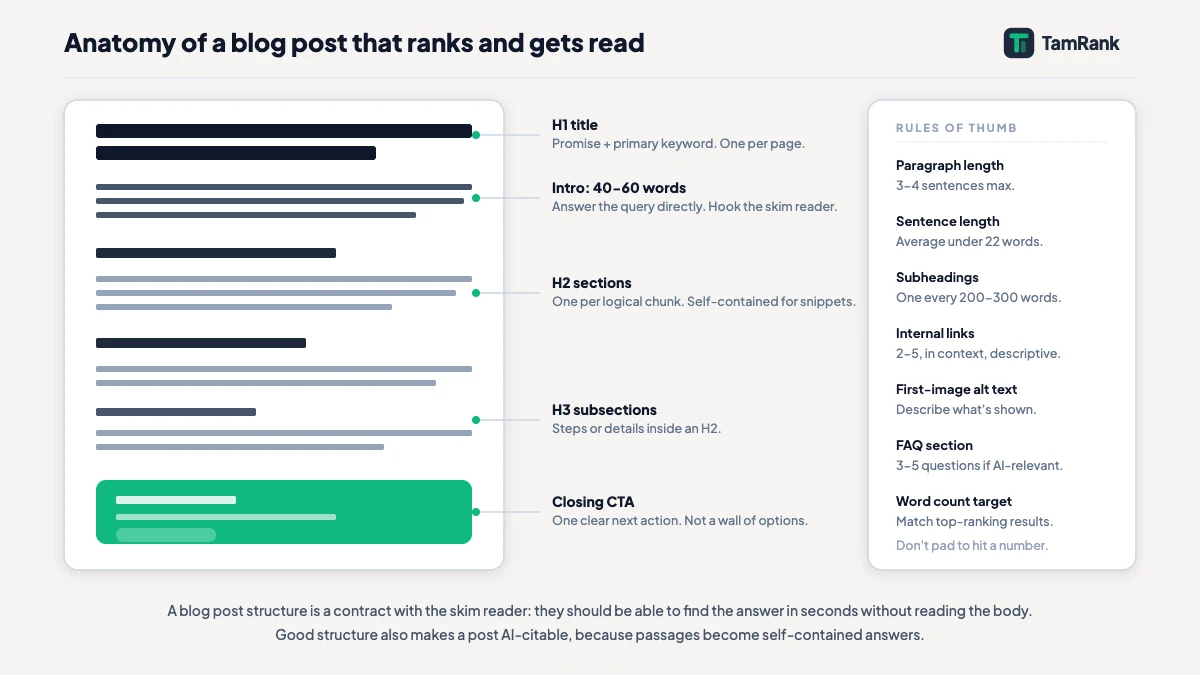
The anatomy of a well-structured post
A post that works tends to carry the same parts in the same order. Treat this as a shape, not a rigid mould; the proportions shift with the topic.
A fast opening. The opening has one job before any other: confirm the reader is in the right place, then deliver. Resist the long throat-clearing. If the post answers a clear question, answer it in plain terms inside the first paragraph or two, then expand. Burying that answer halfway down the page, the buried lede, is the single most common structural mistake I see, and it costs you the impatient reader and the featured snippet in one move.
An optional key-takeaways block. A short summary box near the top, three to five bullets, hands a skimmer the whole argument in ten seconds and hands Google a compact set of facts to read. Not mandatory, but on a longer post it earns its space.
Body sections, each self-contained. The body is a run of sections under clear headings. The discipline that matters is this: each section should make sense on its own, without the reader having read the one before it, like a reference book you can open at any chapter. That is what lets a reader drop in at the heading they need, and what lets Google quote a single section without dragging the rest along. The heading layer that organises all this is covered in full in the heading tags guide.
A real conclusion. The ending should leave the reader holding something: the core action, the one thing worth remembering. A conclusion that recites every section in order adds nothing. One that sharpens the point earns its place.
An FAQ, where it fits. A short FAQ of genuine related questions mops up the specific long-tail queries the main body never quite addressed, and its question-and-answer shape is easy for Google and AI systems to parse. Use it when there are real leftover questions, not as padding.
Writing for skimmers: paragraphs, sentences, formatting
Once the large structure is right, the small structure decides whether the skim ever turns into a read. A handful of concrete habits do most of the work.
Keep paragraphs short, two to four sentences. A paragraph that runs ten lines deep reads, to a skimming eye, as an obstacle, no matter how good the sentences inside it are. Vary your sentence length, because a run of identical medium-length sentences flattens into a drone, and a short sentence dropped after two long ones snaps the reader back to attention. Use lists when you genuinely have a list, steps or parallel items, not as a trick to chop up prose that wants to stay prose. Use bold for real emphasis, the one phrase in a paragraph that carries the weight, rather than scattering it across every other line until it means nothing. And leave white space. A page that breathes is a page people stay on.
None of this is about dumbing anything down. A deeply technical post still gains from short paragraphs and clear sections. Structure and depth are independent variables: you can have both at once, and the best posts always do.
Structuring for featured snippets and AI answers
One structural habit now pays off twice, in classic search and in AI answers, so it is worth pulling out on its own. Make each section a self-contained answer.
In practice that means where a section addresses a real question, phrase its heading as that question, and make the first sentence or two underneath a direct, complete answer, roughly forty to sixty words, that would still read as true and clear if you lifted it clean off the page. Then expand with detail, examples and nuance below. This shape gets called nuggetisation: building a page out of quotable nuggets. A featured snippet is Google lifting one such nugget. An AI answer is a model doing the same trick across several pages at once. A post written as self-contained question-and-answer sections is one both systems can actually use. A post written as one continuous argument, where every paragraph leans on the one before it, is one they cannot pull anything from without the whole thing coming apart.
How long should a blog post be?
There is no ideal blog post length, and the popular targets, 1,500 words, 2,000 words, “long-form ranks better”, are not Google’s position. They are a convention the SEO industry keeps repeating to itself.
Here is the honest version. Google’s guidance on helpful content runs to a long list of questions about whether a page serves its reader, and not a single one mentions a word count. The test Google actually describes is whether a reader finishes the page feeling they learned enough to do what they came to do. That is a measure of completeness, not length. A question with a genuine 600-word answer should get 600 words; pad it to 1,500 to hit a target and you make it worse, because now the reader wades through filler to reach the point. A topic that honestly needs 3,000 words to cover should get 3,000. Length is an output of covering the topic well, never an input you decide up front. Match the depth the query asks for, and let the word count land wherever it lands.
Internal links and the shape of the post
Internal links are part of structure too, and where they sit changes whether they work at all. The habit to build is to link from inside the relevant sentence, in context, at the exact point where a reader would naturally want to go deeper, with anchor text that describes the destination. Two or three such links in a post is a sensible number for most articles. The alternative, dumping a list of “related posts” at the very bottom and calling it internal linking, mostly gets ignored: an in-context link gets followed, an end-of-post list gets scrolled past. Links placed where the reader’s question actually arises are the ones that do the work.
A worked example: restructuring a post
Here is the diagnosis in practice. A WordPress owner has a 1,600-word post that pulls impressions but almost no clicks, and few of the visitors who do arrive hang around. The words are fine. The shape is not.
The diagnosis takes a single read. The post opens with four paragraphs of background before it reaches the actual answer, so the buried lede loses both the skimmer and the snippet. The body is six long sections, several of which only make sense if you have read the one before. Paragraphs run six to nine lines. There are no lists, no key-takeaways block, and the only two internal links sit in a “related” pile at the very bottom.
The restructure changes not one fact. The direct answer moves up into the first paragraph. A five-point key-takeaways block goes in near the top. The six sections are rewritten so each stands on its own, and their headings are reworded as the questions they answer. The long paragraphs are split until none runs past four sentences. The two internal links move into the sentences where they are actually relevant. The post is now roughly the same length, says exactly the same things, and reads like a usable document instead of a wall. That gap, same words and a different shape, is the entire difference between the version that bounced and the version that holds.
How TamRank helps
Structural problems are painfully hard to spot in your own writing, because you already know what the post says and your eye quietly fills in the shape it is meant to have. A reader arriving cold gets none of that help.
TamRank’s content analysis reads the post the way that cold reader would. It flags the paragraphs that have quietly grown too long, a heading structure that does not hold together, a missing meta description, a post that went out with no internal links at all. It will not rewrite the thing for you. It shows you, in plain language, where the shape is letting the writing down, so that a strong draft actually reads like one.
It is part of the free plugin. You can install TamRank free or look over the feature list.
Quick reference: the anatomy of a well-structured post
The structure this article describes, laid out for a typical 1,000 to 2,500 word blog post:
- Title (H1). Descriptive, front-loaded, says plainly what the post covers. On WordPress the theme outputs this; do not add a second H1 in the body.
- Opening paragraph(s). Answer the core question directly within the first 100 to 150 words. No long warm-up. The reader who skimmed to this point needs confirmation they are in the right place.
- Key-takeaways block (optional). 3 to 5 bullet points summarising the main points. Gives skimmers the whole argument in ten seconds.
- Body sections (H2 headings). Each section is self-contained: heading as a question or clear label, first sentence as a direct answer, then depth and detail. Two to four sentences per paragraph. No section should require the reader to have read the previous one to understand it.
- Sub-sections (H3 if needed). Use when a body section genuinely has two or more distinct sub-topics. Nest cleanly; do not skip levels.
- Worked example or case study. Concrete illustration of the main point. Makes abstract advice tangible.
- Conclusion. One clear action or takeaway. Restate the point, do not just list every section again.
- FAQ (where relevant). 3 to 5 genuine related questions not fully addressed in the body. Question-and-answer format. Omit if there are no real leftover questions.
- Internal links. 2 to 3, placed in context, inside the sentence where the reader would naturally go deeper. Not a dump at the end.
Length: as long as the topic genuinely needs. Match the depth, not a word-count target.
Blog post structure FAQ
How long should a blog post be for SEO?
As long as it takes to answer the topic well, and no longer. There is no ideal length and no word-count target. Google’s guidance never mentions word count; it asks whether a reader finishes satisfied. Padding a short answer to hit a target makes the post worse, not better.
What is the best structure for a blog post?
A fast opening that answers the core question early, an optional key-takeaways block, a body of self-contained sections under clear headings, a conclusion that gives the reader something to act on, and an FAQ where there are genuine leftover questions. It is a shape to adapt, not a rigid template.
Where should I put internal links in a post?
In context, inside the sentence where a reader would naturally want to go deeper, with descriptive anchor text. Two or three per post is sensible for most articles. Avoid dumping all your internal links into a “related posts” list at the end, because in-context links are followed and end-of-post lists mostly are not.
Do I need an FAQ section in every blog post?
No. An FAQ is worth adding when there are real related questions the main body did not address directly, because its question-and-answer shape catches specific long-tail queries and is easy for Google to read. Added as filler, with invented questions, it weakens the post instead.
The bottom line
Structure is the shape that lets good content do its job. Open fast and answer early, then build the body from self-contained sections, each one able to stand alone and be quoted. Write for the skim with short paragraphs and genuine formatting, and make each section a clean answer, which serves featured snippets and AI results in the same move. Keep internal links in context rather than piled at the end. And let go of word-count targets, because length is what you get when you cover a topic properly, not a number you aim at first.
None of this rescues a weak post, and none of it is meant to. What it does is make sure a strong post is not wasted. For the heading layer underneath this, see the heading tags guide; for the pre-publish checks, the WordPress SEO checklist. To have a draft’s structure checked as you write, install TamRank free.
Sources
- Google Search Central, “Creating helpful, reliable, people-first content,” on assessing content by whether it satisfies the reader, with no mention of word count. Google developer documentation.
- Google Search Central, “SEO Starter Guide: The Basics,” on organising content logically with headings and on useful content as the largest ranking factor. Google developer documentation.
- Google Search Central, “In-depth guide to how Google Search works,” on Google processing page structure during indexing. Google developer documentation.

