A topical map gets sold as a mind-map. You pick a central subject, brainstorm the branches, draw a few clusters and call it a content plan. That produces a tidy diagram and very little else, because the diagram is the easy 10% of the job. The other 90% is the keyword research underneath it and the discipline to draw a boundary around the subject.
This is the build as a process: six steps that turn a messy keyword export into a sequenced plan you can write from. The topical authority pillar covers why the model works, and why it is not a Google ranking factor. This guide is the method it deferred, the detailed one. One worked example runs alongside the steps throughout: a freelance SEO mapping the subject “time tracking” for a B2B software client.
- A topical map is the plan for covering one subject completely: every subtopic and question, grouped and sequenced before you write. It is a planning tool, not something Google reads.
- The real work is not the diagram. It is clustering a raw keyword list into genuine subtopics, and drawing a boundary so the subject has an edge.
- Cluster keywords by SERP overlap: when the same 4 to 6 URLs rank in the top 10 for two keywords, Google already treats them as one intent, so they belong on one page.
- The map has two layers: merge same-intent keywords into single articles, then group those articles into subtopics under one pillar page.
- Sequence by dependency, not by search volume. Publish the pillar and the foundational articles first, because the later articles link back to them.
What is a topical map?
A topical map is the full plan for covering one subject completely: every subtopic, every question and every angle a knowledgeable reader expects a thorough source to address, grouped and ordered before a single article is written. Ahrefs calls it “the roadmap for your website’s content strategy”, and that is the right frame. It is a planning document, not a page on your site and not anything Google reads.
Two things it is not. It is not a keyword list. A keyword list is the raw output a tool hands you, hundreds of phrases with volumes attached. A topical map is what you get after you have grouped those phrases into real subtopics, found the gaps the tool missed and drawn a boundary. And it is not a content cluster. The content cluster is the published result, a pillar page and its interlinked supporting articles, the pillar-and-cluster shape HubSpot popularised when it rebuilt its blog around topics. The map is the blueprint; the cluster is the building. You build the map first, then publish the cluster from it.
How is a topical map different from keyword mapping?
They sound alike and get used interchangeably, but they solve different problems. Keyword mapping is the assignment step: you have a set of keywords and a set of existing pages, and you map each keyword to the one URL that should target it, so two pages never chase the same term. It is a tidiness exercise on a site that already exists.
A topical map runs earlier and wider. It plans the content before it exists: which subtopics a subject contains, which articles should cover them, and which you have not written yet. Keyword mapping asks which page owns this keyword. A topical map asks what pages this subject should have at all. You often finish a topical map and then do keyword mapping inside it, but the map is the strategic step and mapping is the housekeeping.
Step 1: Define the boundary of the subject
This is the step that decides whether the map is useful or just large. Before any keyword research, you fix two things: what the subject is, and where it ends.
The what is a central entity, the single thing the whole map is about. Koray Tuguberk Gubur, who coined the term “topical map”, frames it as a central entity plus a source context: the reason your site has standing to cover the subject. Standing matters. A map is only worth building on a subject your site has a genuine claim to, through a product, a service or real expertise. Without that, you are planning content you have no business ranking for.
The where is the harder half, and the one most maps skip. A subject has an edge, and naming it is what stops the map sprawling into a second subject with its own hundred articles. The boundary test for any candidate subtopic is two questions. Would a reader of the central subject expect a thorough source to cover this? And does your site have standing to? If both are yes, it is in. If the first is no, it belongs to an adjacent subject. If the second is no, leave it to a site that does.
For the time-tracking map, the freelance SEO sets the central entity as “time tracking” and the source context as the client’s product, time-tracking software. The boundary is the work. Time tracking methods, timesheets, billable hours, tracking for remote teams, the link to payroll and invoicing, working-time compliance: all in. General productivity and time-management self-help: out, a vast adjacent subject the client has no special standing on. “Best time tracking software” roundups: out, that is bottom-of-funnel comparison content, a different job. Drawing that line on day one is what keeps the map from doubling in size by week three.
Step 2: Gather the raw keywords and questions
With the boundary set, collect everything inside it. This step is deliberately undisciplined: you are gathering, not filtering, and the filtering happens in step 3. Cast wide.
Pull from several sources, because each one misses what the others catch:
- A keyword tool export. Seed it with the central subject and the obvious subtopics, then take everything: the head terms, the mid-tail, and especially the long tail, which is the bulk of real search. Our guide to long-tail keywords covers why those specific, lower-volume queries are where a cluster earns traffic first.
- Google’s own surfaces. Autocomplete, the People Also Ask box, and the related searches at the foot of the results page are Google telling you, free, which questions sit around a query.
- Competitor coverage. Take two or three sites already ranking across the subject and read their structure: their navigation, their category pages, their sitemap. You are not copying titles, you are seeing which subtopics a site that already ranks decided were worth covering.
- Where readers actually talk. Reddit threads, niche forums, the questions sections of community sites. This is where you find the phrasing and the problems a keyword tool, which only reports what people already type into Google, never shows you.
The output of step 2 is a single messy list. Do not tidy it, do not deduplicate it, do not delete the low-volume terms. For the time-tracking map the list comes to roughly 600 keywords and questions: a sprawl, much of it overlapping, some of it junk. That overlap is not a problem to clean up here. It is the raw material step 3 works on.
Step 3: How do you cluster keywords into subtopics?
A raw list of 600 keywords is not 600 articles. It is the same handful of intents expressed hundreds of ways, and the job of clustering is to collapse it back down. This is the real work of building a topical map, and it happens in two layers.
Layer one: merge the keywords that are one article. Many keywords in the list are the same search intent in different words. “How to calculate billable hours”, “billable hours formula” and “billable hours calculation” are not three articles. They are one article and two phrasings of its title. Write three pages and you have built keyword cannibalisation on purpose, with your own pages competing for the same result.
The reliable way to decide is SERP overlap. For two keywords, look at the top 10 results for each. If the same URLs rank for both, Google has already decided the keywords share one intent and expects one page to serve them. Oncrawl puts the working threshold at 4 to 6 shared URLs in the top 10: above that, treat the keywords as one article; below it, keep them separate. A looser setting of 2 to 3 builds bigger, vaguer groups; a stricter 7 or more splits hairs. The method works because you are not guessing at intent, you are reading Google’s own answer.
At scale this is a tool job. Ahrefs, Keyword Insights and similar tools run SERP-overlap clustering across thousands of keywords. Without a tool, do it by hand on a sample: take 30 to 50 of your most important keywords, check the live SERP for any pair you are unsure about, and group from there. The manual version is slower, but it teaches you the subject in a way the automated one does not.
Layer two: group the articles into subtopics. Layer one turns 600 keywords into, say, 34 article-level clusters. Layer two groups those 34 into a handful of subtopics, the major divisions of the subject. This grouping is semantic rather than SERP-based: Ahrefs’ Clusters by Parent Topic feature does it automatically, or you do it by hand, because by this point you know the subject. Each cluster also carries a dominant search intent, informational, commercial or transactional, and the map should record it, because an article that misreads its intent fails whatever the cluster around it looks like. Matching each row to its real intent is its own subject, covered in the search intent guide in this cluster.
For the time-tracking map, 600 raw keywords collapse to 34 article-level clusters, which group into 7 subtopics: time tracking basics, methods, timesheets, billable hours, tracking for teams and remote work, the payroll and invoicing link, and working-time compliance. The billable hours subtopic alone shows the layering. “How to calculate billable hours” and its phrasings merge into one article, but “billable versus non-billable hours” draws a different SERP and stays separate, and “what is a good utilisation rate” is a third. One subtopic, five articles, decided by overlap rather than by gut.
Step 4: Lay the clusters out as a map
With the clusters decided, they become the artefact. A topical map is a document, usually a spreadsheet, not a mind-map drawing. The drawing is nice for a pitch; the spreadsheet is what you work from.
Structure it in three tiers. At the top, one pillar page covering the whole subject. Below it, the subtopics from step 3. Under each subtopic, one row per article-level cluster. For every row, record a working title, the target query and the keywords clustered into it, the search intent, the page type (pillar or supporting article), and one more column that does most of the work: the existing URL, if you already have a page for that row, or “new” if you do not. Ahrefs’ template uses much the same set of columns: Topics List, Keyword Clusters, Keyword List, Mapped URL, Page Type and a priority score.
Filling the existing-URL column is a small content audit, and it usually delivers the map’s first surprise. You already cover more of the subject than you thought, just disorganised. Those existing pages are the fastest wins, because refreshing and re-linking a page that already exists beats writing a new one.
Two disciplines hold this step. First, score and cut. Ahrefs’ instruction is blunt and correct: “Don’t add anything and everything you find.” Rate each row on relevance to the business and realistic traffic value, and drop the rows weak on both. A map is defined as much by what you keep off it. Second, keep the map and the cluster distinct in your head. The map is the plan you have just built. The content cluster is what exists once you publish these pages and interlink them, and that interlinking is its own craft, covered in the internal linking guide.
The time-tracking map lands as one pillar and 34 supporting rows across 7 subtopics. The existing-URL pass finds the client already has 9 blog posts: 5 map cleanly onto rows, so the map starts roughly 15% built, and the other 4 sit outside the boundary and stay off the map.
Step 5: Sequence the map for publication
A finished map is a list of 35 pages. The order you write them in is not the order a keyword tool would suggest, and getting it wrong is quietly expensive.
The wrong order is by search volume, highest first. It feels productive and it strands you, because the high-volume head terms are the hardest to rank and the slowest to move. You will have spent two months on the pages least likely to pay off early.
The right order is by dependency. Publish the pillar page and the foundational article in each subtopic first, the pages that define the subtopic, because every later article will link up to them. Then publish the question-level articles that link into that foundation. This way every new article arrives into a structure that already has somewhere to attach it, instead of sitting unlinked until you circle back. Slot the existing-URL refreshes from step 4 early as well. They are quick, they often rank already, and a refreshed, re-linked page is the cleanest early evidence the cluster is working.
For the time-tracking map, the freelance SEO sequences the pillar and the 7 subtopic-defining articles first, then the question-level rows, with the 5 existing posts refreshed in the opening fortnight. At a sustainable two articles a week, a 35-page map is roughly four months of publishing. Set the client’s expectations against that figure honestly: HubSpot, which popularised the cluster model, says plainly that the results are not immediate and never publishes a guaranteed timeline. The map makes the schedule visible, which is the difference between a content plan and a wish.
Step 6: Pressure-test the map before you write
A map drawn in one sitting always has flaws, and they are far cheaper to fix as spreadsheet rows than as published pages. Before you write anything, run three checks.
The boundary check. Read every row against the boundary from step 1. Maps drift outward as you build them, and a row or two will have wandered into the adjacent subject. Cut them, or you have started a second map by accident.
The gap check. The map so far reflects what your keyword research and your competitors surfaced. Compare it against the subject as a knowledgeable practitioner knows it, and against the coverage of the strongest competitor, and look for the subtopic everyone underweights. That is a content gap analysis, the dedicated method covered elsewhere in this cluster, and it is where a map stops being a summary of the SERP and starts being more complete than it.
The information-gain test. Take each row and ask one question: can this article say something a reader cannot already get from the pages ranking for it? If the honest answer is no, the row does not belong, however much volume the keyword has. Google’s guidance on people-first content asks the same thing in its own words, whether a page offers substantial value compared with others in the results. A map full of rows that pass this test is a cluster worth building. A map padded with rows that fail it is the thin-content cluster the topical authority pillar warns about, drawn in advance.
The pressure test reshapes the time-tracking map. The boundary check cuts two rows that had drifted into general time management. The gap check adds a subtopic the research underweighted, time tracking for agencies billing clients. The information-gain test removes three rows that would only have reworded pages already ranking. The map settles at one pillar and 31 supporting articles, and now it is worth writing.
How TamRank helps you map your content
Most of building a topical map is judgement: drawing the boundary, reading intent, deciding what earns a row. None of that automates, and you should distrust anything that claims it does. What does automate is the audit underneath it, knowing what your existing content already covers.
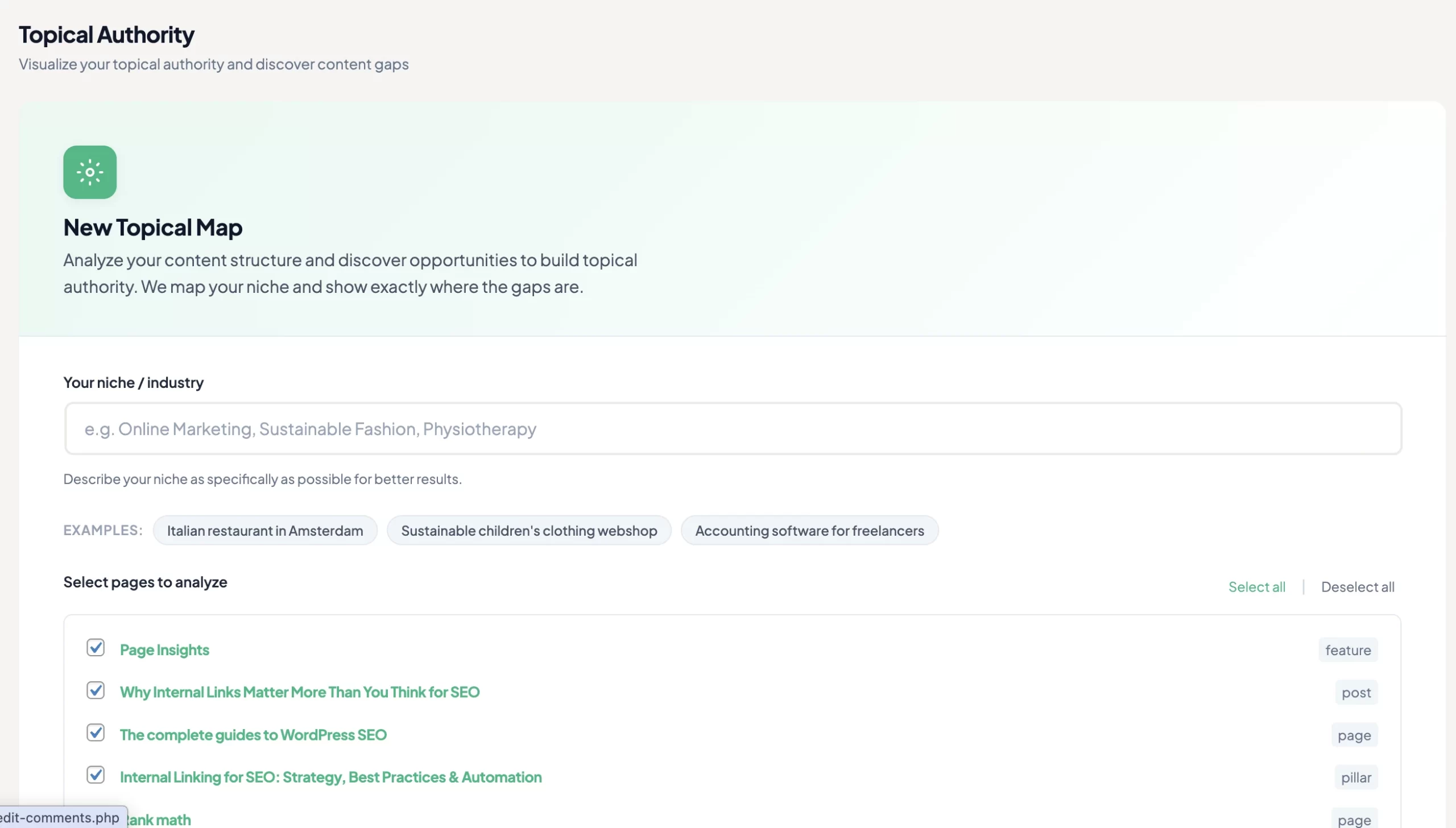
TamRank’s Topical Authority feature, part of the PRO add-on, reads your published pages as a body of work rather than a list of posts. It groups them into the topics they actually cover and scores how complete that coverage is, which is the existing-URL pass from step 4 and the gap check from step 6 done for you, continuously, instead of by hand once. It runs on Claude Haiku 4.5 and uses TamRank’s predictable credit model, 10 credits per 10 pages analysed, so you see the cost before you run it.
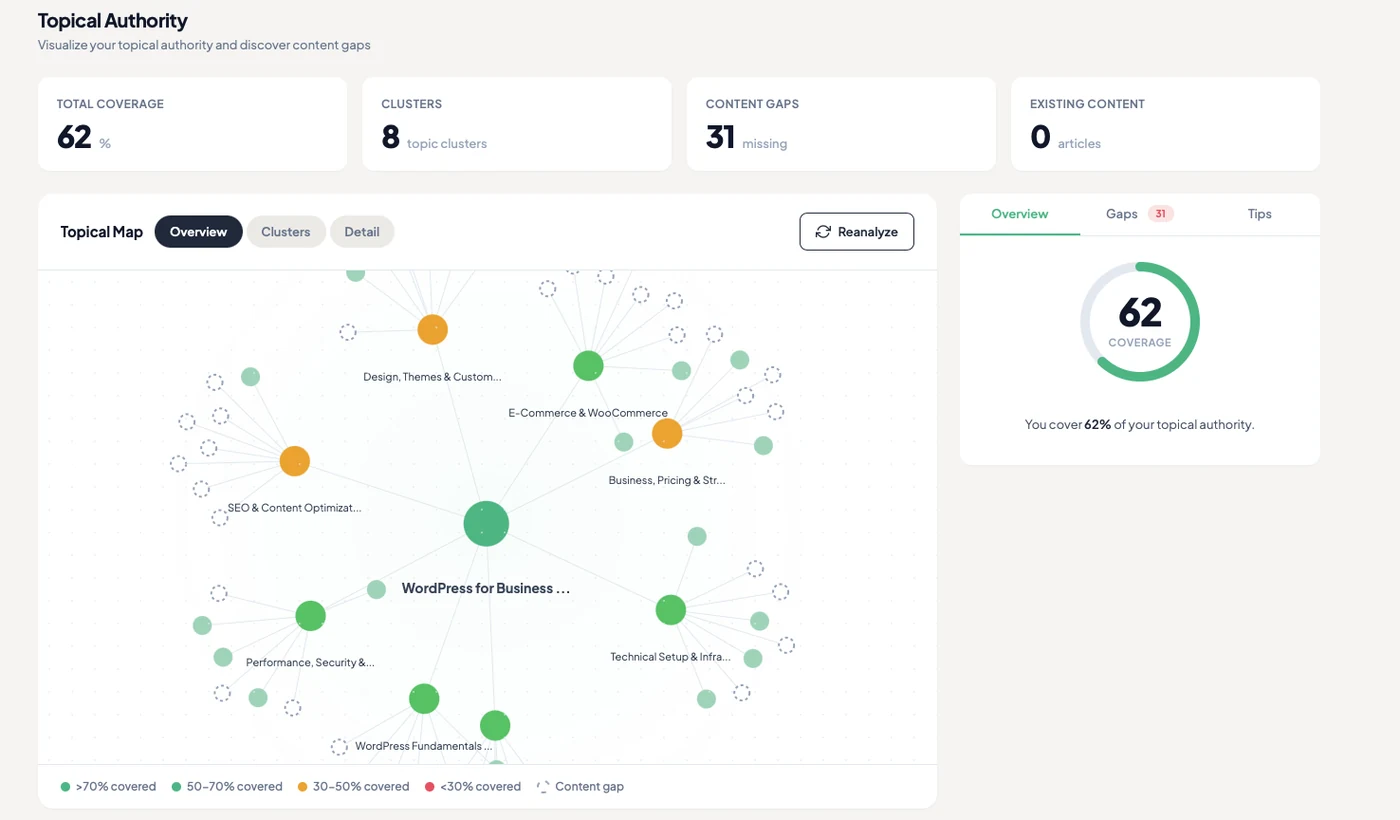
It will not draw the map for you, and it does not pretend coverage is a single number. It shows you, honestly, which subtopics are well covered and which are thin, so the writing effort goes where it changes rankings. You can see the Topical Authority feature or compare the free and PRO plans.
Topical map FAQ
How do you create a topical map?
Define the subject and its boundary, gather a wide keyword list inside that boundary, cluster the keywords into subtopics by SERP overlap, lay them out as a pillar and supporting rows in a spreadsheet, sequence by dependency, and pressure-test the rows before writing. The clustering and the boundary are the real work; the diagram is the easy part.
How is a topical map different from keyword mapping?
Keyword mapping assigns existing keywords to existing pages so that none compete for the same term. A topical map plans content before it exists: which subtopics a subject has and which articles should cover them. The map is the strategy; keyword mapping is the housekeeping you do inside it.
How many articles should a topical map have?
There is no fixed number. The subject decides it, not a target in a spreadsheet. A narrow, well-bounded subject might be complete at 15 articles; a broad one can run past 100. The topical authority pillar covers why counting articles is the wrong goal and coverage is the right one.
Do you need a paid tool to build a topical map?
No. A spreadsheet, Google’s autocomplete and People Also Ask, and manual SERP checks are enough to map a small subject. Paid tools mainly speed up keyword clustering at scale by automating the SERP-overlap comparison. They replace the labour, not the judgement.
What is the difference between a topical map and a content cluster?
The topical map is the plan: subtopics and articles laid out before anything is published. The content cluster is the published result: a pillar page and its interlinked supporting articles. You build the map first, then publish the cluster from it.
The bottom line
A topical map is not the diagram. The diagram is the last ten minutes of a job whose real work is the keyword clustering underneath it and the boundary drawn around it.
Six steps hold the method: define the subject and its edge, gather every keyword inside that edge, cluster them into subtopics by SERP overlap, lay them out as a pillar and supporting rows, sequence by dependency rather than volume, and pressure-test the rows before you write a word. Done properly, the output is not a tidy picture. It is a sequenced plan where every row has earned its place and you know exactly what to write next.
And the map is a planning tool, not a ranking factor. Google never sees it. What it gives you is the thing a pile of unconnected posts never had: a subject with an edge, covered on purpose. If you want to see how much of your subject your current content already maps onto, TamRank’s Topical Authority feature scores your coverage and shows you the gaps.
Sources
- Koray Tuguberk Gubur, on topical authority and the topical map, including the central entity and source context. Medium.
- Ahrefs, “How to Build an SEO Topical Map (With Template),” on the topical map definition, scoring topics for relevance and value, and clustering by parent topic. ahrefs.com.
- HubSpot, “How We Used the Pillar-Cluster Model to Transform Our Blog,” on the origin of the topic cluster model and interlinking within clusters. blog.hubspot.com.
- Oncrawl (Morteza Najafi), “Keyword clustering using Python and the SERP API,” on the 4 to 6 URL SERP-overlap threshold, 3 June 2025. oncrawl.com.
- Google Search Central, “Creating helpful, reliable, people-first content.” Google developer documentation.

