Every SEO plugin has a paid version, and every SEO plugin would quite like you to buy it. The upgrade prompt is wired into the interface, the comparison page is drawn so the free column looks thin, and the message underneath never changes: the paid version is the real one, and you are using the trial.
The honest question, the one the plugins themselves rarely put plainly, is whether you actually need it. For most WordPress sites the answer is no, at least not yet. A good plugin’s free tier is not a crippled demo with the useful parts fenced off; it is a complete foundation. This guide is the version we would give a friend: what the free tier genuinely covers, what your money actually buys, and a plain test for when an upgrade earns its keep and when it is just guilt. It sits under the complete WordPress SEO guide and pairs with the plugin comparison, which tackles the separate question of which plugin to run at all.
- The free tier of a good SEO plugin covers the fundamentals completely: meta tags, sitemaps, schema, an SEO score and the core on-page checks.
- Paid features buy you time and advanced tooling. They do not buy rankings. Google does not rank a site higher because its plugin is paid.
- The real test is time versus money: if a paid feature saves more time than the subscription costs you, it is worth it.
- Free is genuinely enough for most small and new sites. Paying is worth it once you manage several sites or spend hours on manual SEO work.
- Do not upgrade just to silence upgrade prompts. That is paying to fix an annoyance, not to solve a problem.
What the free tier actually covers
Start by being precise about what you get for nothing, because the upgrade pages work hard to make it look like less. A capable SEO plugin’s free tier includes full control of your title tags and meta descriptions, an XML sitemap, basic schema markup, an on-page SEO score with recommendations, a redirect manager, a 404 monitor, and a live connection to Google Search Console. Some free tiers throw in more on top.
Hold that list up against what genuinely moves a WordPress site. The whole foundation any SEO guide describes, crawlable settings, accurate metadata, a sitemap, sound on-page structure, sits entirely inside the free tier. This is not the appetiser menu with the mains locked behind a paywall. It is the full kitchen. A site can rank perfectly well having never paid a plugin a penny, and I have watched plenty do exactly that.
What you pay for
Paid tiers are not a con either. They add real things, and it is worth being just as precise about them. The usual list runs like this: AI features, such as generating a meta description or image alt text at the tap of a button; extended Google Search Console history, where the free view shows recent weeks and the paid view stretches to months; automation and bulk tools, such as bulk editing or scheduled audits; position tracking over time; an API for programmatic access; and priority support.
Now notice the thing every item on that list shares. Not one of them is a ranking factor. They are time-savers and scale tools, nothing more. AI meta generation does not write a better description than you could; it is a faster typist, not a better writer. Extended history does not nudge your rankings; it just hands you more data to read. That single distinction is the most important thing to grasp about paid plugins, and the next section turns it into an actual decision.
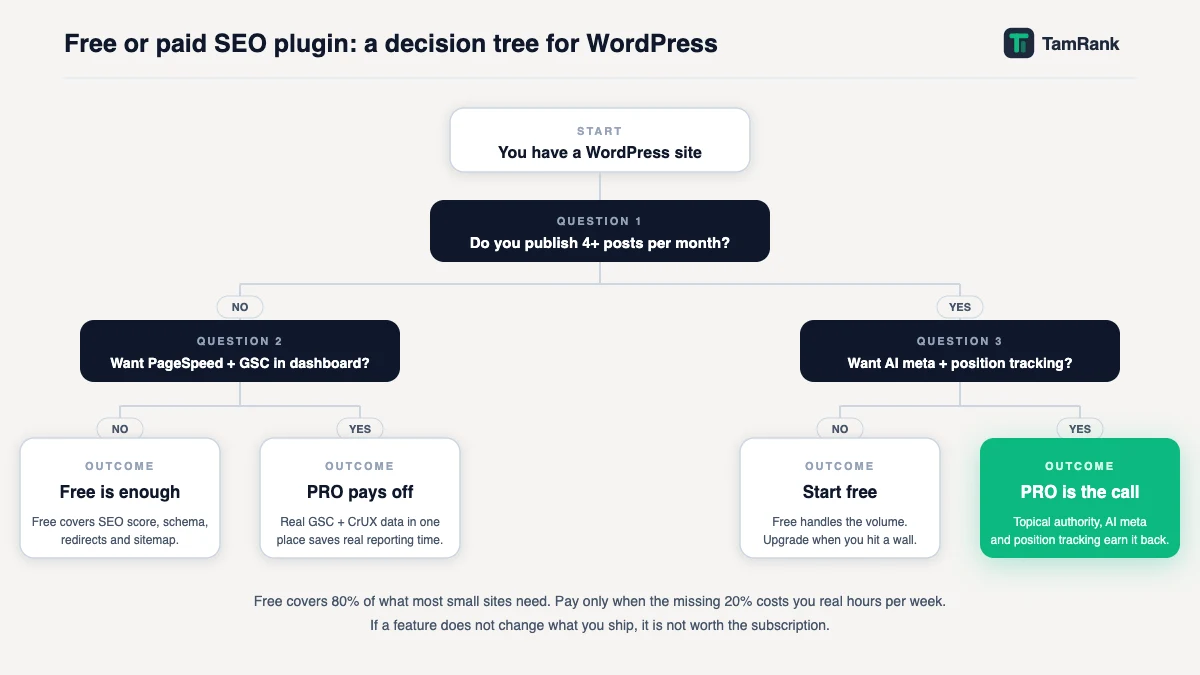
The real question: time versus money
Because paid features buy time rather than rankings, the upgrade question stops being an SEO question at all. It turns into a plain piece of arithmetic.
Google is flat about this: you cannot pay for position. In its own words, “Google doesn’t accept payment to crawl a site more frequently, or rank it higher”. No subscription rewrites that line. A paid plugin will not lift a site that a free one could not. What it can do is give you hours back. So the only question worth asking of any paid feature is this: how much of my time does it save each month, and is that time worth more to me than the price?
Run the numbers once and it clicks. Say a PRO tier costs the equivalent of roughly eight pounds or euros a month. If its AI and bulk features honestly save you two hours a month, and an hour of your time is worth more than four units of currency, the upgrade has already paid for itself. If instead you run one small blog, knock out a meta description in ninety seconds, and would claw back maybe fifteen minutes a month, it has not. Same plugin, same price, opposite verdict, because the number that decides it is the value of your time, not anything to do with SEO.
When free is genuinely enough
For a big share of WordPress sites, the free tier is not merely acceptable, it is the right answer. Free is genuinely enough when most of these hold true:
- You run one site, or a small number, not a portfolio.
- The site is new or small, with up to a few hundred pages.
- You have more time than spare budget, which is the normal situation for a new project.
- You write at a modest pace, so the per-article time savings of AI tools are small in total.
- You are still learning, and adding advanced features would only add things to ignore.
If that is you, paying for a plugin now is spending money to fix a problem you do not have yet. The better home for both your time and your budget at this stage is content, plainly. Stay free, and come back to the question the day something on the next list turns true.
When paying is worth it
Paid tiers earn their cost the moment specific, concrete triggers show up. Upgrade when you can point at one of these and mean it:
- You manage multiple sites. Once you are maintaining five, ten, fifteen sites, the bulk tools and the API stop being conveniences and become the difference between a workflow that scales and one that does not.
- You are spending real hours on manual SEO data work. If you lose a morning each month gathering Search Console data into a spreadsheet, a paid plugin that does it automatically pays for itself immediately.
- You publish at volume. A site shipping many articles a week genuinely benefits from AI assistance on the repetitive metadata work, because the small per-article saving adds up.
- You need history the free tier does not keep. Diagnosing a slow ranking decline needs months of data, and free tiers usually show only recent weeks.
- You are doing this professionally. For an agency or freelance SEO, the reporting, tracking and API features are not luxuries; they are how you deliver and prove the work.
The shape is always the same: you upgrade when your scale or your professional obligations create a real, recurring time cost that a paid feature deletes. Not a day before.
The upgrade-prompt problem
One honest warning, because it is a genuine cost of “free” that the comparison tables never print. Some plugins make their free tier deliberately uncomfortable: banners that will not dismiss, notifications, features dangled in front of you and then locked the moment you reach for them. The friction is designed, not accidental, and it works on people. It is worth naming because it breeds the worst reason to ever upgrade: paying to make the nagging stop.
If you notice yourself reaching for a card mainly to shut a plugin up, step back from the keyboard. You are about to sign up for an annual subscription to cure an irritation, not to solve an SEO problem. The cleaner move is to switch to a plugin whose free tier is not built to wear you down. A quiet free tier with no upsell spam is a real feature in its own right, and it is one you can have for nothing.
A worked example: two owners, two answers
Two WordPress owners ask the identical question and should walk away with opposite answers.
The first runs a personal blog, around 50 posts, publishing twice a month. Call it twenty minutes a month on SEO housekeeping. A paid plugin’s AI and bulk tools might shave five of those minutes off. Five minutes a month set against an annual subscription is a clear no, and they should feel no flicker of doubt about it: their site can rank fully on the free tier.
The second is a freelance SEO looking after twelve client sites. Every month they log into twelve dashboards, pull the Search Console data by hand, and stitch together client reports, call it six hours of work. A paid plugin with an API and automated reporting could fold that down to under two hours. Four hours saved every month, on billable professional time, against one subscription, is an obvious yes. For them, staying free is the expensive option.
Same plugin, same price tag. The decision was never really about SEO. It came down to how much time the features hand back to each person, and whether that time is worth the money. Run that sum on your own week and the answer is usually not close.
How TamRank approaches it
TamRank Free is meant to be a complete WordPress SEO foundation. You can manage metadata, schema, sitemaps, redirects and the core checks without a timer forcing you towards an upgrade. If that is all your site needs, staying on Free is the right decision.
TamRank PRO is not simply a larger pile of checks. It is for the point where finding issues is no longer the difficult part. PRO helps you see which work deserves attention first, understand the evidence, review the exact change before it is made and follow the Search Console movement afterwards. That saves time when you manage an important site or repeat the same work across client sites.
Pay when that workflow saves more time or reduces more uncertainty than the subscription costs. Until then, keep using Free. You can see how the PRO workflow works or compare every plan and feature.
Free vs paid SEO plugin FAQ
Is a free SEO plugin enough?
For most sites, yes. The free tier of a good SEO plugin covers the fundamentals completely: title tags, meta descriptions, an XML sitemap, basic schema, an SEO score and the core on-page checks. A WordPress site can rank fully without ever paying for a plugin.
What do paid SEO plugins add?
Time-savers and advanced tooling: AI features such as meta and alt-text generation, extended Search Console history, bulk and automated tools, position tracking, an API, and priority support. None of these is a ranking factor; they save you time and help you work at scale.
Do paid SEO plugins rank you higher than free ones?
No. Google does not rank a site higher because its plugin is paid; Google states plainly that ranking cannot be paid for. A paid plugin gives you faster and more advanced tools, but a free plugin and a paid plugin both give Google exactly the same signals to rank.
When should I upgrade to a paid SEO plugin?
When a concrete, recurring time cost appears: you manage multiple sites, you spend hours each month on manual SEO data work, you publish at high volume, you need history the free tier does not keep, or you are doing SEO professionally. Upgrade when a feature saves more time than the subscription costs, not before.
What do WordPress practitioners say, free or paid?
The consistent pattern in WordPress community discussions is that experienced users default to free, and that the standard advice to newcomers is to start free without question. The recurring comment is some version of “the free version does everything you need”. Paid tiers come up most often in the context of agencies, developers managing client portfolios, or sites publishing at high volume. The community view aligns with this article’s position: free is the right default, and paid is a justified upgrade once a concrete time-cost appears. That consensus is worth knowing because it comes from people with no interest in selling you an upgrade.
The bottom line
Free versus paid is not an SEO question, and treating it like one is where people go wrong. A good plugin’s free tier covers everything that actually decides whether a site ranks, and Google hands out no bonus for a paid subscription. What the paid tiers sell is time: automation, AI help, history, scale.
So settle it as the economic question it is. Run one small site with more time than budget? Stay free without a second thought and pour the money and effort into content instead. Manage a stack of sites, or bleed real hours into manual SEO chores? The paid tier pays for itself, and not upgrading is the costly call. And never pay simply to switch off the upgrade prompts; if a free tier harasses you, change the plugin, not your bank balance. For which plugin to run in the first place, see the plugin comparison, and the WordPress SEO guide for everything around it. To start on a free tier with no upsell spam, install TamRank free.
Sources
- Google Search Central, “In-depth guide to how Google Search works,” on Google not accepting payment to crawl more often or rank higher. Google developer documentation.
- Google Search Central, “SEO Starter Guide: The Basics,” on useful content influencing rankings more than any other factor. Google developer documentation.
- Google Search Central, “Creating helpful, reliable, people-first content,” on rankings following from content that serves people. Google developer documentation.

